Item logo image for Web TL;DR for Gemini Notebook - Page Summary

Web TL;DR for Gemini Notebook - Page Summary

5.0(

2 ratings

)
Item media 5 (screenshot) for Web TL;DR for Gemini Notebook - Page Summary
Item video thumbnail
Item media 2 (screenshot) for Web TL;DR for Gemini Notebook - Page Summary
Item media 3 (screenshot) for Web TL;DR for Gemini Notebook - Page Summary
Item media 4 (screenshot) for Web TL;DR for Gemini Notebook - Page Summary
Item media 5 (screenshot) for Web TL;DR for Gemini Notebook - Page Summary
Item video thumbnail
Item media 2 (screenshot) for Web TL;DR for Gemini Notebook - Page Summary
Item media 3 (screenshot) for Web TL;DR for Gemini Notebook - Page Summary
Item media 4 (screenshot) for Web TL;DR for Gemini Notebook - Page Summary
Item media 5 (screenshot) for Web TL;DR for Gemini Notebook - Page Summary

Overview

Import the current webpage into Gemini Notebook and automatically get a TL;DR summary

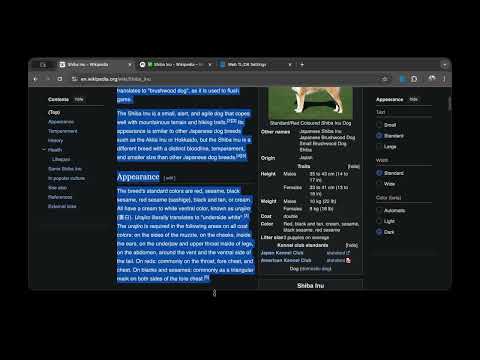
Make Gemini Notebook (NotebookLM) a seamless part of your daily browsing. This extension eliminates the repetitive work of copying URLs and switching tabs, letting you send content directly to your notebook for instant analysis. Unlike other tools, this extension handles the entire workflow automatically. It imports the source and immediately inputs the summary prompt for you, saving you valuable steps during deep research sessions. Key Features: - Instant Page Analysis: Click the extension icon to import and summarize the webpage you are currently viewing. - Link Summarization: Right-click any link to get the gist of the content without opening a new tab. - Focused Analysis: Highlight specific text, right-click, and send just that segment to NotebookLM. - Visual Feedback: Clear status indicators keep you updated on the progress. How to Use: 1. Summarize a Page: Click the extension icon in your toolbar. 2. Summarize a Link: Right-click a link and select "Summarize with NotebookLM". 3. Summarize Selection: Highlight text, right-click, and choose "Summarize with NotebookLM". Prerequisites: You need a valid Google Account and active access to Gemini Notebook: https://notebook.google.com Open Source & Privacy: This project is completely open source. You can verify the code, contribute, or report issues on our GitHub repository. Source Code: https://github.com/Jasonnor/web-tldr

Details

  • Version
    1.3.13
  • Updated
    September 1, 2026
  • Offered by
    Jasonnor
  • Size
    52.43KiB
  • Languages
    8 languages
  • Developer
    Email
    wujason810@gmail.com
  • Non-trader
    This developer has not identified itself as a trader. For consumers in the European Union, please note that consumer rights do not apply to contracts between you and this developer.

Privacy

Manage extensions and learn how they're being used in your organization

Web TL;DR for Gemini Notebook - Page Summary has disclosed the following information regarding the collection and usage of your data. More detailed information can be found in the developer's privacy policy.

Web TL;DR for Gemini Notebook - Page Summary handles the following:

Website content

This developer declares that your data is

  • Not being sold to third parties, outside of the approved use cases
  • Not being used or transferred for purposes that are unrelated to the item's core functionality
  • Not being used or transferred to determine creditworthiness or for lending purposes

Support

Related

Perplexity to NotebookLM

3.0

Import Perplexity conversations to NotebookLM with one click

Prompt Architect for NotebookLM

4.3

A prompt library for Google NotebookLM — browse, create, and apply prompts to Studio cards.

NotebookLM Filter

4.0

A simple NotebookLM filtering extension

NotebookLM to Gemini

5.0

Sends selected text from NotebookLM to a new Gemini tab for analysis.

NotebookLM Citation Mapper

4.8

Maps citation numbers to source filenames in Gemini Notebook (formerly NotebookLM). Now with Rich Text copy and PDF export!

NotebookLM Shortcut Effective Extension

5.0

Safer send, vim-like scroll, model toggles, temporary chats, and clean UI for NotebookLM.

lmexporter – NotebookLM to PDF, Word, PNG

0.0

Save NotebookLM chat conversations and Studio items to multiple file formats for easy organization and archiving.

NotebookLM to Google Docs

0.0

Save Notebooklm chats to google doc and drive

NotebookLM Auto-Sync

5.0

Automatically sync Google Drive sources in NotebookLM

Notebook LM WideScreen Mode

5.0

Enhance your Notebook LM with widescreen mode. Use right/left panels, resize, and full screen for a better workspace.

Easy NotebookLM

0.0

Easy NotebookLM

NotebookLM Source Helper

3.7

Save YouTube, Podcasts, Scholar, PDF & Cloud to NotebookLM. Export Flashcards to Anki. Includes AI Watermark Remover.

Perplexity to NotebookLM

3.0

Import Perplexity conversations to NotebookLM with one click

Prompt Architect for NotebookLM

4.3

A prompt library for Google NotebookLM — browse, create, and apply prompts to Studio cards.

NotebookLM Filter

4.0

A simple NotebookLM filtering extension

NotebookLM to Gemini

5.0

Sends selected text from NotebookLM to a new Gemini tab for analysis.

NotebookLM Citation Mapper

4.8

Maps citation numbers to source filenames in Gemini Notebook (formerly NotebookLM). Now with Rich Text copy and PDF export!

NotebookLM Shortcut Effective Extension

5.0

Safer send, vim-like scroll, model toggles, temporary chats, and clean UI for NotebookLM.

lmexporter – NotebookLM to PDF, Word, PNG

0.0

Save NotebookLM chat conversations and Studio items to multiple file formats for easy organization and archiving.

NotebookLM to Google Docs

0.0

Save Notebooklm chats to google doc and drive

Google apps