

Web Table Export — JSON, CSV & Excel Export
8 ratings
)
Overview
Export tables, lists, and form elements from selected web areas as CSV, Excel, or JSON.
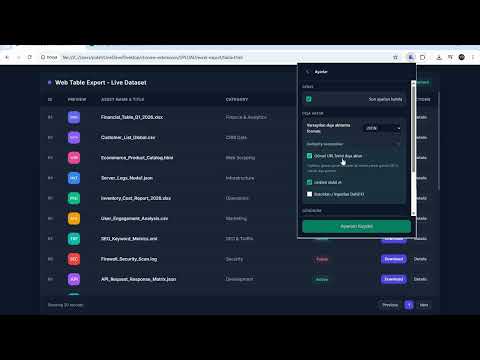
Export Table to Excel – Extract Web Tables & Lists to CSV, Excel, or JSON Copying tables from websites into spreadsheets is slow and messy: broken columns, lost links, and endless copy-paste-fix-repeat. Web Table Exporter lets you select any table, list, grid, or form area directly on a webpage and export the data as CSV, Excel (.xlsx), or JSON — with no copy-paste, no server, and no account. Key features • Select any area – Select the exact table, list, grid, or form area you need. Long pages are supported, so you can scroll while selecting tall tables. Press Escape or right-click to cancel. • CSV, Excel & JSON – Export your data as CSV, real Excel (.xlsx), or JSON. Choose a format from the popup or set your preferred default format in Settings. • Table preview – Preview extracted rows and columns before exporting. Search within the preview, paginate large datasets, and export when you're ready. • Preview Editor – Open your selected area in a new window and edit it before exporting. Change cell values and headers, switch between bold and normal text, adjust text and cell colors, and change the font. Delete rows and columns or reorder them. Print the result, export it as PDF, or send it by email. Undo your changes or reset everything back to the original. • Smart extraction – Export links as clickable URLs, extract image URLs from cells containing images, and optionally include buttons and input fields when you need form data. • Data tools – Filter rows, show/hide, rename, and reorder columns, and remove duplicates before exporting. Export history keeps track of your recent exports. • Settings that stick – Save your default export format, link/image/button extraction options, and theme. Your active export profile is always visible on the dashboard. • Simple workflow – Open the extension popup, choose your format, then use Select Area and Export or Select Area and Preview. You can also use the context menu on supported webpages. • Save hours of manual work – Perfect for research, pricing tables, dashboards, product listings, directories, and other structured web data. Who is it for? • Data analysts exporting tables from internal tools or public websites • Researchers and students collecting structured datasets • Marketers tracking competitor prices, SKUs, and product tables • Operations teams working with lists, grids, and web-based data • Anyone who wants clean exports without manual copy-paste • Users who need to clean up, format, or print a table before sharing it How to use 1. Install the extension. 2. Open a webpage containing a table, list, or grid. 3. Click the extension icon and choose CSV, Excel, or JSON. 4. Click Select Area and Export or Select Area and Preview. 5. Drag over the data you want to extract. 6. Release to export the data or open the preview. 7. Optional: in the preview, open the Preview Editor to edit, format, print, export as PDF, or email the table. 8. Optional: open Settings, customize your options, and click Save Settings. Privacy first Your data stays in your browser. All extraction and file creation happen locally on your device. Your table data is not uploaded to a server, not sent to third-party APIs, and not used for analytics. No account or login is required. What it does NOT do • Does not work on chrome://, edge://, extension pages, or the Chrome Web Store. • Does not extract data from PDF viewers or image-only screenshots. • Does not bypass website login walls or access restricted content. You can export data available on the webpage you're viewing.
4.9 out of 58 ratings
Details
- Version1.11.10
- UpdatedOctober 22, 2026
- Offered byYener POLAT
- Size638KiB
- Languages51 languages
- Developer
Email
support@addonsstore.com - Non-traderThis developer has not identified itself as a trader. For consumers in the European Union, please note that consumer rights do not apply to contracts between you and this developer.
Privacy

This developer declares that your data is
- Not being sold to third parties, outside of the approved use cases
- Not being used or transferred for purposes that are unrelated to the item's core functionality
- Not being used or transferred to determine creditworthiness or for lending purposes
Support
For help with questions, suggestions, or problems, please open this page on your desktop browser