

Web Search Navigator
262 个评分
)
概述
Keyboard shortcuts for Google search, YouTube, Startpage, Brave Search, Google Scholar, Github, and Amazon.
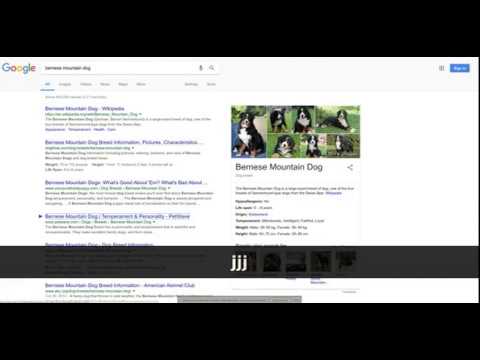
## Overview Simple open source extension that adds keyboard shortcuts to Google search™ and optionally other websites. Note that support for other websites must be enabled in the extension options. See the latest changelog in https://github.com/infokiller/web-search-navigator/blob/master/CHANGELOG.md ## Features - Lightweight - Supports Chrome, Firefox, and Edge - Extensive Google keyboard shortcuts including: - Selecting results - Opening results in the background or foreground - Navigating to other sections (maps/news/videos/etc) - Navigating to the next/previous result page - Changing time restrictions - Support for navigating cards such as Top Stories, Twitter, and videos - All keyboard shortcuts can be changed - Settings are synched between devices with the same browser profile - Supports both key combos and key sequences - Custom CSS rules to control the look of highlighted results - Experimental and optional support for YouTube, Startpage, Brave Search, Google Scholar, Github, Gitlab, and Amazon (needs to be enabled in the options). Note that the extension does not have permissions for these optional websites unless you explicitly enable them. ## Keybindings - `↓`/`j`: Select next search result - `↑`/`k`: Select previous previous result - `/`/`Escape`: Focus on input search box - `Enter`/`Space`: Navigate to selected result - `Ctrl+Enter`/`⌘+Enter`/`Ctrl+Space`: Open selected result in background tab - `Ctrl+Shift+Enter`/`⌘+Shift+Enter`/`Ctrl+Shift+Space`: Open selected result in new window/tab - `←`/`h`: Navigate to previous search result page - `→`/`l`: Navigate to next search result page - `a`/`s`: Navigate to All tab (= default search tab) - `i`: Navigate to images tab - `v`: Navigate to videos tab - `m`: Navigate to maps tab - `n`: Navigate to news tab - `alt+s`: Navigate to shopping tab - `b`: Navigate to books tab - `alt+l`: Navigate to flights tab - `f`: Navigate to financial tab - `z h`: Filter results by past hour - `z d`: Filter results by past 24 hours (day) - `z w`: Filter results by past week - `z m`: Filter results by past month - `z y`: Filter results by past year - `z z`: Turn off filter (show all results) - `z t`: Toggle sort by date/relevance (only when filtering) ©2023 Google LLC All rights reserved. Google™ search is a trademark of Google LLC.
4.9 星(5 星制)262 个评分
详情
- 版本0.5.2
- 上次更新日期2023年5月29日
- 提供方Web Search Navigator Admin
- 大小201KiB
- 语言English
- 开发者
邮箱
gsearch.navigator@gmail.com - 非交易者该开发者尚未将自己标识为交易者。欧盟地区消费者须知:消费者权利可能不适用于您与该开发者达成的合约。
隐私权
该开发者已声明,您的数据:
- 不会因未获批准的用途出售给第三方
- 不会为实现与产品核心功能无关的目的而使用或转移
- 不会为确定信用度或放贷目的而使用或转移
支持
若有任何疑问、建议或问题,请在桌面浏览器中打开此页面