


Przegląd
Web Scraper, Easy, Visual Web Data Extractor
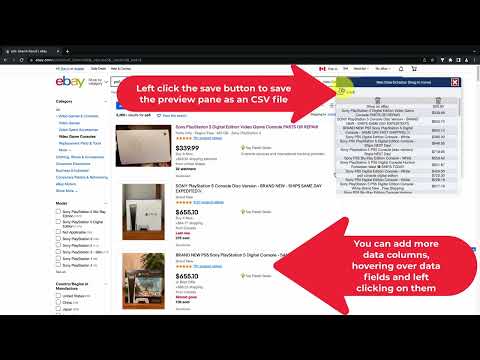
With Web Scraper for Chrome Browser, you can get data from the current webpage easily by clicking on the data fields when you hover your mouse over the data fields on any webpage. When Web Scraper finds a repeating data pattern, an orange shadow will appear on the repeating data fields with similar patterns. After you left-click mouse button, the data preview pane will be filled with the selected data. To add more data columns, simply click on more repeating data fields. If you click on an unwanted data field, you can simply click the "Delete Icon" on the data preview pane. After extracting the data from the web page, you can export it as a CSV file. You can open this CSV data file with Microsoft Excel on Windows or Numbers on Mac. I hope you enjoy my extension. Please leave your feedback if you have any ideas for improvement on it, and thank you very much for your support. Finally, you can watch this 1-minute video to better see its capabilities: https://youtu.be/U0halSVCBAc
1 na 51 ocena
Szczegóły
- Wersja1.11
- Zaktualizowano12 października 2022
- FunkcjeZawiera zakupy w aplikacji
- SprzedawcaWeb Scraper
- Rozmiar59.14KiB
- JęzykiEnglish (United States)
- Deweloper
E-mail
jashuaglynn@yahoo.com - Osoba niebędąca przedsiębiorcąTen deweloper nie określił, że jest przedsiębiorcą. Pamiętaj, że prawa konsumentów nie obowiązują w przypadku umów zawartych między tym deweloperem a konsumentami z Unii Europejskiej.
Prywatność

Ten wydawca oświadcza, że Twoje dane
- nie są sprzedawane osobom trzecim (z wyjątkiem uzasadnionych przypadków)
- nie są używane ani przesyłane w celach niezwiązanych z podstawową funkcją produktu,
- nie są używane ani przesyłane w celu ustalenia zdolności kredytowej lub udzielania pożyczek.
Pomoc
Jeśli masz pytania, sugestie lub problemy, otwórz tę stronę w przeglądarce na komputerze