

Web Product Scraper – Excel Export & Product Image Downloader

Overview
Web scraper for online shops: products to Excel, CSV or JSON, a bulk image downloader (a folder per product) and a PDF catalogue.
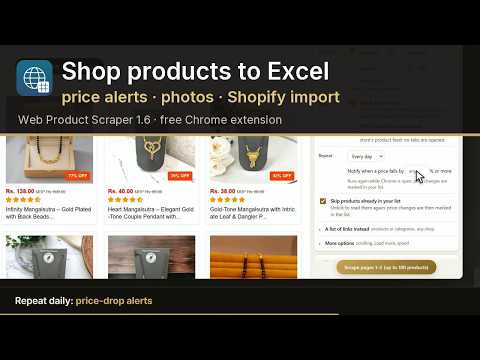
Web Product Scraper is a free product scraper for Chrome. Open an online shop's category, search or product page and export its products to Excel, CSV or JSON in about a minute, with no code and no account. It is also a bulk image downloader for product photos (one ZIP, a folder per product, full-size files), a price tracker that tells you when a price drops, and a PDF catalogue maker with a WhatsApp button on every product. Nothing leaves your browser. Use it to: • scrape products from a website into Excel: name, price, list price, SKU, brand, stock, rating, description, image and video links, one row per product (or per size and colour), prices as real numbers • download product images from a shop, sorted into a folder per product and named after it, as JPG if you like • track competitor prices: repeat a page every day or week and get a notification when a price drops • copy products to your own store with a Shopify or WooCommerce import file (products arrive as drafts) • make a product catalogue PDF with your logo and prices to share with customers on WhatsApp Web Product Scraper reads the products of the shop page you are looking at and collects them in a side panel: one page, four numbered steps. 1. Check the products – see exactly what the page gives, as a table: name, SKU, price, list price, currency, category, brand, stock, rating, description, images, videos, product URL and more. Search it, filter any column (tick brands or categories from a list, set a price range), sort, page through long lists, tick the rows you want, remove products you do not, choose the columns to keep, and add product codes (type a prefix such as XX to get XX-001, XX-002 …). 2. Choose and scrape – the pages ("from page 5 to page 12", with the listing's page count shown), how many products (stop after a number, or a range such as products 201 to 300), and how: Quick, from the list, or Full, with every product page's description, SKU, all photos at full size and videos. Repeat it every day or week (up to 10 pages watched) and get a notification when a price falls by the percentage you choose. Or paste a list of product and category links from any shop. More options covers shops that load products as you scroll or behind a "Load more" button, and the speed. 3. Your list – every product you scraped. Scrape a page again and price changes are marked: up, down and new products. When a run stops at your limit, one click continues with the next products. 4. Download – Excel (.xlsx), CSV or JSON with a preview of the first rows, Copy table, or Open in Google Sheets (it copies the rows and opens a new sheet to paste them into), a Shopify or WooCommerce import file (products arrive as drafts, sizes and colours as variants), or one ZIP with every image and video, a folder per product (photos named after the product, its code or its SKU; tick "Save photos as JPG" to turn WebP, PNG and other photos into JPG files). The downloads contain exactly the rows the table shows, or only the rows you ticked. Product pages are read from their HTML without opening tabs where the shop allows it, which keeps Chrome light; Shopify details come from the shop's product feed. A product page is always handled as one product; recommended items on it are never scraped. Tick "Variants" to get a row per size or colour with its own price, SKU and stock. PDF catalogue: turn the list into a printable catalogue for your customers, about six products per A4 page with the main photo, a few more photos, the code, name, short description and price. Add your logo, business name, address, WhatsApp number, email, website, Instagram and GST number in Settings; they head page 1. Each product gets a WhatsApp button that opens a chat with you, the product's code, name and price already typed in. Show prices or leave them out. Chrome's "Save as PDF" keeps every link clickable. Your price: add a markup (a percentage or a fixed amount) and a "your price" column appears, rounded up to a whole unit, in the table, the exports and the catalogue. Teach this site: when a shop is not read correctly, press Pick next to a field and click the right value on the page (a price, the product photos, a product card, the next-page link). The panel shows the result at once; save it as a profile for that site and it is used on every page of it, including the pages a run opens. Profiles can be edited or deleted in Settings. Send each product to your own automation: enter a webhook address (Zapier, Make, n8n, Google Apps Script) in Settings and every scraped product is posted to it as JSON. Polite by design: it only reads pages you open yourself, reads a few pages at a time with a pause between page loads, and stops on its own if a site starts refusing. Your data never leaves your computer; the extension talks to no server unless you enter the address of your own image-processing tool or of a webhook in its settings. The sidebar shows only on shop tabs (sites you allowed or where you clicked the icon) and stays out of the way everywhere else.
5 out of 51 rating
Details
- Version1.7.0
- UpdatedOctober 20, 2026
- Size414KiB
- Languages2 languages
- DeveloperWebsite
Email
ashutosh.gaikwad0106@gmail.com - Non-traderThis developer has not identified itself as a trader. For consumers in the European Union, please note that consumer rights do not apply to contracts between you and this developer.
Privacy

Web Product Scraper – Excel Export & Product Image Downloader has disclosed the following information regarding the collection and usage of your data. More detailed information can be found in the developer's privacy policy.
Web Product Scraper – Excel Export & Product Image Downloader handles the following:
This developer declares that your data is
- Not being sold to third parties, outside of the approved use cases
- Not being used or transferred for purposes that are unrelated to the item's core functionality
- Not being used or transferred to determine creditworthiness or for lending purposes
Support
For help with questions, suggestions, or problems, please open this page on your desktop browser