概述
Web Page Downloader allows you to download and save entire web pages, including linked resources, for offline viewing.
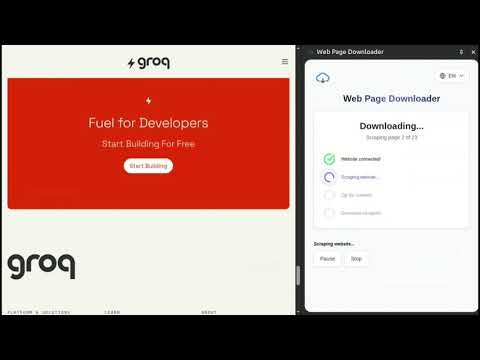
Web Page Downloader is a powerful Chrome extension that allows you to download and save entire web pages, including linked resources, for offline viewing and archiving. With a single click, you can capture the currently active web page, along with all linked images, PDFs, documents, and other web pages from the same domain. NB! Unfortunately, if a page includes elements that load content dynamically, such as when a button is pressed, that content cannot be saved during a download. Dynamically loaded content is only added when the page is loaded or scrolled down. Version 2.0: - It is also possible to download web pages that are generated on the client side. Version 2.1: - You can effortlessly save entire page as single HTML file. Version 2.2: - You can download a variety of file formats, including documents, spreadsheets, presentations, images, videos, audio files, and compressed archives. - I fixed the download issues. Version 2.3: - Improved document download functionality - Made it more visually clear how far the download has progressed - Now you can save the zip file to a location of your choice Version 2.4: Feature Request System - Introduced a comprehensive feature request system that allows users to submit, view, and vote on new feature ideas, fostering community-driven development. Version 2.5: - Persistent Filter Preferences: User download filter settings now automatically save and persist across browser sessions Version 2.6.2: - I have implemented a fix for the "Blob too large for data URL" error by introducing an Offscreen Document to handle large file downloads. - I implemented comprehensive memory management and resource limits for the extension. - The system enables efficient downloading of large files without loading entire resources into memory, reducing memory usage by up to 90% for large downloads. - I implemented the intelligent request throttling and queue management system. This extension offers a convenient side panel for easy downloading. Quickly select the content you want to save using the built-in filters and initiate the download with a single click. All downloaded content is compressed into a ZIP file for efficient management. The ZIP file contains an "index.html" file, which serves as the entry point to the downloaded web page. When opened in a web browser, the "index.html" file faithfully reproduces the original web page's layout, styling, and functionality, ensuring a consistent viewing experience even when offline. NB! Some websites go to great lengths to prevent anyone from downloading their content, and therefore for some websites the downloaded html may differ from the original html. Web Page Downloader intelligently handles linked resources, updating the links within the downloaded HTML to point to the locally saved files. This ensures that all linked content, such as images, PDFs, and other web pages, remains accessible and properly rendered, providing a complete and self-contained offline copy of the web page. Whether you need to archive important web content, create offline documentation, or simply save web pages for later reference, Web Page Downloader offers a reliable and efficient solution. Its user-friendly interface and robust functionality make it an invaluable tool for anyone who frequently works with web content. How to Use Navigate to the web page you wish to download. Click the Web Page Downloader extension icon in your Chrome toolbar to open the popup. Select the items you want to download from the list and click the "Start download" button. The extension will begin downloading the current web page, including all linked resources from the same domain (images, PDFs, documents, and other web pages). Once the download is complete, a ZIP file containing the offline version of the web page will be automatically saved to your default downloads location. Locate the downloaded ZIP file and extract its contents to a folder of your choice. Inside the extracted folder, you'll find an "index.html" file. Double-click this file to open the downloaded web page in your default browser. The offline version of the web page will load, complete with all linked resources, allowing you to view and interact with it just like the original online version.
3.8 星(5 星制)102 个评分
详情
- 版本2.6.2
- 上次更新日期2025年11月25日
- 提供方weBuilder
- 大小301KiB
- 语言English
- 开发者weBuilder
Staadioni 8 Järvakandi, Raplamaa 79101 EE邮箱
info@seoweb.ee - 非交易者该开发者尚未将自己标识为交易者。欧盟地区消费者须知:消费者权利可能不适用于您与该开发者达成的合约。
隐私权

该开发者已声明,您的数据:
- 不会因未获批准的用途出售给第三方
- 不会为实现与产品核心功能无关的目的而使用或转移
- 不会为确定信用度或放贷目的而使用或转移
支持
若有任何疑问、建议或问题,请在桌面浏览器中打开此页面