

Web Historian - Education Edition

סקירה כללית
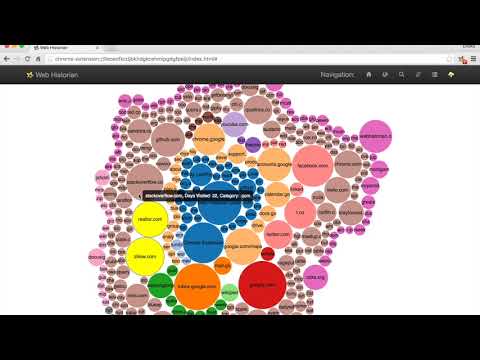
Web Historian - Visualize your web use to understand your habits.
Have you ever lost track of time online? Need to retrace your steps to re-find something? Are you curious how you use the web at different times of the day? Which sites lead you to other sites most often? How your use of a website changes over time? The answers to these questions and many more are locked in data that is already in your web browser. Unlock it with Web Historian. Web browsers keep history data, but they don't enable users to benefit from this data to understand their own habits. Web historian is a browser extension that helps users see their web browsing patterns using interactive visualizations. Users can harness this information to make informed decisions about their web use. Many companies collect and analyze web browsing history for marketing and advertising purposes. Browsing history data has been less accessible to those who want to analyze their own web browsing behavior, and to researchers who study the social impact of the web. That is why Web Historian was created. Web Historian is a non-profit open source project developed specifically to provide users with as much transparency and control over their own information as possible. When users install Web Historian they download a program that runs only on their computer, not online. Take control of how you use the web with Web Historian.
4.4 מתוך 511 דירוגים
פרטים
- גרסה1.0
- עדכון אחרון8 באוגוסט 2022
- גודל769KiB
- שפותEnglish
- מפתחAmerican Universityאתר
4400 Massachusetts Ave, NW Washington, D.C. 20016 USAאימייל
menchent@american.edu - לא עסקהמפַתח הזה לא ציין שהפעילות שלו נעשית במסגרת עסק. חשוב לשים לב: זכויות הצרכן לא חלות על חוזים בין צרכנים שנמצאים באיחוד האירופי לבין המפַתח הזה.
פרטיות

המפַתח הזה מצהיר כי הנתונים שלך:
- לא יימכרו לצדדים שלישיים, למעט בתרחישים שאושרו
- לא משמשים או מועברים למטרות שאינן קשורות לפונקציונליות המרכזית של הפריט
- לא משמשים או מועברים לצורך קביעת מצב אשראי או לצורכי הלוואה
תמיכה
כדי לקבל עזרה לגבי שאלות, הצעות או בעיות, אפשר לפתוח את הדף הזה בדפדפן במחשב