

Web Faker - Test Data & Form Filler

Overview
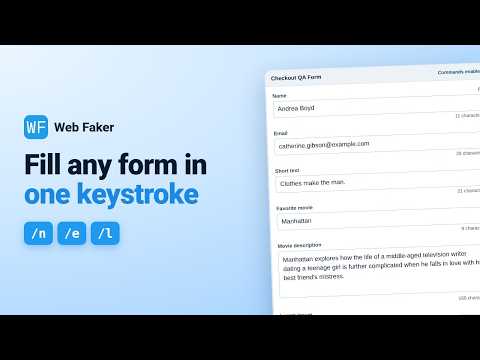
Generate fake names, emails, and Lorem Ipsum in web forms with quick commands. A lightweight test data filler for developers and QA.
**Web Faker — Generate Test Data & Fill Web Forms Faster** Stop wasting time manually entering test data into web forms. Web Faker is a lightweight Chrome extension that helps developers, QA engineers, and designers instantly fill form fields with fake names, email addresses, realistic text, and Lorem Ipsum — without leaving the page. Simply type a short command into any supported input or textarea, and Web Faker replaces it with generated content. Perfect for testing registration forms, checkout pages, admin dashboards, CMS editors, and UI prototypes. **⚡ Key Features** - **Instant Form Filling** — Generate test data directly inside input fields and textareas. - **Quick Text Commands** — Use shortcuts like `/n`, `/e`, `/t`, and `/l` to insert content without switching tabs. - **Realistic Test Data** — Generate names, email addresses, descriptions, text snippets, and chat messages. - **Lorem Ipsum Generator** — Create placeholder text as words, sentences, or paragraphs. - **Custom Commands** — Create your own shortcuts and map them to available data dictionaries. - **Flexible Text Length** — Configure minimum and maximum character limits. - **Website Restrictions** — Enable the extension only on selected websites. - **Double Key Mode** — Speed up repetitive text generation with keyboard-driven input. **🛠 Advanced Capabilities** - Generate related movie information, including matching titles and descriptions. - Insert Wikipedia summaries using an optional command. - Manage commands and dictionary mappings through the extension popup. - Customize generated content to fit different testing scenarios. **💻 Built for Real Development Workflows** **Web Developers** Quickly populate login forms, registration pages, contact forms, and admin interfaces while building and debugging applications. **QA Engineers** Generate sample data for manual testing, input validation, form behavior, and UI edge cases. **UI/UX Designers** Fill prototypes and mockups with realistic-looking content instead of repetitive placeholders. **No-Code Builders** Test forms, landing pages, CMS layouts, and content-driven interfaces without manually preparing sample text. **🔒 Privacy First** Web Faker does not collect analytics, track browsing activity, or send form contents to a Web Faker server. Most content is generated locally using dictionaries bundled with the extension. The optional Wikipedia feature makes a network request only when you explicitly use its command. **🚀 Spend Less Time Typing. More Time Building.** Whether you're developing a web application, testing forms, or designing a prototype, Web Faker helps you generate placeholder content and test data in seconds. Install Web Faker and make repetitive form filling faster and easier.
0 out of 5No ratings
Details
- Version1.8
- UpdatedNovember 21, 2026
- Offered by40i Lab
- Size221KiB
- LanguagesEnglish
- DeveloperAlex
Legotskogo Uzzhorod, Zakarpats'ka oblast 88000 UAEmail
andreiev0204@gmail.com - Non-traderThis developer has not identified itself as a trader. For consumers in the European Union, please note that consumer rights do not apply to contracts between you and this developer.
Privacy

This developer declares that your data is
- Not being sold to third parties, outside of the approved use cases
- Not being used or transferred for purposes that are unrelated to the item's core functionality
- Not being used or transferred to determine creditworthiness or for lending purposes