

Web Collections
1 rating
)
Overview
Web Collections - local side panel to organize pages, notes, and bookmarks.
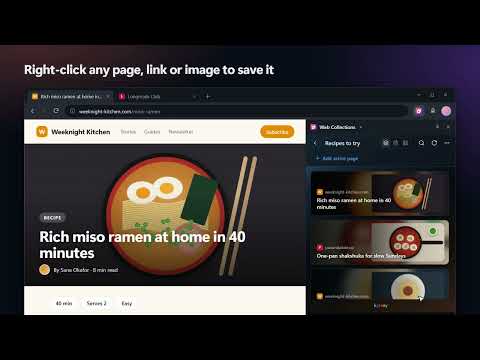
Web Collections is a local Chrome and Edge browser extension that lets you organize pages, write notes, and manage your bookmarks in a sleek, side-by-side workspace. Organize your web search, research projects, articles to read later, and coding resources in one visual side panel that stays open as you browse. Features: - Visual Collections: Organize links with Open Graph images, page metadata, extension store icons, video thumbnails, and local tab captures when no better cover is available. Metadata extraction runs only when you save or explicitly refresh a page. - Beautiful Views: Choose between List, Grid, and Banner views depending on your content. - Right-Click Saving: Choose "Add to a collection" in the context menu of any page, link, or image. - Keyboard Shortcuts: Ctrl+Shift+Y opens the panel and Alt+Shift+S saves the current page to the last used collection (customizable in the browser's extension shortcuts). - Tidy Collections: Pages already saved are not added twice, "Remove duplicates" cleans existing copies, and "Check links" selects unreachable pages for review. - Edge Collections Import: Bring your Microsoft Edge Collections over in one step from their local database file. - Accessible Controls: Keyboard-visible focus states and screen-reader-friendly labels for key side panel actions. - Sticky Notes: Add formatted, colored notes and annotations alongside your saved links. - Permanent JSON Backup: After one explicit activation, keep a complete local backup at `Downloads/Web Collections/web_collections_backup.json`, updated automatically every 24 hours or immediately on request, including locally available covers. - Contextual Backup Onboarding: After the first collection is created—or once on startup for existing local data—a non-blocking prompt explains permanent backup and lets the user trigger the browser permission request with an explicit click. - Resilient Browser Bookmark Backup: After every saved change, automatically maintain validated `Current` and `Previous` recovery generations in browser bookmarks; a manual action remains available. - Safe Recovery: Verify versioned JSON backups with SHA-256 and ask for confirmation before restoring missing or invalid local data. - Multi-Language Support: Automatically follows the browser language, with a persistent manual choice for English, French, German, Spanish, Chinese, Hindi, or Arabic. - 100% Private & Local: All data, settings, and cover images are stored on your device. How to use: 1. Click the extension icon to open the Web Collections side panel. 2. Click "Add active page" or the quick-add icon to save your current tab to a collection, or right-click any page, link, or image and choose "Add to a collection". 3. Drag and drop to reorder or move items between collections. 4. Double-click any note or title to edit, style, or customize. Privacy and permissions: All collections, notes, bookmark backups, cover images, and JSON backups remain on the user's device. Web access is used only to retrieve metadata or a cover for a page the user explicitly saves or refreshes, and to read the HTTP status of saved links when the user chooses "Check links". Background requests omit browser cookies. The optional downloads permission is requested only when the user activates permanent JSON backup. Support: https://github.com/G-kylexy Version 1.3.0 — Right-click saving, keyboard shortcuts, Edge Collections import, and tidy-up tools.
5 out of 51 rating
Details
- Version1.3.0
- UpdatedNovember 4, 2026
- Offered bykylexy
- Size657KiB
- Languages7 languages
- Developer
Email
ghostkylexy1@gmail.com - Non-traderThis developer has not identified itself as a trader. For consumers in the European Union, please note that consumer rights do not apply to contracts between you and this developer.
Privacy

Web Collections has disclosed the following information regarding the collection and usage of your data. More detailed information can be found in the developer's privacy policy.
Web Collections handles the following:
This developer declares that your data is
- Not being sold to third parties, outside of the approved use cases
- Not being used or transferred for purposes that are unrelated to the item's core functionality
- Not being used or transferred to determine creditworthiness or for lending purposes
Support
For help with questions, suggestions, or problems, visit the developer's support site