

Bridle: Capture AI feedback & Bug Reports for your Website

Overview
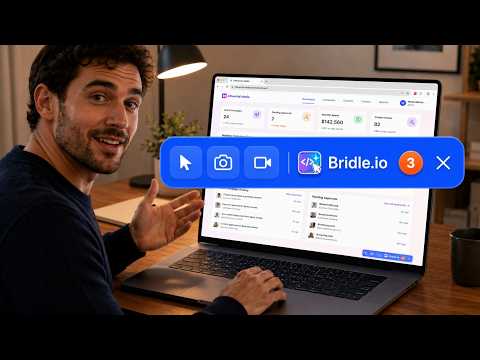
Right-click any page to capture feedback, recordings, and replays, then send them to Lovable, Claude, Codex, or your team.
🕹️ Bridle — Website Feedback for AI and Teams Bridle helps you capture bugs, change requests, feature ideas, quick notes, screenshots, session replays, and video recordings directly on live web pages. Right-click any UI element, describe the issue, and Bridle captures useful context around it — including selectors, styles, layout details, page context, screenshots, and replay evidence. 🚀 Key Features ✅ Right-click any UI element to capture feedback instantly 🪲 Create bug reports, change requests, feature ideas, and quick notes while browsing 🎯 Capture selectors, styles, layout details, page context, and selected element details 📸 Capture screenshots of selected target UI sections for reports and review 🎥 Record session replays to show how a bug or issue happened 🎬 Record video tab walkthroughs for clearer explanations 📦 Export feedback as PDF, HTML, Markdown, and shareable links 🤖 Send structured AI-ready context to Lovable 💖, Claude Code 🧠, GitHub Copilot 👨💻, Gemini ✨, Cursor 🖱️, and other AI tools 👥 Share organised feedback with developers, QA teams, clients, product managers, and stakeholders 🧩 Import feedback from others and review captured feedback and session replays visually on screen 📝 Use the smart AI note taker to refine notes with ChatGPT 👁️ Visual Feedback on Live Websites Instead of writing long explanations like “the button near the top-right of the dashboard”, Bridle lets you point to the exact UI element and capture the context around it. Use Bridle on: 🌐 Live websites (yes ✅) 💻 Localhost:8080 projects 🧪 Staging environments 🔐 Internal tools 📊 Admin dashboards 🤝 Client websites ⚡ Web apps built with AI tools 🪲 Bug Reports and Change Requests with Context Bridle helps you turn unclear feedback into structured reports with useful evidence. When you capture feedback, Bridle can include: 🎯 The selected UI element 🔗 Page URL and page context 🧩 Element selectors and technical details 🎨 Layout and style information 🎥 Session replay context This gives developers, QA teams, product teams, reviewers, and AI coding tools clearer, more precise information about what needs to be fixed, changed, or improved. 🤖 AI-Ready Feedback for Coding Tools Bridle is designed to help you send better structured context to AI coding assistants. For AI coding tools, Bridle can prepare text-based implementation context such as: 📝 Your notes and change request details 🎯 Selected element information 🧩 CSS selectors and technical references 🔗 Page URL and page context 🎨 Layout and style details 🪲 Reproduction notes and task summaries You can send this structured context to your preferred AI coding assistant. This helps reduce the time spent writing long AI prompts manually. 📦 Export and Share Feedback Bridle lets you collect one or multiple feedback items and export them for review, development, or AI implementation. You can export feedback as: 📄 PDF reports 🌐 HTML reports 📝 Markdown 🔗 Shareable links 🧩 `.w2c` feedback files with screenshots and context You can also import `.w2c` files back into Bridle and review feedback visually on screen. 👥 Who Bridle Is For **👨💻 Developers and AI builders** Capture UI changes and send structured context to AI coding tools. **🧪 QA teams** Capture bugs with screenshots, recordings, session replays, and clear reproduction context. **📋 Product managers** Collect product feedback, change requests, and improvement ideas directly on live pages. **🎨 Designers** Annotate UI components and communicate design changes clearly. **💬 Clients and stakeholders** Point, click, explain, and share feedback without long emails or unclear screenshots. **🚀 Solo founders and indie builders** Capture issues, organise ideas, refine notes, and send AI-ready context while improving your own websites and products. **🏢 Agencies and teams** Collect structured feedback from clients, reviewers, QA testers, and product teams in one organised workflow. ## 🆕 What’s New 🎥 Session replay recording 🎬 Video tab recordings (NEW) 🔍 Smart zoom around selected UI elements 🪲 Change requests with replay context 📦 Better exports for team review and AI implementation 📝 Enhanced Quick Notes ✨ Smart AI note refinement with ChatGPT (NEW) ## 🔐 Privacy View our full privacy policy: https://bridle.io/privacy ## 🏁 Getting Started Install Bridle from the Chrome Web Store. Right-click any element on a webpage and select **Ask Bridle**. Describe your change, then send it to your AI tool or export it for review and collaboration. Setup guide: No special setup required. Just right-click your live or local website and select 'Ask Bridle AI'. Got questions? Email us at: support@bridle.io
5 out of 512 ratings
Details
- Version1.1.20
- UpdatedJune 24, 2026
- FeaturesOffers in-app purchases
- Size424KiB
- LanguagesEnglish
- DeveloperINNOVOTECH SOLUTIONS LTDWebsite
128 City Road LONDON EC1V 2NX GBEmail
support@influential.mediaPhone
+44 7915 521000 - TraderThis developer has identified itself as a trader per the definition from the European Union and committed to only offer products or services that comply with EU laws.
- D-U-N-S222791817
Privacy

This developer declares that your data is
- Not being sold to third parties, outside of the approved use cases
- Not being used or transferred for purposes that are unrelated to the item's core functionality
- Not being used or transferred to determine creditworthiness or for lending purposes
Support
For help with questions, suggestions, or problems, visit the developer's support site