

WB Bhumi Smart Print - Land Record Printer

Overview
Print clean BanglarBhumi land records. Formats Khatian (খতিয়ান) & Plot (দাগ) for A4 with smart filenames. Removes ads.
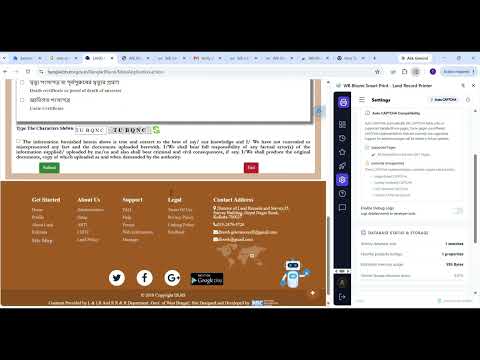
WB Bhumi Smart Print is the ultimate tool for printing clean, professional land records directly from the official BanglarBhumi portal. By default, printing land records from the web can be messy, often including unwanted ads, navigation menus, and broken layouts. This extension instantly converts complex BanglarBhumi web pages into a clean, structured, and print-ready format. Whether you need to save Khatian (ROR) details as a PDF or print Plot (Dag) information on A4 paper, this tool ensures your documents look official and readable. Key Features: • Clean Print Layout: Automatically removes ads, sidebars, and unnecessary web elements to generate a distraction-free print view. • A4 Optimized Formatting: Perfectly aligns property and land record data to fit standard A4 paper without cutting off text. • Smart Filenames: Automatically names your downloaded PDFs based on the record details for easy organization. • Selective Section Printing: Choose to print only the specific property sections you need instead of the entire webpage. • Auto Captcha Assistance: Streamlines your workflow on the portal for faster access to records. Who is this for? This extension is perfect for property buyers, legal professionals, real estate agents, and everyday users in West Bengal who need clear, physical or digital copies of their land records. Privacy & Security: Your privacy is our priority. This extension does not collect, transmit, or store any personal user data. All formatting and processing happen locally within your browser. Disclaimer: This extension is an independent utility tool created to improve the printing experience. It is not affiliated with, endorsed by, or connected to the Government of West Bengal or the official BanglarBhumi portal.
4.5 out of 54 ratings
Details
- Version3.0.0
- UpdatedJuly 31, 2026
- Size1.64MiB
- LanguagesEnglish
- DeveloperSurajit PatraWebsite
Teskona Amlasuli Medinipur, West Bengal 721157 INEmail
surajitp66@gmail.comPhone
+91 86373 78048 - TraderThis developer has identified itself as a trader per the definition from the European Union and committed to only offer products or services that comply with EU laws.
Privacy

WB Bhumi Smart Print - Land Record Printer has disclosed the following information regarding the collection and usage of your data. More detailed information can be found in the developer's privacy policy.
WB Bhumi Smart Print - Land Record Printer handles the following:
This developer declares that your data is
- Not being sold to third parties, outside of the approved use cases
- Not being used or transferred for purposes that are unrelated to the item's core functionality
- Not being used or transferred to determine creditworthiness or for lending purposes
Support
For help with questions, suggestions, or problems, visit the developer's support site