

Overview
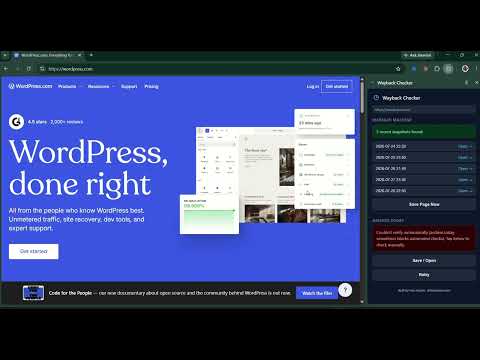
Check if the current page is archived on Wayback Machine, or save it instantly.
Wayback Checker is a free Chrome extension that checks whether the page you're viewing has been archived on the Wayback Machine (archive.org) and archive.today — and lets you save a new snapshot instantly if it hasn't. No sign-up, no account, no data collection. WHY USE WAYBACK CHECKER Check Wayback Machine archive status for any URL in one click See up to 5 recent snapshots per site — not just the latest Also checks archive.today (archive.ph) — a second archive service, for pages Wayback Machine might have missed Save the current page to Wayback Machine or archive.today directly from the side panel Right-click any page or link to check or save it, without opening the panel Lives in Chrome's side panel — stays open and auto-refreshes as you browse, unlike a popup that closes every time you click away 100% private: no tracking, no analytics, no ads, no data stored anywhere WHO IT'S FOR Researchers, journalists, SEO professionals, archivists, students, and anyone who needs to quickly verify whether a web page, article, or link has a historical snapshot — or wants to preserve one before it disappears (link rot, deleted articles, expired domains, changed content).
0 out of 5No ratings
Details
- Version1.0.0
- UpdatedAugust 6, 2026
- Size11.27KiB
- LanguagesEnglish
- DeveloperWebsite
Email
faizazizanxyz@gmail.com - Non-traderThis developer has not identified itself as a trader. For consumers in the European Union, please note that consumer rights do not apply to contracts between you and this developer.
Privacy

This developer declares that your data is
- Not being sold to third parties, outside of the approved use cases
- Not being used or transferred for purposes that are unrelated to the item's core functionality
- Not being used or transferred to determine creditworthiness or for lending purposes