

WATranslate - WhatsApp Translator

Overview
WhatsApp Web 实时双向翻译,支持 DeepSeek AI / Google / DeepL 翻译引擎
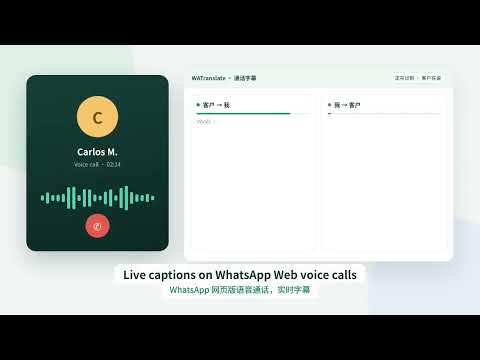
WATranslate —— WhatsApp 网页版实时双向翻译助手,专为外贸与跨境客服设计。 和全世界的客户聊天,不再被语言卡住:客户发来的消息自动翻译成你的语言;你用中文输入,一键翻译成客户的语言再发送。 【聊天翻译】 • 收到的消息自动翻译,译文显示在原文下方,可随时查看原文 • 输入框“翻译并发送”:用母语输入,发出去的是客户语言;原生发送按钮仍发送原文 • 自动识别客户来信语言,并记住每位客户的语言,下次直接按该语言翻译 • 支持 DeepSeek AI、Google、DeepL 等翻译引擎;AI 翻译更懂外贸语境 • 内置 14 种常用语言:简体/繁体中文、英语、西班牙语、葡萄牙语、法语、德语、意大利语、俄语、阿拉伯语、泰语、越南语、日语、韩语 【客户信息】 • 聊天顶部显示买家国家、当地时间和货币,方便把握回复时机与报价币种 • 客户语言设置可导出为 CSV 或通讯录 vCard 备份 【通话字幕 · 试用功能】 • 在 WhatsApp 网页版进行语音通话时,实时显示客户说话的原文和译文 • 2.4.7 起自动接入通话声音,不需要耳机,也不需要手动共享窗口 • 可识别 30 多种通话语言;可选“双向”模式:客户和你轮流识别,客户说话优先 • 字幕只显示在你自己的电脑上,不会发给客户,不保存录音;可导出文字记录 • 需要 Chrome 135 或更新版本,电脑需能访问 Google 语音识别服务 【隐私与说明】 • 安装后翻译默认关闭,由你主动开启 • 开启后,可见的聊天文字会通过 HTTPS 发送给你所选的翻译服务;免费引擎出错时可能使用备用免费服务 • AI 翻译需要登录 WATranslate 账号,由服务端校验额度 • 通话字幕的音频由 Chrome 语音识别服务处理,识别出的文字交给所选翻译服务 • 仅支持电脑版 Chrome 中的 WhatsApp 网页版(web.whatsapp.com),不支持手机和 WhatsApp 桌面客户端 • 本扩展为独立第三方工具,与 WhatsApp 或 Meta 无关联 隐私政策:https://wa.dayiwu.com/privacy WATranslate — real-time two-way translation for WhatsApp Web, built for international sales and cross-border customer service. Chat with customers anywhere without language barriers: incoming messages are translated into your language automatically, and you can type in your own language and send the message in your customer's language with one click. CHAT TRANSLATION • Incoming messages are translated automatically and shown under the original; the original is always available • "Translate & send" in the message box: write in your language, send in your customer's language. The native Send button still sends your original text • Detects each customer's language from their messages and remembers it for next time • Choose DeepSeek AI, Google or DeepL; AI translation handles trade and sales wording well • 14 built-in languages: Simplified & Traditional Chinese, English, Spanish, Portuguese, French, German, Italian, Russian, Arabic, Thai, Vietnamese, Japanese and Korean CUSTOMER CONTEXT • Shows the buyer's country, local time and currency at the top of the chat • Export saved customer language settings as CSV or vCard CALL CAPTIONS (TRIAL) • Live captions with translation while you are on a WhatsApp Web voice call • New in 2.4.7: connects to the call audio automatically — no headset and no screen-share dialog needed • Recognizes 30+ spoken languages; optional two-way mode captions both sides in turn, customer first • Captions stay on your computer only, are never sent to the other person, and no recording is stored; you can export the text • Requires Chrome 135 or later and access to Google's speech recognition service PRIVACY & NOTES • Translation is off after installation until you turn it on • When enabled, visible chat text is sent over HTTPS to the translation service you choose; free engines may fall back to other free services on errors • AI translation requires a WATranslate account; usage is checked on our server • Call caption audio is processed by Chrome's speech recognition; the recognized text goes to your selected translation service • Works with WhatsApp Web (web.whatsapp.com) in desktop Chrome only — not the mobile apps or the WhatsApp desktop app • WATranslate is an independent third-party tool and is not affiliated with WhatsApp or Meta Privacy policy: https://wa.dayiwu.com/privacy
0 out of 5No ratings
Details
- Version2.4.8
- UpdatedOctober 28, 2026
- Offered bypartysir56
- Size142KiB
- Languages中文(中国)
- DeveloperBerkam
30 N Gould St Ste. N Sheridan, WY 82801-6317 USEmail
partysir56@gmail.comPhone
+86 180 5895 5556 - TraderThis developer has identified itself as a trader per the definition from the European Union and committed to only offer products or services that comply with EU laws.
- D-U-N-S145806245
Privacy

WATranslate - WhatsApp Translator has disclosed the following information regarding the collection and usage of your data. More detailed information can be found in the developer's privacy policy.
WATranslate - WhatsApp Translator handles the following:
This developer declares that your data is
- Not being sold to third parties, outside of the approved use cases
- Not being used or transferred for purposes that are unrelated to the item's core functionality
- Not being used or transferred to determine creditworthiness or for lending purposes
Support
For help with questions, suggestions, or problems, visit the developer's support site