

Watchtower for Nest

Overview
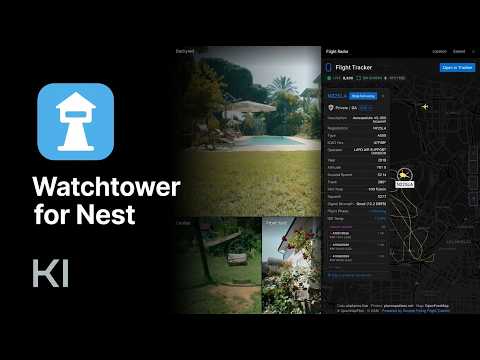
Turns your Nest and Google Home camera pages into a full-screen, reorderable camera wall with three dark themes and a flight radar.
Watchtower turns the camera page of Google Home for web (home.google.com) and the legacy Nest web app (home.nest.com) into a full-screen camera wall. • Every camera, edge to edge. The previews fill the whole window, sized automatically for however many cameras you have. • Drag to reorder. Drop any camera onto another; the order is remembered. • Three dark themes: Obsidian, Graphite and Signal. • Two layouts: Grid, or Spotlight with one camera large and the rest beside it. • Fit or Fill: show the whole picture or crop it to cover the tile. • Self-healing feeds: a stuck feed shows a spinner with a countdown, and the page reloads itself after 10 seconds to bring the stream back. • Flight Radar (optional): a live flight map for a location you choose, next to your cameras. • Off until you switch it on. A small Watchtower button sits in the bottom-right corner of the camera page. Clicking a camera still opens it in Nest or Google Home exactly as before; the extension never touches the single-camera view. Privacy: no account, no analytics, no tracking. Your camera video never leaves the connection between your browser and Google. Settings are stored only in your browser. The optional Flight Radar sends the place you search for to OpenStreetMap and the chosen location (rounded to about 1 km) to simpleflying.com to load the map. Keyboard shortcuts: T next theme, L layout, F fit/fill, P Flight Radar. Watchtower for Nest is an independent project and is not affiliated with, endorsed by or sponsored by Google. Nest and Google Home are trademarks of Google LLC.
0 out of 5No ratings
Details
- Version2026.11.1
- UpdatedNovember 12, 2026
- Offered byKeyser Intelligence
- Size33.34KiB
- LanguagesEnglish
- Developer
Email
kev@keyserintel.com - Non-traderThis developer has not identified itself as a trader. For consumers in the European Union, please note that consumer rights do not apply to contracts between you and this developer.
Privacy

Watchtower for Nest has disclosed the following information regarding the collection and usage of your data. More detailed information can be found in the developer's privacy policy.
Watchtower for Nest handles the following:
This developer declares that your data is
- Not being sold to third parties, outside of the approved use cases
- Not being used or transferred for purposes that are unrelated to the item's core functionality
- Not being used or transferred to determine creditworthiness or for lending purposes