


Overview
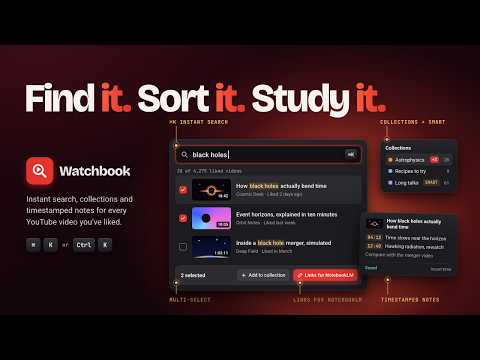
Likes search for any liked YouTube video, in seconds with Ctrl+K. Organize with collections and timestamped notes, on your device.
What's new in 1.3.3 - Better user experience! The note you take from Ctrl+K fades away while you watch, and comes back when you move the mouse. Choose 3 to 15 seconds, or Always show. What's new in 1.3.2 - We have updated our branding! The extension is now called Watchbook. It still searches the videos you liked on YouTube. Your install and your Pro license stay as they are. - Now the scope of the extension is broadened and more useful features will soon follow! Watchbook is an organizer, a note taker, and a likes search for the videos you have liked on YouTube, built to organize your videos and to let you turn them into a reserach asset. (or to just let you find music you liked and are never able to find it when you wanna hear it the most!) Press Ctrl+K (Cmd+K on Mac) on any YouTube page and find the video in seconds. While it plays, write a private note and mark the moment. When a set of videos belongs together, copy their links, open NotebookLM, paste the links in and transition to deeper research. Previously called Likes Search for YouTube. It is the same extension. Your install and your Pro license stay as they are. NOTES • Take a quick note from Ctrl+K while the video plays, without leaving the page • Mark a moment in the note. On that video, a click returns you to it. From the Workbench, the same mark opens the video at that time • One private note on a video, and one note on a collection for the thread that ties those videos together • Search your notes from Ctrl+K. Download a note, or all of them, as Markdown INTO NOTEBOOKLM • Select the videos you want to study and copy their links • Open NotebookLM from the toolbar or the Workbench, then paste the links in yourself. Watchbook opens NotebookLM. You do the paste • The same selection can also leave as CSV, JSON, Markdown, or a list of links FIND AND KEEP • Ctrl+K search over your liked videos, forgiving of typos • Filters for length and channel. Pro adds custom lengths, liked and upload dates, view counts, and several channels at once • Pin the videos and channels you come back to • Collections you build by hand, and Smart Collections that keep themselves up to date from a saved search • Select several videos at once to add them to a collection or open them • Public channel numbers (subscribers when shown, views, videos) for the channels in your likes, refreshed when you ask PRIVATE BY DESIGN • Your liked videos, collections and notes stay in your browser. They are never sent to our servers • Read-only access to YouTube through Google's official API; the extension never changes your YouTube account • Only Pro licence details and payment go to our server and to Stripe • Disconnect removes your YouTube data from this browser, and offers to download your notes first FREE (STARTER) • Your 300 most recent liked videos • 3 collections and 1 Smart Collection • Notes on 10 videos (notes on collections are free) • Up to 4 videos selected at a time • One free export or send of up to 50 videos, one 30-minute preview of the Pro filters, and one channel-numbers refresh PRO ($19 once, lifetime; no subscription) • Your whole liked history, kept up to date by auto-sync • Unlimited collections, Smart Collections and notes • Every filter, any time • Exports and sends of any size • A channel-numbers refresh every day HOW IT WORKS 1. Install, read the privacy summary, and connect your YouTube account 2. Your liked videos sync to this browser 3. Press Ctrl+K, write down the moment worth keeping, then copy the links into NotebookLM when you are ready to study them A liked video is easy to lose. A note on the moment, and a link you can paste into NotebookLM, is how you get the work out of it. YouTube is a trademark of Google LLC. Use of this trademark is subject to Google Permissions. Watchbook is an independent project developed by Sophyte Digital LLC and is not affiliated with, authorized, maintained, sponsored, or endorsed by Google LLC or YouTube.
3.9 out of 58 ratings
Details
- Version1.3.3
- UpdatedOctober 15, 2026
- FeaturesOffers in-app purchases
- Size263KiB
- LanguagesEnglish
- DeveloperSophyte DigitalWebsite
30 N Gould St Ste N Sheridan, WY 82801 USEmail
sophytedigital@gmail.comPhone
+1 307-317-7366 - TraderThis developer has identified itself as a trader per the definition from the European Union and committed to only offer products or services that comply with EU laws.
Privacy

Watchbook has disclosed the following information regarding the collection and usage of your data. More detailed information can be found in the developer's privacy policy.
Watchbook handles the following:
This developer declares that your data is
- Not being sold to third parties, outside of the approved use cases
- Not being used or transferred for purposes that are unrelated to the item's core functionality
- Not being used or transferred to determine creditworthiness or for lending purposes
Support
For help with questions, suggestions, or problems, please open this page on your desktop browser