Item logo image for WasItAI

WasItAI

5.0(

4 ratings

)
Item media 4 (screenshot) for WasItAI
Item video thumbnail
Item media 2 (screenshot) for WasItAI
Item media 3 (screenshot) for WasItAI
Item media 4 (screenshot) for WasItAI
Item video thumbnail
Item media 2 (screenshot) for WasItAI
Item media 3 (screenshot) for WasItAI
Item media 4 (screenshot) for WasItAI

Overview

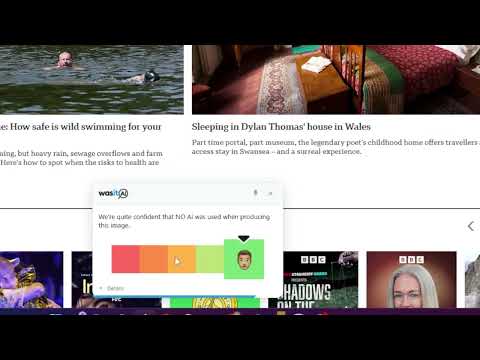
This extension connects to your WasItAI account and lets you analyze images you encounter while browsing.

WasItAI for Chrome WasItAI extension instantly tells you whether any image on the web was generated by AI, directly from your browser, without leaving the page. Note: A WasItAI account is needed for extension to work. Getting Started Connect your WasItAI account by following the instructions in the extension's Settings page. How It Works Hover over any image and a small "Check with WasItAI" button will appear. Click it, and within seconds you'll receive: - An AI detection verdict - A confidence score - A non-intrusive result overlay displayed at the bottom of the page Features # Hover-to-check A lightweight button appears when you hover over images, so there's no need to right-click or copy image URLs. # Instant badge After an image has been analyzed, a compact badge appears whenever you hover over it again, so you won't accidentally analyze the same image twice. # Confidence score See how confident the classifier is, not just a simple AI or Human result. # History The extension popup keeps a history of recently analyzed images, including: - Verdict - Confidence score - Timestamp Per-site control Disable the hover button on specific websites with a single click. Supports all common web image formats and works across virtually every website.

Details

  • Version
    1.0.4
  • Updated
    August 1, 2026
  • Offered by
    WasItAI
  • Size
    130KiB
  • Languages
    English
  • Developer
    Email
    info@wasitai.com
  • Non-trader
    This developer has not identified itself as a trader. For consumers in the European Union, please note that consumer rights do not apply to contracts between you and this developer.

Privacy

Manage extensions and learn how they're being used in your organization

WasItAI has disclosed the following information regarding the collection and usage of your data. More detailed information can be found in the developer's privacy policy.

WasItAI handles the following:

Website content

This developer declares that your data is

  • Not being sold to third parties, outside of the approved use cases
  • Not being used or transferred for purposes that are unrelated to the item's core functionality
  • Not being used or transferred to determine creditworthiness or for lending purposes

Support

For help with questions, suggestions, or problems, visit the developer's support site

Related

Vision AI

5.0

Capture web screenshots and add prompts for instant AI-powered responses with Vision AI.

AI Image Analyzer

0.0

Save images with AI descriptions and detect AI-generated images.

ViewshotAI

0.0

AI-powered full-page screenshots — capture, annotate, analyse with Claude AI, crop, highlight and share with one click

위드애니AI

0.0

위드애니AI는 브라우저 우측 사이드패널로 어떤 웹페이지에서든 원하는 AI를 바로 실행할 수 있게 해주는 브라우저 확장 프로그램입니다.

AI Protect: Prompt & Extension Guard

3.3

Audits risky Chrome extensions and lets you enable a safer extension mode before using AI and sensitive work apps.

AIBlock - Block AI Images Across the Web

3.3

Block AI Images and Google's AI Overview Answers in Real Time

AI Leak Block

4.0

Prevent AI data leaks by detecting personal AI accounts and redirecting to corporate-approved tools.

AI Image Detector by IsItAI.com

5.0

Quickly detect AI-generated images with IsItAI.com's powerful analysis engine

ScreenGrab AI

0.0

AI-powered screenshot capture and analysis tool. Extract and analyze text from any webpage.

PromptPal

4.8

Your AI assistant for the web — analyze, score, and refine your prompts in real-time.

AI Meta Viewer

5.0

View AI-generated image metadata (prompts, settings) directly in your browser.

Image Describer AI

5.0

Right-click any image to get instant AI descriptions, prompts, captions, and analysis.

Vision AI

5.0

Capture web screenshots and add prompts for instant AI-powered responses with Vision AI.

AI Image Analyzer

0.0

Save images with AI descriptions and detect AI-generated images.

ViewshotAI

0.0

AI-powered full-page screenshots — capture, annotate, analyse with Claude AI, crop, highlight and share with one click

위드애니AI

0.0

위드애니AI는 브라우저 우측 사이드패널로 어떤 웹페이지에서든 원하는 AI를 바로 실행할 수 있게 해주는 브라우저 확장 프로그램입니다.

AI Protect: Prompt & Extension Guard

3.3

Audits risky Chrome extensions and lets you enable a safer extension mode before using AI and sensitive work apps.

AIBlock - Block AI Images Across the Web

3.3

Block AI Images and Google's AI Overview Answers in Real Time

AI Leak Block

4.0

Prevent AI data leaks by detecting personal AI accounts and redirecting to corporate-approved tools.

AI Image Detector by IsItAI.com

5.0

Quickly detect AI-generated images with IsItAI.com's powerful analysis engine

Google apps