

Ward Blocker

Overview
Block distracting websites during Ward focus sessions. Requires the Ward app for macOS.
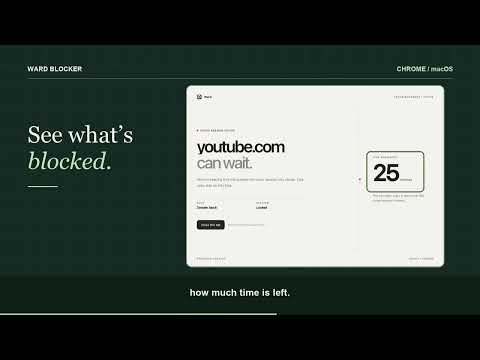
Keep distracting websites outside your focus session. Ward Blocker connects Chrome to Ward, the focus app for Mac. Choose your website rules in Ward, start a session, and the extension redirects matching websites to a quiet reminder with your session status and remaining time when available. REQUIRES WARD FOR MAC This is a companion extension, not a standalone timer or blocker. Install and run the Ward macOS app (macOS 14 or later), enable Chrome protection, and complete the browser connection setup. It does not support Windows, Linux, or ChromeOS. YOUR RULES, IN CHROME Block a domain, an exact host, subdomains, or a specific page. Keep useful exceptions with allow rules, or use Ward's allowlist-only mode for a smaller working space. Existing matching tabs are redirected when Ward sends an updated policy. FOCUS AT YOUR OWN PACE Control timed, untimed, and Pomodoro sessions in the Mac app. Chrome follows the effective session policy, including planned breaks. Profiles and session history are managed in Ward, not in this extension. LOCAL BY DESIGN The extension checks website addresses locally to decide whether a page should be blocked. Rules and session policy come from Ward on this Mac through native messaging and expire shortly after Ward stops sending updates. The extension has no advertising, analytics SDK, or remote executable code. GET STARTED 1. Install Ward for Mac (macOS 14 or later). 2. Install this extension and confirm Chrome's permission prompt. 3. In Ward, open Browser Setup and choose Copy Setup Command. Paste it into Terminal, replace EXTENSION_ID with Ward Blocker’s ID from chrome://extensions, run the command, then restart Chrome. 4. Add a website rule, start a focus session, and try opening that website in Chrome. IMPORTANT LIMITS Ward blocks supported website navigation; it is not a firewall, app blocker, parental-control service, or tamper-proof lock. Keep Ward running and the extension enabled. If the connection is interrupted, reopen Ward and check Browser Setup. Chrome internal pages and extensions are not blocked. A macOS app installation and browser permission are required before protection works. The toolbar icon does not contain a timer or popup; manage sessions in the Ward app.
0 out of 5No ratings
Details
- Version1.0.2
- UpdatedNovember 11, 2026
- Offered byParticular Systems
- Size42.04KiB
- LanguagesEnglish
- DeveloperBhupendra Singh Shekhawat
Sai Sree Layout Bengaluru, Karnataka 560068 INEmail
hello@particularsystems.comPhone
+91 89497 36768 - TraderThis developer has identified itself as a trader per the definition from the European Union and committed to only offer products or services that comply with EU laws.
Privacy

Ward Blocker has disclosed the following information regarding the collection and usage of your data. More detailed information can be found in the developer's privacy policy.
Ward Blocker handles the following:
This developer declares that your data is
- Not being sold to third parties, outside of the approved use cases
- Not being used or transferred for purposes that are unrelated to the item's core functionality
- Not being used or transferred to determine creditworthiness or for lending purposes
Support
For help with questions, suggestions, or problems, visit the developer's support site