

WappHub Sync: WhatsApp Chats to Your CRM

Overview
Send every WhatsApp Web chat to your CRM automatically. Set up in 2 minutes, see each message live, keep private numbers out.
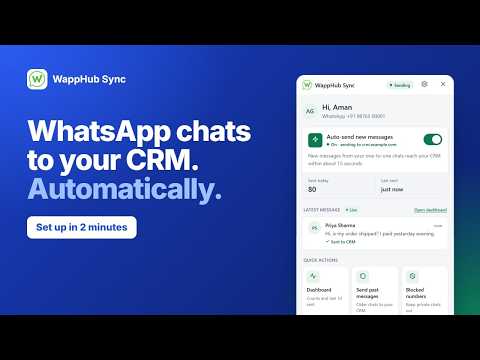
Stop losing leads that live on one phone. WappHub Sync sends your WhatsApp Web chats to your CRM, automatically. Every new message in your one-to-one chats, sent and received, reaches your CRM. No copy-paste. No WhatsApp Business API. No per-message fees. Works with any CRM or tool that accepts a webhook, either directly or through an automation tool like Zapier, Make, n8n or Pabbly. ⚡ SET UP IN 2 MINUTES 1. Add your license key. 2. Paste your CRM's webhook URL. We send one test message first, so you know it works before you save. 3. Turn on auto-send. Done. Everything happens in a panel inside WhatsApp Web. No code, no technical knowledge needed. 🎯 WHY SALES AND SUPPORT TEAMS USE IT ✓ Every customer conversation lands in your CRM, not just on one person's phone ✓ Your whole team sees the full chat history before they reply ✓ Follow-ups start from your CRM, on time ✓ Customer chats stay with the business, even when someone leaves the team ✓ One flat price: no API approval, no charge per message 📊 SEE THAT IT'S WORKING • Live dashboard: messages delivered to your CRM in the last hour, today, 7 days or 30 days • Live activity: what happened to every new message (sent, retrying, group chat, blocked number) • Automatic retries: if your CRM doesn't answer, each message is tried 3 times by itself • Clear fixes: if something needs attention, the panel tells you what's wrong and gives you the button to fix it 🕒 CATCH UP ON OLDER CHATS Choose the chats and a time range (last 24 hours, last 7 days or your own dates), then send them in one click. • Messages your CRM already has are skipped, so nothing arrives twice • Your CRM gets real phone numbers, even for chats WhatsApp shows with a private ID 🔌 WORKS WITH YOUR CRM • POST, PUT, GET or DELETE requests • Custom headers, such as an API key • Your own message format, with a live preview of exactly what your CRM receives • Multiple connections, each switched on or off on its own • With PRO, our team helps you connect your CRM 🔒 PRIVATE AND SECURE • Block family, friends and staff numbers: their messages never reach your CRM • One-to-one chats only: groups, channels and status updates are never sent • Every message is encrypted in your browser (AES-256-GCM), then sent over HTTPS • Your WhatsApp login stays yours: you never share a QR code or login code with us 💰 SIMPLE PRICING Free to install. PRO: ₹199/month or ₹1,910/year in India Outside India: $5/month or $48/year 7-day money-back guarantee. ❓ FAQ Do I need the WhatsApp Business API? No. WappHub Sync works on WhatsApp Web in Chrome. There's no API approval and no per-message fees. Which CRMs does it work with? Any CRM or tool that accepts a webhook, either directly or through an automation tool. Are group chats sent to my CRM? No. Only one-to-one chats are sent. Groups, channels and status updates are always skipped. Can I keep personal chats out of my CRM? Yes. Block any number, and its messages never leave your browser. 🚀 GET STARTED 1. Click "Add to Chrome". 2. WhatsApp Web opens with the setup panel ready. 3. Follow the 3 steps, then send yourself a message and watch it reach your CRM. Setup guide with screenshots: https://wapphub.com/sync-chat/setup Questions? Email support@wapphub.com. A real person replies. — WappHub is an independent product. It is not affiliated with, endorsed or sponsored by WhatsApp or Meta.
5 out of 53 ratings
Details
- Version2.0.63
- UpdatedNovember 20, 2026
- Size627KiB
- LanguagesEnglish
- DeveloperWebsite
Email
contact.wapphub@gmail.com - Non-traderThis developer has not identified itself as a trader. For consumers in the European Union, please note that consumer rights do not apply to contracts between you and this developer.
Privacy

This developer declares that your data is
- Not being sold to third parties, outside of the approved use cases
- Not being used or transferred for purposes that are unrelated to the item's core functionality
- Not being used or transferred to determine creditworthiness or for lending purposes
Support
For help with questions, suggestions, or problems, visit the developer's support site