

WApp+ - Nền WhatsApp Web
3 lượt xếp hạng
)
Tổng quan
Tùy chỉnh nền WhatsApp Web và bật/tắt thanh bên trò chuyện.
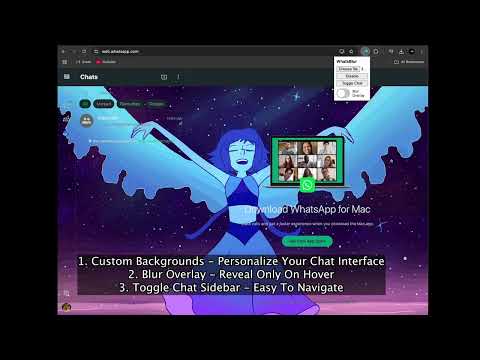
WApp+ is the ultimate customization and productivity tool for WhatsApp Web, designed to elevate your messaging experience to the next level. Whether you're looking to personalize your chat interface, enhance your privacy, or simply make WhatsApp Web more enjoyable to use, WApp+ has you covered. With a suite of powerful features and support for 47 languages, WApp+ is the perfect companion for WhatsApp Web users worldwide. Key Features 1. Custom Backgrounds Personalize Your Chat Interface: Tired of the plain, default background on WhatsApp Web? With WApp+, you can upload your favorite image or photo to set as the background. Whether it’s a family photo, a scenic landscape, or a minimalist design, your WhatsApp Web will reflect your style. Easy to Use: Simply upload an image through the extension’s popup, and the background will be applied instantly. You can also toggle the background on or off with a single click. 2. Toggle Chat Sidebar Distraction-Free Messaging: The chat sidebar on WhatsApp Web can sometimes be distracting, especially when you’re trying to focus on a single conversation. With WApp+, you can easily hide the sidebar for a cleaner, more focused interface. Quick Access: Need to switch chats? No problem! You can show the sidebar again with just one click, making it easy to navigate between conversations. 3. Blur Overlay Enhanced Privacy: The blur overlay feature adds a layer of privacy to your WhatsApp Web. When enabled, the entire chat interface is blurred, protecting your conversations from prying eyes. Hover to Reveal: When you hover over specific elements (like images, videos, buttons, or emojis), the blur effect is lifted, revealing the content. This feature is perfect for shared workspaces or public environments where privacy is a concern. 4. Multi-Language Support Global Accessibility: WApp+ is designed for users around the world. With support for 47 languages, the extension ensures that everyone can enjoy its features in their preferred language. Seamless Localization: The extension automatically detects your browser’s language settings and displays the interface in the appropriate language. 5. Persistent Settings Save Your Preferences: WApp+ remembers your settings, so you don’t have to reconfigure the extension every time you use it. Whether it’s your custom background, sidebar state, or blur overlay preference, everything is saved automatically. Sync Across Devices: If you use WhatsApp Web on multiple devices, your settings will be consistent across all of them. 6. User-Friendly Interface Simple and Intuitive: WApp+ is designed with ease of use in mind. The popup interface is clean and straightforward, allowing you to customize WhatsApp Web with just a few clicks. Real-Time Updates: Any changes you make (e.g., toggling the sidebar or enabling the blur overlay) are applied instantly, so you can see the results right away. Why Choose WApp+? 1. Enhance Your WhatsApp Web Experience WApp+ transforms WhatsApp Web from a simple messaging platform into a personalized and enjoyable experience. Whether you’re customizing the background, hiding the sidebar, or enabling the blur overlay, WApp+ gives you full control over your chat interface. 2. Boost Productivity By hiding the chat sidebar, you can focus on the conversation at hand without distractions. This is especially useful for work environments or when you need to concentrate on important messages. 3. Protect Your Privacy The blur overlay feature ensures that your conversations remain private, even in shared or public spaces. With the hover-to-reveal functionality, you can maintain privacy without sacrificing convenience. 4. Global Reach With support for 47 languages, WApp+ is accessible to users around the world. No matter where you are or what language you speak, you can enjoy the benefits of WApp+. 5. Easy to Use WApp+ is designed for users of all technical levels. You don’t need to be a tech expert to customize WhatsApp Web—just install the extension, and you’re ready to go. If you're enjoying WApp+ and find it useful, please consider supporting its development with a donation. Your contribution helps cover maintenance costs and fuels future improvements to make your WhatsApp Web experience even better. Every donation, no matter the size, is greatly appreciated and goes directly toward keeping this extension alive and evolving. Thank you for being part of our community!
3,7/53 lượt xếp hạng
Chi tiết
- Phiên bản1.1
- Đã cập nhật16 tháng 4, 2025
- Nhà cung cấpAtul Ankit Prakash
- Kích thước61.56KiB
- Ngôn ngữ46 ngôn ngữ
- Nhà phát triển
Email
dravidjones114@gmail.com - Người bán phi thương mạiNhà phát triển này không tự nhận mình là người bán. Đối với người tiêu dùng ở Liên minh Châu Âu, xin lưu ý rằng các quyền của người tiêu dùng không được áp dụng trong hợp đồng giữa bạn và nhà phát triển này.
Quyền riêng tư

Nhà phát triển này tuyên bố rằng dữ liệu của bạn
- Không được bán cho bên thứ ba, ngoài những trường hợp sử dụng đã được phê duyệt
- Không được sử dụng hoặc chuyển nhượng cho các mục đích không liên quan đến chức năng chính của mặt hàng
- Không được sử dụng hoặc chuyển nhượng để xác định khả năng thanh toán nợ hoặc phục vụ mục đích cho vay