

WaBulkMessenger — WhatsApp Bulk Sender

Overview
Send personalized bulk WhatsApp messages from WhatsApp Web with Excel/CSV import, scheduling, attachments, and campaign tracking.
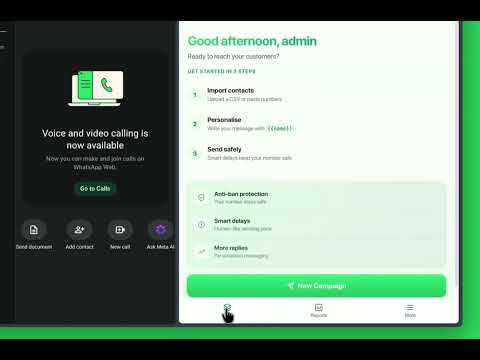
WaBulkMessenger — WhatsApp Bulk Sender for Chrome (+ Android App) WaBulkMessenger helps businesses, marketers, agencies, and professionals send personalized WhatsApp messages to multiple contacts directly from WhatsApp Web — from your own WhatsApp account, with no API setup, no WhatsApp Business account, and nothing extra to install. Instead of sending the same message over and over by hand, import your contacts, personalize each message, attach files, and track delivery live — all from a clean side panel right inside WhatsApp Web. The same account also unlocks a companion Android app, so you're never tied to one device. WaBulkMessenger requires a free account (sign in with email or Google). A generous FREE plan is included, and PRO unlocks higher volume, faster sending, and AI features — on both the extension and the app. ◆ Key Features 📢 Bulk messaging — Send personalized messages to many contacts in one campaign, directly within WhatsApp Web, with natural typing delays so it never looks automated. 📥 CSV/Excel import — Upload a contact list, paste numbers manually, or pick a saved group. Custom columns (city, company, order ID, anything) become message variables automatically. 🏷️ Message personalization — Use dynamic placeholders like {{name}}, {{city}}, or any custom column from your file, plus write a few message variants and let each contact get a random one. 📎 Per-recipient attachments — Send a different photo, PDF, or video to each contact automatically — not just the same one file to everyone. Up to 25 MB per attachment. 🤖 AI message assistant (PRO) — One click rewrites your message in a different tone (Friendly, Professional, or Urgent on the extension; five tones including Casual and Formal on the Android app). ⏱️ Smart, anti-ban sending — Character-by-character typing, randomized human-like delays, batch pauses, and a gradual warm-up ramp for new numbers — configurable in Settings, all designed to keep your number safe. 🔁 Warm-up Auto-Reply (PRO) — Auto-reply to incoming messages to build trust on a new number, even outside of a campaign. 📄 Templates — Save your best-performing messages and reuse them in one click. 🔍 Number filtering — Validate and filter your number list by country or format. 📤 Contact & delivery-log export — Download your contact lists and campaign delivery logs. 🚫 Blacklist & auto opt-out — Anyone who replies STOP is automatically removed from future campaigns. 📊 Live campaign tracking — Watch messages go out in real time, pause/resume/stop anytime, resend to failed or pending contacts with one click, and download full reports. If your browser closes mid-campaign, resume right where you left off. ◆ Also available: WaBulkMessenger for Android Everything above, from your phone — same login, same plan, same monthly quota, fully synced with the Chrome extension either way. The Android app additionally offers: 📲 Hands-free sending — an optional accessibility-based auto-send mode that can run a campaign on your phone with no manual taps. 🎭 Five AI rewrite tones (PRO) — Friendly, Professional, Urgent, Casual, and Formal. 🔄 Not locked to one number — since your plan is tied to your account, not to a specific WhatsApp number, switching phones or WhatsApp accounts doesn't cost you a new subscription. ◆ Free vs. PRO (applies to both the extension and the Android app) FREE — 50 messages/month, 20 messages per batch, 50 uses/month each for attachments, CSV import, contact export, number filtering, and delivery-log export. No credit card required. PRO (₹499/month) — 5,000 messages/month, 100 messages per batch, faster sending, unlimited attachments, and unlimited use of every import/export/filter tool — plus AI message rewriting and Warm-up Auto-Reply, which are PRO-only features. ◆ Perfect For • Small businesses and e-commerce stores • Marketing agencies and sales teams • Customer support teams • Event organizers and educational institutions • Real estate professionals ◆ How It Works 1. Install WaBulkMessenger and open the side panel (or install the Android app). 2. Create a free account or sign in with Google. 3. Open WhatsApp Web and log in to your WhatsApp account (or open WhatsApp on your phone for the app). 4. Import contacts via CSV/Excel or add numbers manually. 5. Write and personalize your message, attach media if needed. 6. Send and track your campaign live. ◆ Privacy and Data • To run campaigns across your devices, WaBulkMessenger transmits and stores your account data (contacts, message templates, campaign details, and delivery results) securely on our servers. • Saved contact groups are encrypted before being stored — we can't read them. • We do not sell your data or use third-party advertising trackers. You can delete your data at any time. • Messages are delivered through your own WhatsApp Web session (or your own WhatsApp app, on Android). • Privacy Policy: https://wabulkmessenger.com/privacy-policy/ ◆ Responsible Use WaBulkMessenger is intended for messaging contacts who have opted in to hear from you. You are responsible for complying with WhatsApp's Terms of Service, local regulations, and anti-spam laws. Sending unsolicited bulk messages can lead to account restrictions, so use the extension responsibly and only with consenting recipients. Learn more: https://wabulkmessenger.com/
4.5 out of 58 ratings
Details
- Version1.0.13
- UpdatedOctober 13, 2026
- FeaturesOffers in-app purchases
- Size895KiB
- LanguagesEnglish
- DeveloperWebsite
Email
admin@wabulkmessenger.com - Non-traderThis developer has not identified itself as a trader. For consumers in the European Union, please note that consumer rights do not apply to contracts between you and this developer.
Privacy

WaBulkMessenger — WhatsApp Bulk Sender has disclosed the following information regarding the collection and usage of your data. More detailed information can be found in the developer's privacy policy.
WaBulkMessenger — WhatsApp Bulk Sender handles the following:
This developer declares that your data is
- Not being sold to third parties, outside of the approved use cases
- Not being used or transferred for purposes that are unrelated to the item's core functionality
- Not being used or transferred to determine creditworthiness or for lending purposes
Support
For help with questions, suggestions, or problems, visit the developer's support site