

WA Scheduler
30 ratings
)
Overview
Schedule messages for your WhatsApp contacts
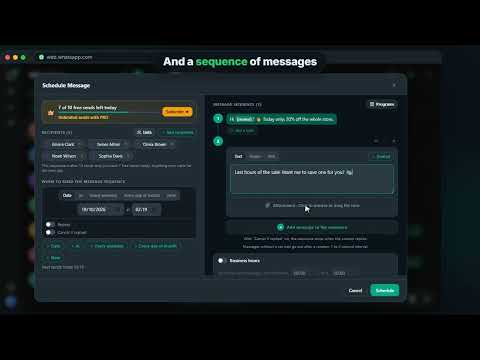
Schedule WhatsApp messages, automate replies, create message sequences, send bulk messages, schedule WhatsApp Status updates, and automate your WhatsApp Web. WA Scheduler turns WhatsApp Web into a complete scheduling and automation tool. Schedule messages for one or multiple contacts, groups, and channels, set up keyword-based automatic replies, create sequences with text, audio, files, and polls, send recurring messages, run bulk campaigns to hundreds of contacts, and manage everything from one dashboard. You can also import contacts from Excel, CSV, or TXT files, personalize messages with each contact's name, organize automations into folders, view your scheduled messages in a calendar, configure business hours, and monitor failed messages and retries. No separate app is required. Install WA Scheduler, open WhatsApp Web, and automate your messages directly from your browser. ⭐ KEY FEATURES ✅ WhatsApp Message Scheduling Schedule WhatsApp messages for a specific date and time or use relative scheduling such as: • In 30 minutes • In 2 hours • In 3 days Use scheduled messages for reminders, follow-ups, payment reminders, appointments, notifications, and recurring communication. ✅ Triggers and Automatic Replies Automate WhatsApp replies based on what happens in each conversation. Create triggers for: • First contact: automatically send a welcome message to people who contact you for the first time or who have not messaged you for several days. • Keywords: automatically reply when a message contains words such as "price", "menu", "hours", or any other keywords you define. Uppercase letters and accents do not matter. • Away messages: automatically reply to people who contact you outside your business hours or activate a vacation mode. Choose whether to reply immediately or after a delay of a few minutes, limit how many times the same contact can receive an automatic reply, and use complete sequences with text, audio, files, and polls. The automation can automatically stop when the contact replies. ✅ WhatsApp Message Sequences Create sequences containing multiple messages sent in order. Combine different types of content in the same sequence: • Text messages • Audio and voice messages • Images and videos • PDFs, documents, and other files • WhatsApp polls Set a custom delay between each step. For example: send a text message, wait 30 seconds, send an audio message, wait 2 minutes, then send a file or poll. ✅ WhatsApp Bulk Messaging Send messages to hundreds of contacts with control over the sending pace. Configure: • Delays between messages • Randomized intervals • Pauses after each batch • Allowed sending hours You can also use different text variations and monitor your campaign in real time, including contacts who received, read, or failed to receive the message. ✅ Multiple Recipients Schedule messages, sequences, and automations for multiple WhatsApp contacts at once. Select recipients individually, use saved lists, or import a list of phone numbers. ✅ Import Contacts from Excel, CSV, and TXT Import phone numbers from Excel (.xlsx), CSV, or TXT files. You can also paste a list of phone numbers directly into WA Scheduler. The extension checks which numbers have WhatsApp before sending. ✅ Personalize Messages with Contact Names Use {nome} in your messages to automatically personalize each message. Example: "Hello, {nome}! How are you?" Each contact receives the message with their own name. ✅ WhatsApp Groups and Channels Schedule messages for WhatsApp groups and channels as well as individual conversations. Manage different types of recipients from the same scheduling dashboard. ✅ Recurring WhatsApp Messages Create messages and sequences that repeat automatically. Choose from: • Every day • Specific days of the week • Every month • Custom intervals Perfect for reminders, payment follow-ups, notifications, recurring updates, and other automated communication. ✅ Flexible Scheduling Rules Choose exactly how and when a message should be sent: • Specific date and time • Relative time • Specific days of the week • Daily repetition • Weekly repetition • Monthly repetition • Custom repeat intervals ✅ Business Hours Define the hours when automated messages are allowed to be sent. For example, you can configure business hours from 08:00 to 18:00. When a message or sequence step falls outside the allowed hours, WA Scheduler can wait until the next available period before continuing the sequence. Business hours are fully customizable. ✅ Cancel When Contact Replies Automatically cancel a scheduled message or sequence when the contact sends a new message or replies to the conversation. This is especially useful for automated follow-ups. ✅ Schedule WhatsApp Status Schedule WhatsApp Status updates in advance. Create text or media Status updates and customize: • Text • Images and videos • Font • Background color Plan your WhatsApp Status updates without having to publish them manually at the exact time. ✅ Calendar View View your upcoming and recurring scheduled messages in a monthly calendar. See what is scheduled for each day and easily organize your automated messages. ✅ Folders for Recurring Automations Organize your recurring messages into folders. Create categories for customers, payments, groups, campaigns, reminders, or any other type of automation. Drag your scheduled items into folders to keep everything organized. ✅ Save Recipient Lists Save contact lists and reuse them for new schedules, sequences, and bulk messages. This makes it easier to repeatedly send messages to the same groups of contacts without selecting them again. ✅ Save Messages and Templates Save frequently used messages and reuse them later. Create message templates to use again in new schedules, automatic replies, and sequences. ✅ Search and Filters Quickly find your scheduled messages using information such as: • Phone number • Contact name • Message content • Other available details ✅ Failed Message Alerts and Retry When a message cannot be sent, the dashboard shows the reason for the failure. This can happen, for example, if WhatsApp is closed, the computer is turned off, or there is no internet connection. You can then retry or reschedule the message with one click. ✅ Backup Back up your WA Scheduler data to make it easier to recover your information and keep your schedules protected. ☁️ CLOUD SYNC With the PRO plan, you get unlimited scheduling and unlimited sending. Your schedules are synchronized in the cloud and available on any computer where you sign in to your account. Switch computers without having to recreate your scheduled messages. 📱 SEND WITH WHATSAPP WEB CLOSED With the PRO plan, you can connect your WhatsApp account using a QR Code. After connecting your account, WA Scheduler can send scheduled messages without requiring WhatsApp Web to remain open in your browser. This allows your scheduled messages and automations to continue running even when WhatsApp Web is closed. 💼 WHO IS WA SCHEDULER FOR? WA Scheduler is designed for professionals, teams, and businesses that need to automate communication through WhatsApp. Common use cases include: 📈 Sales and customer follow-ups 📅 Appointment, meeting, and consultation reminders 💳 Payment reminders, collections, and due dates 🎧 Customer support and service teams 📣 Recurring campaigns and business communications 🤖 Keyword-based automatic replies 👋 Automatic welcome messages for new contacts 🏖️ Away messages and vacation mode 🔁 Recurring notifications and automations 📱 Scheduled WhatsApp Status updates 🚀 HOW IT WORKS 1. Install WA Scheduler. 2. Open WhatsApp Web normally. 3. Open a conversation and click the calendar button next to the message box. 4. Choose a contact, group, channel, or saved recipient list. 5. Create a message, sequence, automation, or bulk campaign. 6. Choose text, audio, image, video, poll, document, or another supported file. 7. Configure the date, time, delays, recurrence, and business hours. 8. Use {nome} to personalize your messages. 9. Schedule the message or activate the automation. 10. Monitor your messages directly from the dashboard. Turn WhatsApp Web into a powerful messaging, scheduling, and automation platform. Schedule WhatsApp messages, schedule Status updates, automate replies, create message sequences, set keyword triggers, send recurring messages, run bulk messaging campaigns, import contacts from Excel and CSV, personalize messages with {nome}, organize your schedules into folders, and manage everything from one place. WA Scheduler — WhatsApp message scheduling, automatic replies, automation, and bulk messaging for WhatsApp Web.
4.1 out of 530 ratings
Details
- Version2.3.17
- UpdatedOctober 22, 2026
- FeaturesOffers in-app purchases
- Offered byCleverson Pelegrini
- Size509KiB
- Languages3 languages
- Developer
Email
cleversonpelegrini@gmail.com - Non-traderThis developer has not identified itself as a trader. For consumers in the European Union, please note that consumer rights do not apply to contracts between you and this developer.
Privacy

This developer declares that your data is
- Not being sold to third parties, outside of the approved use cases
- Not being used or transferred for purposes that are unrelated to the item's core functionality
- Not being used or transferred to determine creditworthiness or for lending purposes