

WA Privacy

Overview
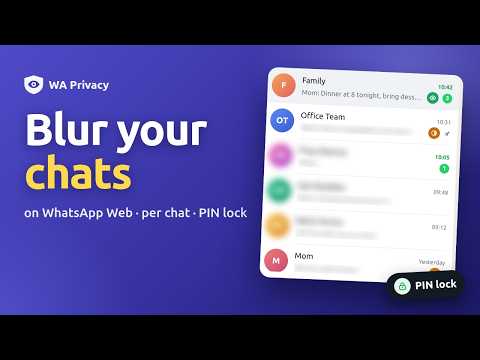
Blur WhatsApp Web by default and choose, per chat, what you want to see.
Keep your WhatsApp Web chats private from people looking at your screen. BLUR EVERYTHING BY DEFAULT Chat names, profile photos, last-message previews, messages, and photos & videos are blurred until you choose otherwise. CHOOSE PER CHAT • Click the eye on any chat to cycle: Blurred → Name & photo → Visible. • Open the toolbar popup to set each part of a chat to Visible or Blurred: chat name, profile photo, last message, messages, photos & videos. • Set what stays visible for all chats you haven't customised. PEEK SAFELY Hover over anything blurred to reveal it for a moment. Adjust the blur strength to your liking. APP LOCK Lock WhatsApp Web with a PIN: • after 1, 5, 15, 30 or 60 minutes without activity • when the browser starts • when you leave the tab • right away with Alt+L All WhatsApp tabs lock and unlock together. KEYBOARD SHORTCUTS • Alt+W: show / blur the open chat • Alt+B: pause or resume blurring • Alt+L: lock now PRIVATE BY DESIGN • Everything runs in your browser. Nothing is sent to us or to anyone else. • No accounts, no tracking, no ads. • Your PIN is never stored, only a secure hash of it, kept on your computer. GOOD TO KNOW • This protects against people looking at your screen, not against someone with full access to your computer. • WhatsApp's desktop notifications are not blurred. Turn them off in WhatsApp's settings if needed. • Forgot your PIN? Remove the extension and add it again (this also resets your chat settings). Not affiliated with, endorsed by, or sponsored by WhatsApp or Meta.
5 out of 52 ratings
Details
- Version1.0.1
- UpdatedOctober 9, 2026
- Size42.99KiB
- LanguagesEnglish
- DeveloperWebsite
Email
sabirmansuri900@gmail.com - Non-traderThis developer has not identified itself as a trader. For consumers in the European Union, please note that consumer rights do not apply to contracts between you and this developer.
Privacy

WA Privacy has disclosed the following information regarding the collection and usage of your data. More detailed information can be found in the developer's privacy policy.
WA Privacy handles the following:
This developer declares that your data is
- Not being sold to third parties, outside of the approved use cases
- Not being used or transferred for purposes that are unrelated to the item's core functionality
- Not being used or transferred to determine creditworthiness or for lending purposes