

WA Contacts Extractor
4 ratings
)
Overview
Extract and save WhatsApp contacts from chats, groups, labels or countries, and export phone numbers to CSV, Excel, JSON or vCard.
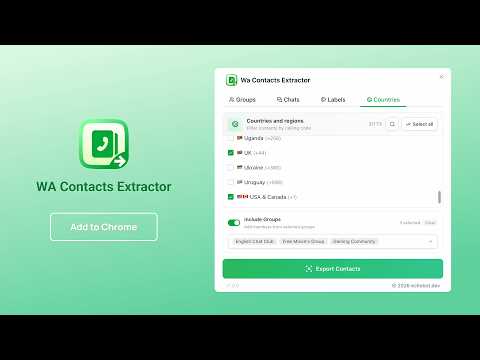
WA Contacts Extractor helps you find, organize and export contact information from your existing WhatsApp Web session. Extract contacts from individual chats, selected groups, WhatsApp labels or countries, preview the results and download a clean contact list in the format that fits your workflow. Whether you manage customer relationships, sales leads, community groups, event attendees or business contacts, this WhatsApp contact exporter turns scattered contact details into structured files you can use in Excel, Google Sheets, CRM tools, address books, databases and automation workflows. 💡 WHY CHOOSE WA CONTACTS EXTRACTOR? 🔹 Comprehensive WhatsApp Contact Extraction Extract contact information from chats, WhatsApp groups, labels and country-based filters, so you can organize both saved and unknown phone numbers more efficiently. 🔹 Flexible Export Options Save your WhatsApp contacts in the format that fits your workflow, including CSV, XLSX (Excel), JSON and vCard (VCF) for spreadsheets, CRM tools, databases and address books. 🔹 Clean and Organized Results Preview contacts before downloading, skip unusable phone numbers and merge duplicate phone numbers automatically to create a cleaner contact list. 🔹 Private, Browser-Based Workflow Contact extraction and file generation happen locally in your browser, and exported files are saved directly to your computer. ✨ KEY FEATURES ✅ Four extraction modes: Chats, Groups, Labels and Countries ✅ Export WhatsApp contacts and group members to CSV, Excel, JSON or vCard ✅ Search and quickly select groups, labels, countries and calling-code filters ✅ Preview contacts, remove duplicates and skip unusable phone numbers ✅ Preserve useful contact, country, label, business and chat-context details ✅ Quick-access button inside WhatsApp Web 🎯 PERFECT FOR - Small businesses organizing customer and lead contact lists - Sales teams preparing WhatsApp contacts for CRM import - Community managers exporting members from WhatsApp groups - Event organizers managing attendee and participant contacts - Support teams organizing contacts by labels and conversation status - International teams filtering contacts by country or calling code - Users moving WhatsApp contact information into spreadsheets or address books - Developers who need structured JSON contact data for permitted workflows 📋 HOW TO USE 1. Click the WA Contacts Extractor shortcut in the WhatsApp navigation bar 2. Choose Chats, Groups, Labels or Countries 3. Select the chat type, groups, labels or countries you want to include 4. Click "Export Contacts" to extract and preview the matching contacts 5. Download your contact list as CSV, Excel, JSON or vCard 🔎 FOUR FLEXIBLE EXTRACTION MODES Chats — Export contacts from all chats, chats with unread messages or chats without unread messages Groups — Select one or multiple WhatsApp groups and export their members Labels — Select WhatsApp labels and export the contacts and group members associated with them Countries — Select countries or calling codes and optionally include members from selected groups 📊 EXPORTED DATA FIELDS Depending on the available WhatsApp contact data, exported rows can include: - Display name - Public name - Formatted name - Phone number - Formatted phone number - Country code - Country name - Saved-contact status - Business-account status - Blocked status - WhatsApp labels - Last message text - Last message date - Read or unread status - Last-message direction - Extraction date and time 📁 EXPORT FORMATS CSV — Best for Google Sheets, simple spreadsheets, CRM imports and databases XLSX / Excel — Best for spreadsheet analysis, filtering and business workflows JSON — Best for developers, scripts, databases and automation vCard / VCF — Best for importing contacts into phones, address books and contact apps 💎 FREE VS PRO FREE Features: ✓ Extract and preview up to 20 contacts per export ✓ Use Chats, Groups, Labels and Countries modes ✓ Export to CSV, Excel or JSON ✓ Search, select and preview contacts before downloading PRO Features: ✓ Export complete contact lists without the free contact limit ✓ Export contacts as vCard / VCF ✓ Import contacts more easily into phones and address books ✓ Priority support 🔒 PRIVACY NOTICE Your WhatsApp contact data is processed locally in your browser and exported directly to your computer. The extension does not require a WhatsApp API key. Account, configuration, feedback and subscription features may connect to our service when needed, and payments are handled by secure third-party payment providers. We never store your card details. Only export and use contact information when you have a legitimate purpose and the appropriate permission. Protect exported files and follow the privacy, consent and data protection rules that apply to you. ⚠️ DISCLAIMER This extension is an independent tool and is not affiliated with, endorsed by, sponsored by or associated with WhatsApp LLC, Meta Platforms, Inc. or any of their affiliates. WhatsApp is a trademark of its respective owner. WA Contacts Extractor is intended for legitimate contact management, business record keeping and data portability. Users are responsible for complying with WhatsApp's Terms of Service and all applicable laws in their jurisdiction. Do not use this extension for spam, unsolicited marketing, harassment or unauthorized collection of personal data. 💬 SUPPORT Have a question, found a bug or want to request a feature? Use the feedback link inside the extension or email echobot.dev@gmail.com.
4 out of 54 ratings
Details
- Version1.0.0
- UpdatedJune 25, 2026
- Offered byAddonsNext
- Size764KiB
- Languages54 languages
- Developer
Email
echobot.dev@gmail.com - Non-traderThis developer has not identified itself as a trader. For consumers in the European Union, please note that consumer rights do not apply to contracts between you and this developer.
Privacy

This developer declares that your data is
- Not being sold to third parties, outside of the approved use cases
- Not being used or transferred for purposes that are unrelated to the item's core functionality
- Not being used or transferred to determine creditworthiness or for lending purposes