總覽
輕鬆備份並匯出 WhatsApp Web 聊天、訊息與媒體為 CSV、Excel、JSON 或 HTML 格式。
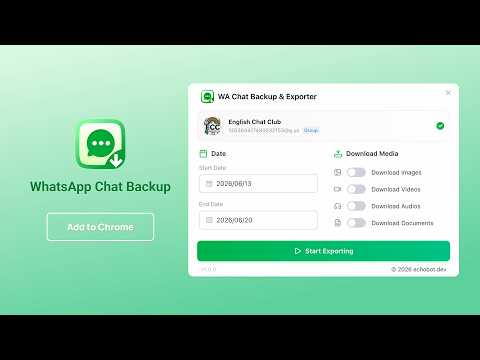
WA Chat Backup & Exporter helps you save important WhatsApp Web conversations as clean, structured files. Open WhatsApp Web, select a chat, click the extension button, choose an export format, and download your chat backup to your computer. Whether you need to archive customer conversations, preserve business records, organize personal messages, analyze chat history, or keep a readable offline copy, this WhatsApp Web chat exporter turns conversations into practical files you can open in Excel, Google Sheets, Notion, databases, scripts, or a browser. ✨ KEY FEATURES ✅ One-click chat backup from WhatsApp Web ✅ Export messages to CSV, XLSX (Excel), JSON, or HTML ✅ Export individual chats and group chats ✅ Filter messages by date range before exporting ✅ Preview messages before downloading your backup ✅ Clean spreadsheet-ready fields for analysis and record keeping ✅ HTML export with a chat-style readable layout ✅ Custom file naming rules for chat backups and media files ✅ Optional media downloads for images, videos, audio, voice notes, stickers, and documents ✅ Quick button beside the chat title for faster access ✅ No WhatsApp API key required — works with your existing WhatsApp Web session 🎯 PERFECT FOR - Small businesses saving customer support chats and order conversations - Freelancers archiving client communication and project records - Researchers and analysts organizing message history for review - Teams preserving group chat decisions, notes, and references - Users who want an offline copy of important personal conversations - Anyone who needs WhatsApp Web chat export to CSV, Excel, JSON, or HTML 📋 HOW TO USE 1. Open WhatsApp Web at https://web.whatsapp.com 2. Select the individual chat or group chat you want to back up 3. Click the WA Chat Backup & Exporter icon in your browser toolbar 4. Click "Export Chat Backup" to open the exporter panel 5. Choose your date range and optional media types 6. Preview the messages that will be exported 7. Download your chat backup as CSV, Excel, JSON, or HTML Tip: You can also use the quick button beside the chat title inside WhatsApp Web to open the exporter faster. 📊 EXPORTED DATA FIELDS Depending on your plan and selected options, exported rows can include: - Sender name - Message text - Message type - Phone number - Country - Avatar URL - Chat name - Message ID - Created date and time - Media file path - Media type - Media file size 📁 EXPORT FORMATS CSV — Best for spreadsheets, databases, and simple backups XLSX / Excel — Best for formatted spreadsheet workflows JSON — Best for developers, automation, and data processing HTML — Best for readable offline chat archives 💎 FREE VS PRO FREE Features: ✓ Export up to 100 recent text messages per chat backup ✓ Export to CSV, Excel, JSON, or HTML ✓ Date range selection ✓ Message preview ✓ Custom file naming rules PRO Features: ✓ Export unlimited messages per chat backup ✓ Download chat media files ✓ Include images, videos, audio, voice notes, stickers, and documents ✓ Media file naming and folder options ✓ Priority support 🔒 PRIVACY NOTICE Your chat data is private. WA Chat Backup & Exporter processes chat export data locally in your browser and downloads files directly to your computer. The extension does not collect or sell your WhatsApp messages, chat history, or media files. Account, configuration, feedback, and subscription features may connect to our service when needed, and payments are handled by secure third-party payment providers. We never store your card details. ⚠️ DISCLAIMER This extension is an independent tool and is not affiliated with, endorsed by, sponsored by, or associated with WhatsApp LLC, Meta Platforms, Inc., or any of their affiliates. WhatsApp is a trademark of its respective owner. This extension is intended for legitimate personal backup, business record keeping, research, and data portability purposes only. Users are responsible for complying with WhatsApp's Terms of Service and all applicable laws in their jurisdiction. Please respect privacy, consent, and data protection requirements when exporting or storing conversations. 💬 SUPPORT Have a question, found a bug, or want to request a feature? Contact support from inside the extension or email echobot.dev@gmail.com.
詳細資料
- 版本1.0.1
- 已更新2026年10月10日
- 提供者AddonsNext
- 大小811KiB
- 語言54 種語言
- 開發人員
電子郵件
echobot.dev@gmail.com - 非交易商這位開發人員並未表明自己是交易商。歐盟地區的消費者請注意,消費者權利不適用於你和這位開發人員之間簽訂的合約。
隱私權

這位開發者就你的資料做出下列聲明:
- 除經核准的用途外,不會將你的資料販售給第三方
- 不會基於與商品核心功能無關的目的,使用或轉移資料
- 不會為了確認信用度或基於貸款目的,使用或轉移資料