개요
WhatsApp Web 채팅, 메시지, 미디어를 CSV, Excel, JSON, HTML로 쉽게 백업하고 내보내세요.
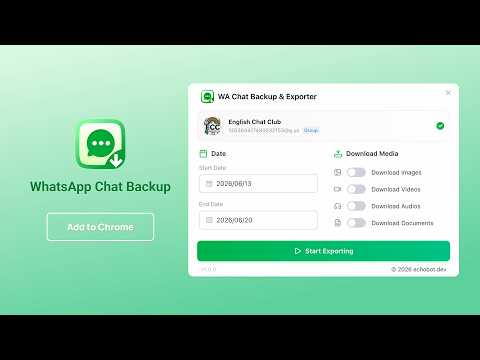
WA Chat Backup & Exporter helps you save important WhatsApp Web conversations as clean, structured files. Open WhatsApp Web, select a chat, click the extension button, choose an export format, and download your chat backup to your computer. Whether you need to archive customer conversations, preserve business records, organize personal messages, analyze chat history, or keep a readable offline copy, this WhatsApp Web chat exporter turns conversations into practical files you can open in Excel, Google Sheets, Notion, databases, scripts, or a browser. ✨ KEY FEATURES ✅ One-click chat backup from WhatsApp Web ✅ Export messages to CSV, XLSX (Excel), JSON, or HTML ✅ Export individual chats and group chats ✅ Filter messages by date range before exporting ✅ Preview messages before downloading your backup ✅ Clean spreadsheet-ready fields for analysis and record keeping ✅ HTML export with a chat-style readable layout ✅ Custom file naming rules for chat backups and media files ✅ Optional media downloads for images, videos, audio, voice notes, stickers, and documents ✅ Quick button beside the chat title for faster access ✅ No WhatsApp API key required — works with your existing WhatsApp Web session 🎯 PERFECT FOR - Small businesses saving customer support chats and order conversations - Freelancers archiving client communication and project records - Researchers and analysts organizing message history for review - Teams preserving group chat decisions, notes, and references - Users who want an offline copy of important personal conversations - Anyone who needs WhatsApp Web chat export to CSV, Excel, JSON, or HTML 📋 HOW TO USE 1. Open WhatsApp Web at https://web.whatsapp.com 2. Select the individual chat or group chat you want to back up 3. Click the WA Chat Backup & Exporter icon in your browser toolbar 4. Click "Export Chat Backup" to open the exporter panel 5. Choose your date range and optional media types 6. Preview the messages that will be exported 7. Download your chat backup as CSV, Excel, JSON, or HTML Tip: You can also use the quick button beside the chat title inside WhatsApp Web to open the exporter faster. 📊 EXPORTED DATA FIELDS Depending on your plan and selected options, exported rows can include: - Sender name - Message text - Message type - Phone number - Country - Avatar URL - Chat name - Message ID - Created date and time - Media file path - Media type - Media file size 📁 EXPORT FORMATS CSV — Best for spreadsheets, databases, and simple backups XLSX / Excel — Best for formatted spreadsheet workflows JSON — Best for developers, automation, and data processing HTML — Best for readable offline chat archives 💎 FREE VS PRO FREE Features: ✓ Export up to 100 recent text messages per chat backup ✓ Export to CSV, Excel, JSON, or HTML ✓ Date range selection ✓ Message preview ✓ Custom file naming rules PRO Features: ✓ Export unlimited messages per chat backup ✓ Download chat media files ✓ Include images, videos, audio, voice notes, stickers, and documents ✓ Media file naming and folder options ✓ Priority support 🔒 PRIVACY NOTICE Your chat data is private. WA Chat Backup & Exporter processes chat export data locally in your browser and downloads files directly to your computer. The extension does not collect or sell your WhatsApp messages, chat history, or media files. Account, configuration, feedback, and subscription features may connect to our service when needed, and payments are handled by secure third-party payment providers. We never store your card details. ⚠️ DISCLAIMER This extension is an independent tool and is not affiliated with, endorsed by, sponsored by, or associated with WhatsApp LLC, Meta Platforms, Inc., or any of their affiliates. WhatsApp is a trademark of its respective owner. This extension is intended for legitimate personal backup, business record keeping, research, and data portability purposes only. Users are responsible for complying with WhatsApp's Terms of Service and all applicable laws in their jurisdiction. Please respect privacy, consent, and data protection requirements when exporting or storing conversations. 💬 SUPPORT Have a question, found a bug, or want to request a feature? Contact support from inside the extension or email echobot.dev@gmail.com.
세부정보
- 버전1.0.1
- 업데이트됨2026년 10월 10일
- 제공AddonsNext
- 크기811KiB
- 언어언어 54개
- 개발자
이메일
echobot.dev@gmail.com - 비판매자판매자로 식별되지 않은 개발자입니다. 유럽 연합에 거주하는 소비자의 경우, 이 개발자와 체결한 계약에 대해서는 소비자 권리가 적용되지 않을 수 있음을 유의해야 합니다.
개인정보 보호

개발자가 사용자 데이터에 관해 다음과 같이 선언했습니다
- 승인된 사용 사례를 제외하고 서드 파티에 판매하지 않음
- 항목의 핵심 기능과 관련 없는 목적으로 사용하거나 전송하지 않음
- 신용도 판단 또는 대출 목적으로 사용하거나 전송하지 않음