


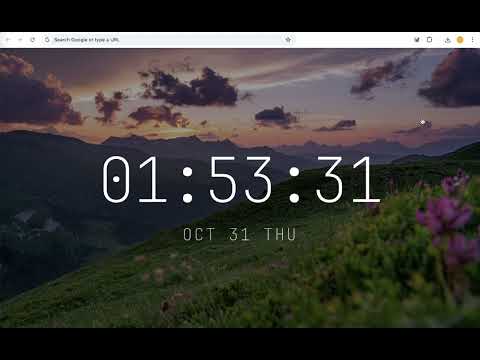
Overview
VTab - Beautiful & Personalized New Tab Experience
Daily View Tab replaces the default Chrome new tab page with a cleaner workspace for everyday browsing. It keeps the things you open often close at hand: website shortcuts, your bookmark bar, search, weather, notes, todos, a Pomodoro timer, and a Word of the Day. The layout stays quiet, so your new tab feels useful without becoming another noisy dashboard. What you can do with Daily View Tab: - Open your favorite sites from a customizable Quick Access grid - Add the current page to Quick Access from the extension button - View and open bookmark bar folders from the new tab page - Search with your preferred search engine - Check current weather and a short forecast - Write quick notes and manage a simple todo list - Pin Notes when you want them to stay visible - Use a Pomodoro timer for focused work sessions - Switch between light, dark, and system themes - Refresh or download the current Unsplash background - Enter Zen Mode for a distraction-free clock and background view What's new in version 1.2: - Notes now includes a todo list - Notes can be pinned so they stay visible while you browse the new tab page - Quick Access sorting and dropdown layering have been improved Privacy and permissions: Daily View Tab is designed to run locally in your browser. It does not collect or sell personal information. The extension asks for the permissions it needs to provide its features: - Bookmarks: to show your bookmark bar on the new tab page - Storage: to save settings, notes, shortcuts, and local cache data - Tabs: to add the current page to Quick Access when you click the extension button - Search: to support search from the new tab page - Favicon: to display website icons for shortcuts and bookmarks - Unsplash and dailyviewtab.com access: to load backgrounds and default shortcut data Quick Tip: Access settings via right-click menu or the top-right corner gear icon (⚙️).
5 out of 51 rating
Details
- Version1.2.19
- UpdatedSeptember 5, 2026
- Size3.26MiB
- Languages2 languages
- DeveloperWebsite
Email
SuperExtTeam@gmail.com - Non-traderThis developer has not identified itself as a trader. For consumers in the European Union, please note that consumer rights do not apply to contracts between you and this developer.
Privacy

VTab - Daily View Tab has disclosed the following information regarding the collection and usage of your data. More detailed information can be found in the developer's privacy policy.
VTab - Daily View Tab handles the following:
This developer declares that your data is
- Not being sold to third parties, outside of the approved use cases
- Not being used or transferred for purposes that are unrelated to the item's core functionality
- Not being used or transferred to determine creditworthiness or for lending purposes
Support
For help with questions, suggestions, or problems, visit the developer's support site