


Overview
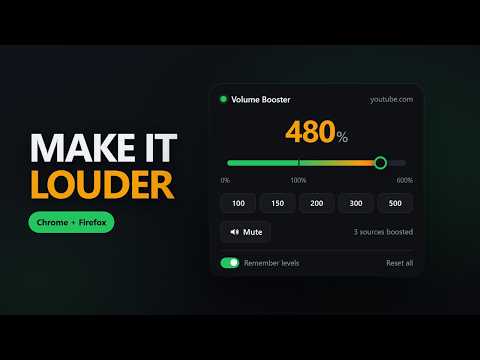
Boost any tab's volume up to 600% with one slider. Remembers the level per site. No tracking, no network calls.
Turn up quiet videos, podcasts and streams past whatever ceiling the site's own volume slider puts on them. Volume Booster puts one slider in your toolbar. Drag it and the audio in that tab changes right away. Nothing to set up. No account to make. WHAT YOU GET 0% to 600% on a single slider, with a notch at 100% so normal is easy to find again. It turns audio down as well as up. Your level is remembered per site. Set a site to 200% once and it's still 200% next week. A limiter kicks in above 100%, so loud gets louder instead of turning to crackle. Presets at 100, 150, 200, 300 and 500 percent. Mute, plus a reset that clears every site at once. Keyboard shortcuts. Alt+Shift+Up and Alt+Shift+Down to nudge, Alt+Shift+0 to reset, Alt+Shift+M to mute. The toolbar badge shows the current level. You can tell at a glance which tabs are boosted (it warms from green to red as you push it). Each tab keeps its own level, so two tabs on the same site don't fight each other. WHERE IT WORKS Most of the web. Video sites, music and podcast players, live streams, news sites, and plain audio and video on any page. Embedded players work too, because every frame is handled on its own. WHERE IT DOESN'T Worth knowing before you install. Plenty of listings in this category skip past it. Anything protected by DRM won't boost, which covers the major paid video and music subscriptions. Their audio is encrypted and no extension is allowed near it, though that's a browser rule rather than something anyone can code around. A few sites stream their audio from a separate domain without the header that permits access to it. The browser blocks that as well, so on those pages the extension leaves the sound alone rather than breaking it. You can still turn the volume down either way, and the popup says what happened instead of quietly doing nothing. Browser pages are off limits too, chrome:// and the Web Store included. Chrome doesn't let extensions run there. PRIVACY Nothing here tracks you. There are no ads, no analytics, and no account to sign up for. The extension makes no network requests at all. There's no server for it to talk to. It saves one thing: a list of sites and the level you picked for each. That sits on your own device, in the browser's storage. Reset all wipes it. Uninstalling deletes it. It asks for three permissions: storage to remember your levels, activeTab to know which tab to apply them to, and scripting to attach to a tab that was already open when you installed it. It does not ask for your browsing history. It does run on every page, because that is where the audio is, and Chrome describes that at install as reading and changing your data on all websites. What it actually does on a page is look for audio and video elements and change how loud they are. It doesn't read page content, and there is nowhere for it to send anything even if it did. OPEN SOURCE The full source is on GitHub, MIT licensed. It's the same plain JavaScript that ships in the package. No bundler, no minifier, so you can read exactly what runs. https://github.com/TiltedLunar123/volume-booster
0 out of 5No ratings
Details
- Version1.0.5
- UpdatedAugust 10, 2026
- Size30.72KiB
- LanguagesEnglish (United States)
- DeveloperWebsite
Email
support@secplusmastery.com - Non-traderThis developer has not identified itself as a trader. For consumers in the European Union, please note that consumer rights do not apply to contracts between you and this developer.
Privacy

Volume Booster has disclosed the following information regarding the collection and usage of your data. More detailed information can be found in the developer's privacy policy.
Volume Booster handles the following:
This developer declares that your data is
- Not being sold to third parties, outside of the approved use cases
- Not being used or transferred for purposes that are unrelated to the item's core functionality
- Not being used or transferred to determine creditworthiness or for lending purposes
Support
For help with questions, suggestions, or problems, please open this page on your desktop browser