

Volume Booster — Loud & Clear
2 ratings
)
Overview
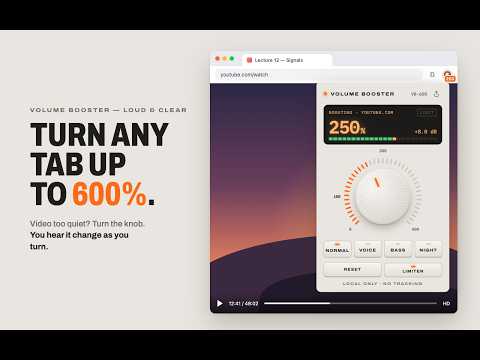
Turn any tab up to 600% without the crackle. Voice, Bass and Night modes. No ads, no tracking, nothing leaves your device.
Too quiet? Turn any Chrome tab up to 600%, without the crackle. Volume Booster — Loud & Clear makes quiet videos, weak laptop speakers and hard-to-hear calls louder. Click the knob icon, turn it up, and hear the change as you turn. A built-in limiter catches the peaks, so the sound gets louder instead of distorted. HOW TO USE 1. Click the knob icon on the tab that's too quiet. 2. Turn the knob: drag, scroll or use the arrow keys. 3. That's it. The boost stays on that tab until you reset it. MODES • Voice: clearer dialogue in films, quiet people on calls, lectures • Bass: more low end for small laptop speakers • Night: evens out loud and quiet scenes ALSO • Clean boost: a built-in limiter stops crackle at high levels • Fullscreen keeps working while a tab is boosted • The toolbar icon shows the boost level of the tab • Go below 100% to turn one noisy tab down • Light and dark themes follow your system WORKS ON When you watch YouTube or Netflix. When you listen to Spotify Or others such us Twitch, Google Meet and Zoom in the browser, podcasts, online courses and any site that plays sound. Chrome doesn't allow extensions to capture sound on its own pages, such as Settings or the Chrome Web Store. PRIVATE BY DESIGN All sound processing happens on your device. No account, no ads, no analytics, no browsing history. The code is open on GitHub. PERMISSIONS, IN PLAIN WORDS • activeTab: works only on the tab you open it on • tabCapture: takes that tab's sound so it can be made louder on your device • offscreen: runs the sound processing in the background • scripting: adds a small helper to the boosted tab so fullscreen keeps working • windows: switches the window to fullscreen when a video asks for it • storage: remembers your settings, on your device A NOTE ON VOLUME Very loud sound for a long time can harm your hearing. Turn it up only as far as you need.
5 out of 52 ratings
Details
- Version1.1.0
- UpdatedNovember 10, 2026
- Offered bymajchrowski.d
- Size111KiB
- LanguagesEnglish (United States)
- Developer
Email
majchrowski.d@gmail.com - Non-traderThis developer has not identified itself as a trader. For consumers in the European Union, please note that consumer rights do not apply to contracts between you and this developer.
Privacy

This developer declares that your data is
- Not being sold to third parties, outside of the approved use cases
- Not being used or transferred for purposes that are unrelated to the item's core functionality
- Not being used or transferred to determine creditworthiness or for lending purposes
Support
For help with questions, suggestions, or problems, visit the developer's support site