


Overview
The fastest way to write, think, and capture ideas on the web
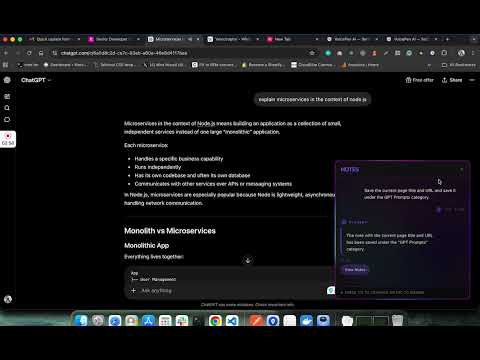
Use your own OpenAI key (BYOK). VoicePen AI is a voice-powered dictation assistant and context-aware AI notebook that lives wherever you browse - Gmail, Notion, Slack, Google Docs, Twitter/X, and any web-based tool. ───────────────────────────────────── AI DICTATE — Speak. Write. Done. ───────────────────────────────────── Hold your keyboard shortcut (Alt+D on Windows, Option+D on Mac), speak your thoughts, and watch VoicePen instantly transcribe and refine them into polished prose — directly in the page you're on. • 5 output modes: Default, Email, Notes, Casual, Professional • Real-time dynamic refinements as you speak • Change style mid-dictation by voice ("make it more formal", "rewrite as an email") • Voice editing commands ("delete the last sentence", "make this shorter", "summarize what I just said") • AI suggestions read aloud while you dictate • Snippets: speak a trigger phrase to auto-expand frequently used text • Output in any of 40+ languages — dictate in one language, write in another • Works inside any text field — no copy-pasting required ───────────────────────────────────── AI NOTES — Capture knowledge without breaking your flow ───────────────────────────────────── Trigger Notes AI (Alt+N), speak your note, and it handles the rest. It reads the page, understands your intent, and files your note exactly where you want it. • Voice-first capture — speak and it saves instantly • Smart page capture — summarize articles or save your selected text • AI creates new note categories on the fly based on what you say • Split a long article into multiple topic notes with one voice command • Generate Q&A study cards from any page ("create 10 learnable notes from this article") • Attach the page URL and title to any note automatically • Color-coded categories, fuzzy search, sort by date • Everything stored locally — browse and review your notes from the extension ───────────────────────────────────── BYOK — BRING YOUR OWN AI API KEY ───────────────────────────────────── Use different models - OpenRouter integration coming soon VoicePen AI does NOT charge a monthly AI usage fee. You connect your own OpenAI API key and pay OpenAI directly — pennies on the dollar compared to any bundled AI SaaS subscription. Real-world cost: I used VoicePen AI every day for a full week and spent $0.05 in OpenAI API charges. That's not a typo. Typical AI tools bundle AI access into a $10–$20/month subscription. With BYOK you cut that cost by 95% or more. Why BYOK is the smarter choice: • Your requests go directly from your browser to OpenAI — no middleman • Faster responses — no round-trip through a third-party relay server • Full control over your spending — set usage limits directly in your OpenAI account • 100x+ lower cost compared to typical bundled AI services ───────────────────────────────────── PRIVACY FIRST — Your data never touches our servers ───────────────────────────────────── Every piece of sensitive data stays on your device: • API keys are encrypted with AES-256-GCM and stored in your browser's local storage — they are never sent to our servers or any third party • Your notes and dictation history are stored locally in your browser • Voice requests travel directly from your browser to OpenAI — VoicePen's servers are never in the loop • Your license key is encrypted and stored locally — never exposed ───────────────────────────────────── WORKS EVERYWHERE ON THE WEB ───────────────────────────────────── VoicePen AI injects into any webpage. No context-switching, no copy-pasting. ───────────────────────────────────── ONE-TIME PAYMENT — No subscription. Ever. ───────────────────────────────────── Pay once. Use forever. • Lifetime access with all future feature updates included • No monthly fees, no annual renewals, no surprise billing • Instant activation with your license key • Free trial available to get started — no credit card required ───────────────────────────────────── REQUIREMENTS ───────────────────────────────────── • OpenAI API key — required for transcription and AI features (get one at platform.openai.com) • Google Cloud TTS API key — optional, used for voice readback of AI suggestions (generous free tier: ~16 hours/month)
0 out of 5No ratings
Details
- Version1.0.5
- UpdatedJune 9, 2026
- FeaturesOffers in-app purchases
- Size468KiB
- Languages5 languages
- DeveloperWebsite
Email
support@sakuraleaf.com - Non-traderThis developer has not identified itself as a trader. For consumers in the European Union, please note that consumer rights do not apply to contracts between you and this developer.
Privacy

VoicePen AI - Speech-To-Text Dictate has disclosed the following information regarding the collection and usage of your data. More detailed information can be found in the developer's privacy policy.
VoicePen AI - Speech-To-Text Dictate handles the following:
This developer declares that your data is
- Not being sold to third parties, outside of the approved use cases
- Not being used or transferred for purposes that are unrelated to the item's core functionality
- Not being used or transferred to determine creditworthiness or for lending purposes
Support
For help with questions, suggestions, or problems, visit the developer's support site