

Voiceland.ai Meet Notetaker

Overview
Turn Google Meet calls into meeting notes in Voiceland.ai: transcript and summary. Voiceland.ai account required.
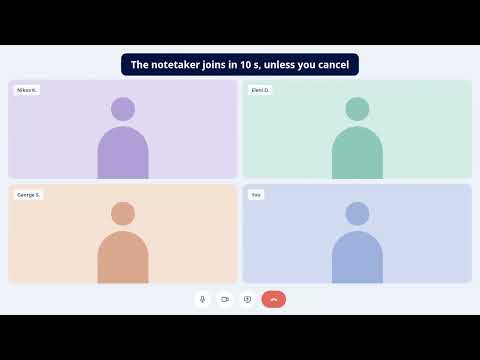
Voiceland.ai Meet Notetaker turns your Google Meet calls into meeting notes in your Voiceland.ai project: a transcript with speaker names, a summary, decisions, action items and the recording to replay. The extension records the Meet tab in your own browser. HOW TO START 1. Install the extension and click "Connect to Voiceland.ai" in its popup. Sign in to your Voiceland.ai account and choose the project that should receive your notes. 2. Open a Google Meet call and join it. 3. Click the Voiceland.ai icon in the Chrome toolbar and press "Start notes", or just press Alt+Shift+N. When you join a call, a small card reminds you to start notes (you can turn the reminder off in the settings). A small "Recording" bar with a Stop button appears on the call page. 4. Press "Stop" when the meeting is over. The recording is uploaded to your Voiceland.ai project, processed, and the notes appear there under Meetings. Changed your mind? "Stop and delete" ends the recording and discards it. AUTOMATIC NOTETAKER FOR YOUR TEAM (GOOGLE WORKSPACE) Your Google Workspace administrator can install the extension for the whole team from the Google Admin console and name the Voiceland.ai project by policy. Team members are then connected with their own Google account, without signing in to Voiceland.ai. If the project's administrator has turned on the automatic notetaker, a card appears when you join a call: "The notetaker joins in 10 s", with a "Not this call" button. If you do not cancel, the Voiceland.ai notetaker (notetaker@voiceland.ai) asks to join the call as a guest, says in the chat that it is taking notes, and the notes appear in the project as usual. Nothing is sent before the countdown ends, and you can pause the automatic notetaker in the extension's settings unless your administrator does not allow it. ALLOW YOUR MICROPHONE ONCE Chrome's tab capture records what you hear in the call, not your own voice. After installing, the extension opens a page where you can allow your microphone once, so that you are in the notes too. Without it, only the other participants' audio is recorded and the popup tells you so. WHAT IS RECORDED, AND WHEN Only after you click "Start notes", and only until you click "Stop": - the video and audio of the Google Meet tab you started it on, and your microphone; - from the Meet page: the participant names, who is speaking when, the meeting title and the meeting link, so that the notes say who said what. Nothing is recorded before you start or after you stop. The extension runs on Google Meet pages and reads the meeting link and title there, to know that you are in a call; nothing leaves your browser until you click "Start notes", or, with the automatic notetaker, until the countdown ends without "Not this call" (then only the meeting link and title are sent, so the notetaker can join). It does not read your other tabs, your browsing history or your Google account, and it has no access to any other site besides the Voiceland.ai service. WHERE YOUR DATA GOES The recording, the participant list, the speaker timeline and the meeting title and link are sent over an encrypted connection to your own Voiceland.ai project. Your recordings are stored in the EU (Frankfurt); some processing is done by sub-processors listed in our privacy policy, under GDPR safeguards. Your data is used to produce your meeting notes and for nothing else: no advertising, no sale of data. You can delete a meeting in Voiceland.ai at any time. The extension itself keeps only your connection to Voiceland.ai (a device key), your settings and the state of the current recording on your computer, and you can disconnect the browser from its settings page. TELL YOUR PARTICIPANTS Recording a call can require the consent of everyone on it, depending on the country and your organisation's rules. Tell participants before you start notes, and get their consent where the law or your policy asks for it. You are responsible for using the extension lawfully. GOOD TO KNOW - A Voiceland.ai account is required. Your project administrator decides whether meeting notes are available in the project. Meeting minutes are counted against your project's Voiceland.ai minutes. - Transcription works for meetings in Greek and in English. The extension itself is available in Greek and English and follows your Chrome language. - After you press Stop, keep Chrome open until the popup says "Creating your meeting notes…". If your connection drops, the upload resumes by itself when it is back. - Chrome 116 or later. Voiceland.ai Meet Notetaker is a product of Voiceland.ai. It is not affiliated with, endorsed by or sponsored by Google. Google Meet is a trademark of Google LLC. Support: support@voiceland.gr
0 out of 5No ratings
Details
- Version0.6.5
- UpdatedNovember 10, 2026
- Offered byvoiceland.ai
- Size143KiB
- Languages2 languages
- DeveloperVOICELAND SOCIETE ANONYME
81 Ifigeneias Nea Ionia Attikis 14231 GREmail
support@voiceland.grPhone
+30 693 693 5215 - TraderThis developer has identified itself as a trader per the definition from the European Union and committed to only offer products or services that comply with EU laws.
- D-U-N-S523529635
Privacy

Voiceland.ai Meet Notetaker has disclosed the following information regarding the collection and usage of your data. More detailed information can be found in the developer's privacy policy.
Voiceland.ai Meet Notetaker handles the following:
This developer declares that your data is
- Not being sold to third parties, outside of the approved use cases
- Not being used or transferred for purposes that are unrelated to the item's core functionality
- Not being used or transferred to determine creditworthiness or for lending purposes
Support
For help with questions, suggestions, or problems, visit the developer's support site