
![Item logo image for VoiceKeep [Beta] - keep track of your voice](https://lh3.googleusercontent.com/0dO8zdiI9zRvK6mDJjDw_Dcvv9fxqNM3W3D5Y_5_iHv4RAueBXmlI_Myz5fO9jjjyqfjU3eojc6HEnb2ZVLm2ywcew=s60)
VoiceKeep [Beta] - keep track of your voice
![Item media 4 (screenshot) for VoiceKeep [Beta] - keep track of your voice](data:image/gif;base64,R0lGODlhAQABAIAAAP///////yH5BAEKAAEALAAAAAABAAEAAAICTAEAOw==)
Overview
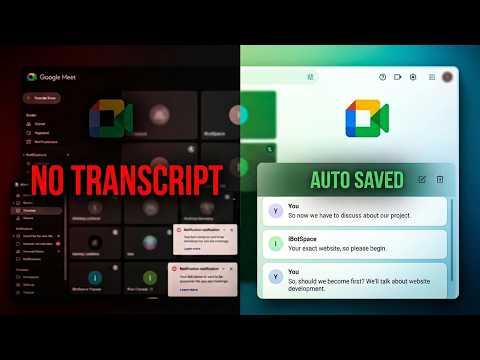
Capture and save live meeting captions from Online Meetings with speaker tracking and conversational flow.
VoiceKeep helps you capture, organize, and export live caption transcripts directly from your browser. Designed to be fast, lightweight, and privacy-focused, VoiceKeep stores sessions locally on your device so you stay in control of your data. Currently supported: - ✅ Google Meet - 🚀 More platforms coming soon Features • Capture live captions in real time • Save transcripts automatically • Export sessions anytime • Access recent transcript history • Lightweight and easy to use • Local-first storage • No account required Privacy First VoiceKeep stores transcript data locally in your browser. No external servers, cloud processing, or account setup required. Built for users who want a simple way to preserve conversations, lectures, meetings, classes, interviews, and other captioned content. VoiceKeep is currently in beta and will continue to receive improvements, including support for more meeting platforms, new export formats, enhanced transcript management, and additional customization options.
4 out of 51 rating
Details
- Version0.1.1
- UpdatedJuly 22, 2026
- Size20.74KiB
- LanguagesEnglish
- DeveloperWebsite
Email
hello@0xhemant.com - Non-traderThis developer has not identified itself as a trader. For consumers in the European Union, please note that consumer rights do not apply to contracts between you and this developer.
Privacy

VoiceKeep [Beta] - keep track of your voice has disclosed the following information regarding the collection and usage of your data. More detailed information can be found in the developer's privacy policy.
VoiceKeep [Beta] - keep track of your voice handles the following:
This developer declares that your data is
- Not being sold to third parties, outside of the approved use cases
- Not being used or transferred for purposes that are unrelated to the item's core functionality
- Not being used or transferred to determine creditworthiness or for lending purposes
Support
For help with questions, suggestions, or problems, visit the developer's support site