

VoiceFlow — Speech to Text & Text to Speech

Overview
Speech to text (STT) and text to speech (TTS). Dictate with VoiceWhisper Text, then play Audio replies — anywhere on the web.
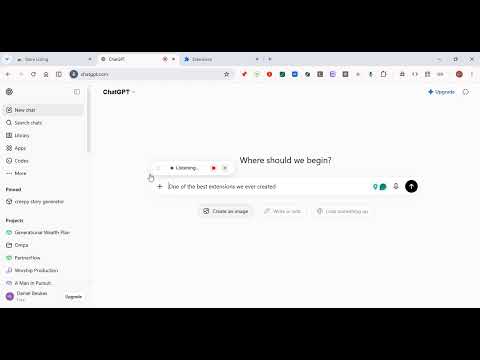
VoiceFlow — Speech to Text & Text to Speech ✨🎙️ Speech to text (STT) and text to speech (TTS). Dictate with VoiceWhisper Text, then play Audio replies — anywhere on the web. VoiceFlow turns your voice into text and your text into speech on any website. Hold a key, speak naturally, and watch words appear. Then optionally speak the reply with VoiceWhisper Audio — catalog voices or Your Voice clone. --- 🚀 How It Works Speech to text (STT) 1. Click any text field on a webpage 2. Hold your shortcut key (default: Ctrl + Space) 3. Speak naturally 4. Release — your words are right there ✅ Text to speech (TTS) 1. Dictate or type a message 2. Choose a VoiceWhisper Audio voice (or create Your Voice) 3. Play Audio to hear the reply spoken aloud Ctrl + Shift + V opens VoiceFlow settings anytime. --- 💻 Also on Desktop & Mobile • VoiceFlow Windows Desktop Available — same account, dictate outside the browser too • VoiceFlow Mobile App Coming SOON --- 🌟 Key Features 🎯 Works Everywhere Any website with a text field — email clients, chat apps, social media, documents, forms, CRMs, and more. If you can type in it, VoiceFlow works there. ⚡ VoiceWhisper Text (STT) Dictate with speech to text — browser dictation or VoiceWhisper Text transcription. Fast, accurate, and built for everyday writing. 🔊 VoiceWhisper Audio (TTS) Turn text into speech after you dictate. Use catalog voices or clone Your Voice with a short read-aloud (about 1–2 minutes). 🌍 50+ Languages English, Spanish, French, German, Japanese, Korean, Arabic, Hindi, Portuguese, and many more. Switch languages in one click. ✏️ Smart Punctuation Say "comma", "period", "question mark", or "exclamation mark" and VoiceFlow types the actual punctuation. Even handles things like "new line" and "new paragraph". 📧 Smart Email Mode In email fields, say your address naturally and get a properly formatted email. Handles popular providers and custom domains. 🔢 Smart Number Mode In phone or number fields, speak digits naturally and get properly formatted numbers. Recognizes "double", "triple", and spoken digits. ⏸️ Pause & Resume Hit stop to pause, then resume when you're ready. The listening indicator stays visible so you always know the state. 🖱️ Draggable HUD The floating "Listening" indicator can be dragged anywhere on the page. It remembers where you put it. ⚙️ Fully Customizable - Choose your trigger shortcut (any modifier + any key) - Toggle continuous mode (hold-to-talk vs toggle) - Enable/disable live preview - Pick your language and Audio voice --- 💡 Perfect For 📝 Writing long emails without touching the keyboard 💬 Quick replies on messaging apps — typed and spoken 📋 Filling out forms faster 🧠 Brain-dumping ideas into notes 🌐 People who think faster than they type ♿ Users with repetitive strain injuries or mobility challenges --- 🎨 Clean & Minimal VoiceFlow stays out of your way. A tiny floating indicator shows when it's listening — no clutter, no distractions. Just you and your words. --- 🛡️ Permissions We Use (and why) Microphone — To hear your voice for speech to text All sites — So dictation and Audio work on every website Storage — To remember your settings and account preferences Identity — Optional Google sign-in for your VoiceFlow account VoiceWhisper Text and VoiceWhisper Audio are processed by our speech providers when you use those features. See the privacy policy for details. --- 🏢 Built by PartnerFlow VoiceFlow is crafted with care by the team at PartnerFlow (https://partnerflow.co.za?utm_source=voiceflow_extension&utm_medium=chrome_web_store&utm_campaign=store_listing&utm_content=description_link&utm_term=voiceflow). We build tools that make digital life simpler and more human. --- Stop typing. Start talking — and listening. 🎙️✨
5 out of 51 rating
Details
- Version1.5.0
- UpdatedOctober 17, 2026
- Size266KiB
- LanguagesEnglish
- DeveloperWebsite
Email
beukzgroup@outlook.com - Non-traderThis developer has not identified itself as a trader. For consumers in the European Union, please note that consumer rights do not apply to contracts between you and this developer.
Privacy

This developer declares that your data is
- Not being sold to third parties, outside of the approved use cases
- Not being used or transferred for purposes that are unrelated to the item's core functionality
- Not being used or transferred to determine creditworthiness or for lending purposes
Support
For help with questions, suggestions, or problems, please open this page on your desktop browser