

VoiceBridge: Real-Time YouTube Dubbing & Bilingual Subtitles

Overview
Real-time YouTube dubbing and bilingual subtitles in 10 target languages. For captioned on-demand videos. Optional local processing.
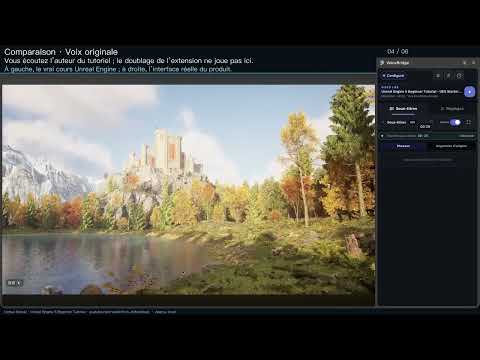
Official website: https://vb.elementrelation.com/ Complete illustrated guide (10 real screenshots): https://vb.elementrelation.com/guide.html?lang=en VoiceBridge: Real-Time YouTube Dubbing & Bilingual Subtitles Listen to YouTube videos in your chosen language while keeping the original words in view. VoiceBridge turns readable YouTube captions into translated speech and bilingual subtitles. The source-caption language is the language of the video's existing captions. The target language is the language you want to read and hear. Choose them separately; captions do not need to be converted to English first. 10 source-caption languages supported in 1.0.2: Chinese, English, Japanese, Korean, German, French, Russian, Portuguese, Spanish and Italian. 10 target languages for translated text and dubbing: Chinese, English, Japanese, Korean, German, French, Russian, Portuguese, Spanish and Italian. Use readable manual captions or automatically generated captions in the same language; manual captions are preferred. If automatic selection is uncertain, choose the source-caption language in Settings. YouTube auto-translated captions are not treated as the source. Without readable captions, VoiceBridge does not transcribe the audio or dub captionless videos. Available voices, language pairs, translation quality and startup time depend on captions, translation and speech engines, your device and settings. WHAT YOU CAN DO • Listen to translated speech and compare the original with the translation. • Follow captions in the sidebar and return to a sentence's video position. • Pause, seek and resume from the video controls. • Adjust subtitle size, width and background; choose a light or dark theme. • Reuse locally saved captions, translations and generated speech, and clear the cache in Settings. Choose from 10 target languages: Chinese, English, Japanese, Korean, German, French, Russian, Portuguese, Spanish and Italian. Available voices depend on your selected speech engine. GET STARTED 1. Install the extension and open a YouTube on-demand video with readable source captions. 2. Choose your target language and configure translation and speech. We recommend the optional VoiceBridgeNativeKit desktop companion for local processing. 3. Start dubbing. If the original caption language is unclear, select it in Settings and start again. LOCAL OR ONLINE — YOUR CHOICE NativeKit provides local translation and speech after its components and models are installed. Local inference processes subtitle text on your computer. Initial downloads, updates, account checks and allowance checks still need internet access. Other supported translation services and Chrome or online voices are available in Settings. An online engine sends the necessary text to the provider you select; separate provider fees may apply. TRY FIRST, THEN DECIDE • 3 free days without registration. • Register and verify your email for 40 free minutes a day. Only actual dubbing playback counts; pauses, ads and waiting do not. The allowance is shared across devices and resets at midnight in the account timezone established at first use, with no carry-over. Active trials and Pro access do not use it. • Pro passes cover 1, 3 or 12 calendar months. Purchases are one-time, with no automatic renewal. Up to 3 authorized devices per account; a fourth login replaces the earliest authorized device. Current prices and purchase terms are in the account center. BEFORE YOU START Designed for desktop Google Chrome and captioned YouTube on-demand videos. Videos without readable source captions and livestreams are outside the core supported workflow. Results and startup time depend on caption quality, your device and the chosen engines. VoiceBridge is independently developed and is not affiliated with, sponsored by or endorsed by YouTube or Google LLC. It does not download, host or redistribute videos. Get started: https://vb.elementrelation.com/onboarding.html Help: https://vb.elementrelation.com/support.html Plans: https://vb.elementrelation.com/account.html Privacy: https://vb.elementrelation.com/privacy.html Contact: yehaike@gmail.com
0 out of 5No ratings
Details
- Version1.0.2
- UpdatedOctober 17, 2026
- FeaturesOffers in-app purchases
- Size1.75MiB
- Languages12 languages
- DeveloperWebsite
Email
yehaike@gmail.com - Non-traderThis developer has not identified itself as a trader. For consumers in the European Union, please note that consumer rights do not apply to contracts between you and this developer.
Privacy

VoiceBridge: Real-Time YouTube Dubbing & Bilingual Subtitles has disclosed the following information regarding the collection and usage of your data. More detailed information can be found in the developer's privacy policy.
VoiceBridge: Real-Time YouTube Dubbing & Bilingual Subtitles handles the following:
This developer declares that your data is
- Not being sold to third parties, outside of the approved use cases
- Not being used or transferred for purposes that are unrelated to the item's core functionality
- Not being used or transferred to determine creditworthiness or for lending purposes
Support
For help with questions, suggestions, or problems, visit the developer's support site