


Overview
Voice to voice translator for coursera: real-time ai dubbing, so you listen to the video translation instead of reading it.
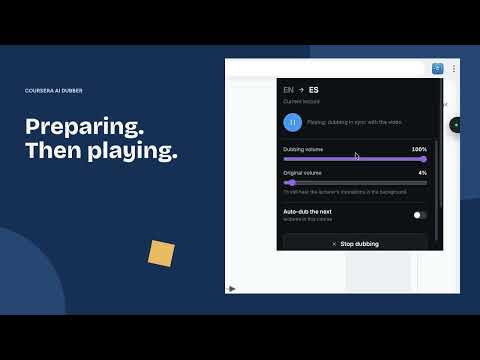
🎧 You cannot read coursera subtitles and watch the slides at the same time. The professor is writing code on screen and explaining it out loud. The captions sit at the bottom. Look down and you miss the code, look up and you miss the sentence. This voice to voice translator removes the choice: it plays a captioned coursera lecture as real ai dubbing in your language and leaves your eyes free for the screen. 🚀 Get started 1. Add the extension to Chrome and open a coursera lecture with captions. 2. Sign in for Free Online, or activate your PRO license. 3. Pick your language and an available voice in the extension. 4. Start dubbing, wait for the ready indicator, then press play. Here are 6 reasons to pick this coursera translator 1️⃣ Real voice dubbing rather than a second row of captions. 2️⃣ Voices generated on servers in real time, a segment at a time. 3️⃣ A Free Online option with your remaining dubbing time shown in the extension. 4️⃣ Works as a video translator inside the player you already use. 5️⃣ PRO can save translated subtitles in your browser for later study. 6️⃣ Built for study, so you can replay the same 30 seconds until you get it. 🎙️ How the voice to voice translator handles a lecture ➤ It reads the lecture captions, runs ai video translation on them and speaks the result out loud. ➤ Speech is generated on servers and synchronized with the video as you watch. ➤ You watch the whiteboard while the video voice translator handles the words. ➤ A plain coursera subtitle translation add-on leaves you reading while the professor draws. ➤ Choose a voice available for your target language. Voice choices vary by language and plan. ⚡ Real time dubbing for Free and PRO Free Online - Sign in and choose a supported language to start real time video translation. - Speech is generated on servers while you listen; there is no local voice model to download. - A stable internet connection is required. Initial buffering and server availability affect when audio is ready. PRO voices - An active PRO entitlement unlocks additional server-generated voices where supported. - Built-in AI subtitle translation is selected automatically, without an API key. - The rest of the dubbing is prepared as you watch, rather than generating a complete audio track first. 🔓 How dubbing time works Free accounts have 30 minutes per 24-hour usage window and 120 minutes per 7-day usage window. Both limits apply. Each window starts on first use and restarts on first use after it expires, not at midnight or at the start of a calendar week. The extension shows your remaining time. Active paid licenses remove these Free minute caps; trial terms are shown with your offer. Dubbing minutes and AI Chat wallet credits are separate. Free plan • Server-generated ai dubbing in real time for supported languages • Translation through Google Translate • Translated captions and separate original/dubbed audio volume controls • A video language translator for captioned lectures in your program • Account sign-in required; minute limits apply PRO plan • Additional server-generated voices, with availability depending on your language • Built-in AI subtitle translation without an API key • AI Lecture Chat for questions, summaries, notes and quizzes • Built-in chat uses wallet credits; your own supported AI provider key is optional for chat • Local caching of translated subtitles when enabled • Monthly, yearly and lifetime options; current terms are shown at checkout Who this video translation tool is for ▸ Students who follow english lectures with effort and want to translate video audio into a language they think in. ▸ Professionals taking certificates who need a spanish video translator this month and another language pair after that. ▸ Non-native speakers who are tired of reading translation coursera captions instead of watching the demo. ▸ Anyone who wants an ai video translator with clear Free and PRO access information. ▸ Learners who revisit the same coursera course all semester and want translated captions alongside the audio. ❓ Frequently asked questions ❓ What are the Free dubbing limits? 💡 Free accounts have both a 30-minute/24-hour window and a 120-minute/7-day window. Check the extension for your remaining time and reset dates. ❓ How does this coursera video translator work? 💡 It pulls captions from the lecture, translates them, generates speech on servers in real time and plays that dubbing over the video. ❓ Is there a real time mode? 💡 Yes. Both Free Online and PRO use real time video translation and server-generated speech. Start dubbing and wait for the ready indicator before you press play. ❓ Does my data leave the browser? 💡 Caption text is processed by translation and speech services. Account, license and error-diagnostic data also reach our services. Read the privacy policy for details; voice generation requires an internet connection. ❓ Which languages does it cover? 💡 Choose from the supported languages in the voice picker. Use it to translate spanish video to english, english to spanish, chinese to english and more. Free and PRO voice availability varies by language. ❓ Can I still read the text? 💡 Yes. Translated captions remain available, so the extension also works as a video subtitle translator when you prefer to read. ❓ What is BYOK? 💡 Bring your own key. PRO users can connect a supported AI provider, such as OpenAI or Gemini, for AI Lecture Chat. Subtitle translation is selected automatically by your plan. ❓ Is dubbed audio saved for offline replay? 💡 Real-time audio uses a temporary buffer and may be generated again after stopping or reopening a lecture. PRO can cache translated subtitles, but the current realtime flow does not export a dubbed video or a complete audio track. 📌 This voice to voice translator is maintained for the coursera player. If a lecture or feature stops working, use the extension's support links to report it. 🎉 Install it, open a captioned coursera lecture and pick a language, then let the dubbing run.
4.7 out of 532 ratings
Details
- Version4.0.2
- UpdatedNovember 3, 2026
- FeaturesOffers in-app purchases
- Size51.98MiB
- Languages52 languages
- DeveloperWebsite
Email
oleg.pharo@gmail.com - Non-traderThis developer has not identified itself as a trader. For consumers in the European Union, please note that consumer rights do not apply to contracts between you and this developer.
Privacy

This developer declares that your data is
- Not being sold to third parties, outside of the approved use cases
- Not being used or transferred for purposes that are unrelated to the item's core functionality
- Not being used or transferred to determine creditworthiness or for lending purposes