

Voice Out: Read Aloud Text to Speech Reader

Overview
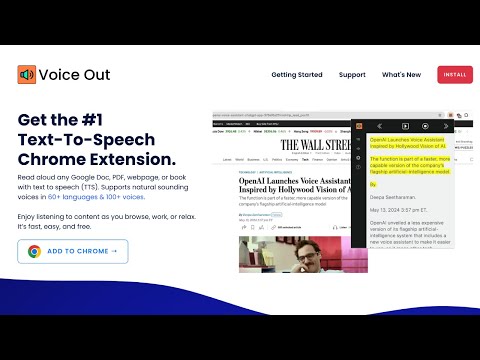
Read aloud any webpage, PDF, Google Doc or ebook with natural AI voices. Free text to speech (TTS) in 30+ languages, 130+ voices.
Voice Out is a free text to speech (TTS) Chrome extension that reads aloud any webpage, PDF, Google Doc, ebook, or email with natural, human-sounding AI voices. Listen to articles, study material, and documents in over 30 languages with 130+ lifelike voices. It is perfect for multitasking, accessibility, language learning, and anyone who prefers listening over reading. KEY FEATURES ➤ Read Aloud Anything: Web articles, news, blogs, Google Docs, PDFs, ebooks, and emails. Voice Out's smart text detection automatically finds and reads the main content on any page — no copy-pasting needed. ➤ Natural AI Voices: Choose from 130+ voices across 30+ languages and accents. These aren't robotic voices — they're crafted to sound natural and engaging, so you can listen for hours. ➤ PDF & Document Reader: Open any PDF in the built-in viewer (https://voiceout.app/readpdf/) and have it read aloud with synchronized playback. ➤ Follow Along with Highlighting: See the text highlighted as it's spoken — proven to improve comprehension and focus, especially for readers with dyslexia or ADHD. ➤ Full Playback Control: Adjust speed, pitch, and volume. Speed-listen at 2x or slow down for language learning. Control everything with keyboard shortcuts. ➤ Bring Your Own Voices: Connect premium voices from OpenAI, Google Cloud, Microsoft Azure, and Amazon Polly using your own API keys. ➤ Works Offline: Free offline voices keep reading even without an internet connection. ➤ Built for Accessibility: A valuable everyday tool for people with dyslexia, low vision, eye strain, or reading fatigue — and for auditory learners everywhere. HOW IT WORKS 1. Install the Voice Out text to speech extension. 2. Open any article, webpage, or Google Doc or upload a PDF at https://voiceout.app/readpdf/ 3. Click the Voice Out icon (or press the keyboard shortcut) to start listening. 4. Pick your favorite voice, set the speed, and let it read to you. PERFECT FOR - Students: listen to textbooks, papers, and study notes - Professionals: get through long reports and documentation hands-free - Language learners: hear native pronunciation in 30+ languages - Commuters and multitaskers: turn any reading into a podcast - Accessibility: dyslexia, visual impairment, or screen fatigue FREQUENTLY ASKED QUESTIONS ❓ Is Voice Out free? Yes. Voice Out is free to use with standard and offline voices. Premium natural AI voices are available with an account, and you can also connect your own OpenAI, Google, Microsoft, or Amazon voices via API key. ❓ What can Voice Out read aloud? Any webpage, news article, blog, Google Doc, PDF, ebook, or email in Chrome. It automatically detects the main content and skips menus and ads. ❓ How do I read a PDF aloud? Open your PDF in Voice Out's PDF viewer at https://voiceout.app/readpdf/ and press play. Voice Out reads it aloud with your chosen voice and speed. ❓ Which languages does Voice Out support? 30+ languages including English, Spanish, French, German, Portuguese, Italian, Dutch, Hindi, Japanese, Korean, Chinese, Arabic, Russian, and more. ❓ Can I change the voice or reading speed? Yes — choose from 130+ voices and adjust speed, pitch, and volume anytime from the extension options. --- For support or feedback, reach us at support@voiceout.app See what's new: https://voiceout.app/new/
4.1 out of 5191 ratings
Details
- Version1.34
- UpdatedSeptember 14, 2026
- Size1.87MiB
- Languages40 languages
- DeveloperWebsite
Email
support@dictanote.co - Non-traderThis developer has not identified itself as a trader. For consumers in the European Union, please note that consumer rights do not apply to contracts between you and this developer.
Privacy

This developer declares that your data is
- Not being sold to third parties, outside of the approved use cases
- Not being used or transferred for purposes that are unrelated to the item's core functionality
- Not being used or transferred to determine creditworthiness or for lending purposes
Support
For help with questions, suggestions, or problems, visit the developer's support site