

VO Desk

Overview
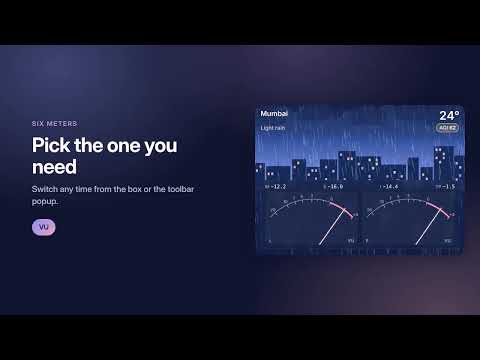
A meter box for ElevenLabs and Cartesia: spectrum, LUFS, VU, peak and stereo meters for every take, over a live weather scene.
VO Desk adds a small, resizable meter box to ElevenLabs and Cartesia, so you can see what every take is doing while it plays. It sits in the empty space of the ElevenLabs sidebar, beside your script. SIX METERS • Spectrum: FFT size from 512 to 8k, bars, line or filled, 16, 32 or 64 bands, flat, 3 or 4.5 dB per octave tilt, fast, medium or slow release, and peak hold. • Spectrogram: a scrolling view of the take, with its own FFT size and speed, and an optional note grid that shows a keyboard, a line at every C and the strongest note with its offset in cents (middle C as C4, or C5 as in FL Studio). • Loudness: momentary, short-term and integrated LUFS (ITU-R BS.1770-4), loudness range, true peak, and the distance to your target (-14, -16, -23 or -24 LUFS). • VU: classic 300 ms needles, stereo or mono, with 0 VU at -20, -18 or -14 dBFS. • Peak: left and right bars, sample or true peak, 1 s, 3 s or infinite hold, fast or PPM fall, and a clip marker. • Stereo: a polar display with correlation and balance. A loudness line (M, S, I and true peak) can sit above any meter. THE BOX • Five animated scenes in a soft pink, lilac and periwinkle palette: monsoon rain over a city, spring blossom, a summer sunset, autumn leaves and a winter cabin, each by day and by night. • Keep one scene, cycle through the seasons, or follow the live weather where you are. • Your city, the current conditions, the temperature (°C or °F) and air quality (US AQI). • Drag it anywhere and resize it from the corner; it remembers. Hover it to change the scene or meter, or hide it. Alt+Shift+V shows or hides it. HOW TO USE 1. Open ElevenLabs or Cartesia and play any take. 2. Click the VO Desk icon to choose a meter and its settings, a scene, and your units. 3. For temperature and air quality, open the Weather tab and click "Use my location" once. PRIVACY The sound of your takes is measured on your computer while they play. Nothing is recorded, saved or sent anywhere. If you choose "Use my location", your approximate location (rounded to about 100 m) is sent to Open-Meteo for the weather and air quality, and to BigDataCloud once for your city's name, and is saved only in your browser. No account, no analytics, no ads. Weather data by Open-Meteo.com (CC BY 4.0). VO Desk is an independent tool and is not affiliated with ElevenLabs or Cartesia.
0 out of 5No ratings
Details
- Version0.4.3
- UpdatedNovember 13, 2026
- Offered byayan249416@gmail.com
- Size72.99KiB
- LanguagesEnglish
- Developer
Email
ayan249416@gmail.com - Non-traderThis developer has not identified itself as a trader. For consumers in the European Union, please note that consumer rights do not apply to contracts between you and this developer.
Privacy

VO Desk has disclosed the following information regarding the collection and usage of your data. More detailed information can be found in the developer's privacy policy.
VO Desk handles the following:
This developer declares that your data is
- Not being sold to third parties, outside of the approved use cases
- Not being used or transferred for purposes that are unrelated to the item's core functionality
- Not being used or transferred to determine creditworthiness or for lending purposes
Support
For help with questions, suggestions, or problems, please open this page on your desktop browser