


Overview
Full-page screenshots, polished in one click, then turned into scrolling videos and carousels. Pay once. Your captures stay local.
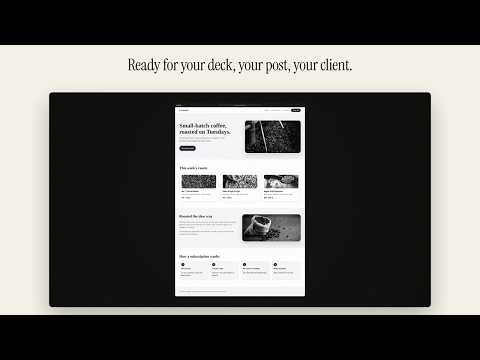
Screenshots worth showing. Take a full page screenshot of any web page, top to bottom and pixel sharp, then make it ready for your deck, your post or your client in one click. $24 once. No subscription. Every 1.x update free. No account. Your screenshots never leave your computer. Vitrine: French for the display window. Use it for full page screenshots, scrolling screenshots, web pages saved as PDF, and screenshots turned into videos or carousels. WHY PEOPLE SWITCH • Save, copy and export are free. Always. • Pay once. Nothing to cancel, ever. • No account, no sign-in. • No pop-ups. No tabs opened on updates. No begging for reviews. • Your licence never expires and works offline. • Cookie banners, chat bubbles and pop-ups are left out of the shot. • Ads and empty ad boxes are left out of the shot. • Very long pages stay sharp. CAPTURE FOUR WAYS • Full page: the whole page as one clean image, even pages that scroll inside a box, like inboxes and dashboards • Visible area: exactly what you see • Region: drag over any area • Element: click a card, chart or section and Vitrine grabs just that (press ↑ to take the bigger box around it) Sticky headers show once, not on every screen. Cookie banners, chat bubbles, pop-ups and ads are hidden before the shot and put back after. Nothing is blocked on the page itself. Lazy images load first. Emails and API keys can be blurred before the image is taken. Press Esc on a very long page to stop and keep what you have. Pages too tall for one sharp image are also kept as sharp pages, to save as a ZIP or a PDF. INSTANT COPY Set "After capture" to Copy and every shot goes straight to your clipboard, already styled. Paste into Slack, email, X or Notion in one second. POLISH IN THE STUDIO • Brand match: a backdrop pulled from the site's own colours, automatically • Designed backdrops, browser window frame, padding, corners, soft shadow • Sizes for slides and X (16:9), feed posts (1:1, 4:5) and Stories (9:16) • Arrows, boxes, highlights, labels, numbered steps, blur and crop • Proof stamp: the source link and capture date under the image • Save your look once and every capture opens in your style • Drop or paste your own screenshots in too GUIDES AND COMPARISONS • Record a step-by-step guide: each capture becomes a numbered step, add a note to each, export a clean PDF or Markdown with images for Notion and help docs • Put 2 to 4 captures side by side on one image: pricing pages, before and after, A/B tests PAGE TO VIDEO AND CAROUSELS • Page to video: a long capture becomes a smooth scrolling MP4 in four sizes (16:9, 1:1, 4:5, 9:16), ready for posts, Stories and slides. Made from your capture, in your framed look, on your computer. • Carousel: a long capture becomes numbered 4:5 slides, each one cut between blocks of text. Export a PDF for LinkedIn or PNG slides for Instagram. YOUR LIBRARY • Every capture is saved in a private library, grouped by day • Search by the words that were on the page, not just the title • Collections for clients, research and projects • Back up everything as one zip, restore any time FREE AND PRO Free, for good: all four capture modes, markup, Instant Copy, save and export to PNG, JPG and PDF, your library and search, one collection, guides, comparisons, videos and carousels with a small "Made with Vitrine" mark, backup and restore. Everything free today stays free in every 1.x update. Pro, $24 once: brand match, your saved look, social sizes, the proof stamp, unlimited collections, and guides, comparisons, videos and carousels without the mark. New users get a 7‑day Pro trial, no card needed. 14‑day money-back promise. PRIVATE BY DESIGN • No account. No analytics. No tracking. • Vitrine only touches a page when you start a capture. • Your screenshots and library stay in this browser, on your computer. • Videos and carousels are made on your computer, with Chrome's own video tools. • No network requests, except a one-time licence check when you activate Pro. WHAT EACH PERMISSION IS FOR • Active tab: capture the tab you're on, only when you ask. • Scripting: scroll the page, hide sticky bars, pop-ups and ads, and blur private details during a capture. • Storage: keep your settings and licence on your computer. • Unlimited storage: keep your screenshot library on your computer. Full-page captures are large. • Downloads: save your exports (images, PDFs, videos and slides) to your Downloads folder. • Context menus: add Capture to the right-click menu. QUESTIONS support@metadatamarketer.com. A real person replies within 3 business days. Shortcuts (Mac): ⌥⇧S full page, ⌥⇧V visible, ⌥⇧R region, ⌥⇧E element. Windows: Alt+Shift+S, Alt+Shift+V, Alt+Shift+R, Alt+Shift+E. Available in English and French.
0 out of 5No ratings
Details
- Version1.2.2
- UpdatedNovember 4, 2026
- FeaturesOffers in-app purchases
- Size239KiB
- Languages2 languages
- DeveloperMohamed SbaitiWebsite
333 29e Avenue Sainte-Marthe-sur-le-Lac, QC J0N 1P0 CAEmail
support@metadatamarketer.comPhone
+1 438-927-9269 - TraderThis developer has identified itself as a trader per the definition from the European Union and committed to only offer products or services that comply with EU laws.
Privacy

This developer declares that your data is
- Not being sold to third parties, outside of the approved use cases
- Not being used or transferred for purposes that are unrelated to the item's core functionality
- Not being used or transferred to determine creditworthiness or for lending purposes