

VisualKit - Live Website Editor & UI Capture

Overview
An elegant visual toolkit for everyone. Inspect elements, edit live CSS, and capture high-res UI screenshots to perfect the web.
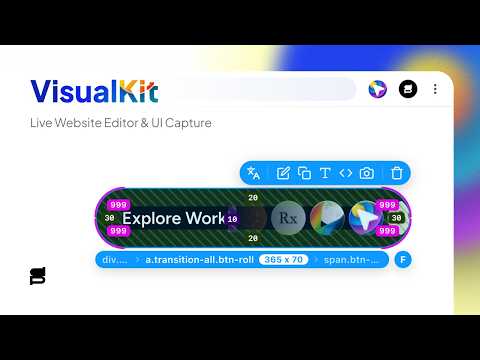
Turn any webpage into your personal design lab. VisualKit is a powerful, elegant browser extension that combines advanced design inspection, live CSS editing, box-model visualization, global theme tweaking, and professional screenshot tools into one calm, keyboard-friendly interface. Instead of juggling clunky browser DevTools, separate screenshot apps, and bulky inspection utilities, VisualKit floats gently above your page. Whether you are a frontend developer debugging CSS, a UI/UX designer testing color palettes, a copywriter editing live text, or a marketer capturing pixel-perfect mockups, VisualKit gives you instant creative superpowers without ever leaving your browser. WHY CHOOSE VISUALKIT? • All-in-One Toolkit: Replaces multiple extensions for CSS inspection, live webpage editing, and full-page screenshots. • Calm & Non-Intrusive: A beautiful, floating UI that gets out of your way and respects your viewport. • Lightning Fast: Built for speed with intuitive keyboard shortcuts for every major tool and capture mode. KEY FEATURES Live Inspection & Box Model HUD Hover over any DOM element on the live webpage to instantly reveal computed styles, exact dimensions, fonts, and alignment. Easily visualize padding (green), margin (orange), and even Flexbox/Grid gaps directly on the page. Visual Style Editor (Element Level) Click any element to open the floating Visual Editor. Instantly modify typography, font sizes, colors, gradients, background images, spacing, borders, and border-radius. Scale your changes across multiple matching elements instantly using smart class-matching. Global Style Studio (Design Tokens) Press Shift+S to launch the Style Studio. Experiment with site-wide design tokens, swap document theme colors, test dark/light modes, and update global heading or body typography in real time. Element Navigator & DOM Tree Layers Easily navigate complex HTML hierarchies with a draggable, resizable Layers Panel (Shift+E) or use the HUD breadcrumbs to seamlessly select hard-to-reach parent, child, or sibling containers. Direct Text & Asset Replacement Double-click any text element on the page to edit the wording live—perfect for testing headlines or checking layout wrap. Instantly replace images, background graphics, or SVGs with assets directly from your clipboard. Advanced UI Capture & Full-Page Screenshots Ditch your external screenshot tools. VisualKit includes built-in, high-resolution capture modes: • Shift+1: Capture the exact Visible Viewport area. • Shift+2: Stitch and capture a flawless Full-Page scrolling screenshot. • Isolated Component Capture: Snap clean images of individual UI elements or cards. Production-Ready HTML & CSS Export Export any modified element or component as a self-contained, pristine HTML/CSS package. Automatically includes embedded @font-face rules, external font links, and dynamic pseudo-classes (:hover, :focus) ready to paste into your project. PRIVACY FIRST & 100% LOCAL Your data belongs to you. Every inspection, live edit, and screenshot stays entirely local on your device. VisualKit contains zero tracking scripts, does not monitor your browsing history, and never transmits your creative content to external servers. WHO IS VISUALKIT FOR? • Frontend Developers: Debug CSS, verify alignment, inspect Flexbox/Grid layouts, and export clean code. • UI/UX Designers: Test new color palettes, typography, and design tokens live on production sites. • QA & QA Engineers: Highlight UI bugs, verify exact pixel dimensions, and capture visual proof. • Copywriters & Marketers: Test new landing page copy and headlines in-situ before making code changes. QUICK KEYBOARD SHORTCUTS • Shift+S: Toggle Global Style Studio • Shift+E: Toggle Element Navigator / Layers Panel • Shift+1: Capture Visible Area Screenshot • Shift+2: Capture Stitched Full-Page Screenshot Level up your web development and design workflow today. Install VisualKit and perfect the web!
5 out of 54 ratings
Details
- Version1.5.7
- UpdatedOctober 6, 2026
- FeaturesOffers in-app purchases
- Size278KiB
- LanguagesEnglish
- DeveloperSidiq PrihatnoWebsite
Perum Graha Indah Blok D1 No. 14 Graha Indah Balikpapan, Kalimantan Timur 76126 IDEmail
hi@sidiqprihatno.comPhone
+62 895-3948-56969 - TraderThis developer has identified itself as a trader per the definition from the European Union and committed to only offer products or services that comply with EU laws.
Privacy

VisualKit - Live Website Editor & UI Capture has disclosed the following information regarding the collection and usage of your data. More detailed information can be found in the developer's privacy policy.
VisualKit - Live Website Editor & UI Capture handles the following:
This developer declares that your data is
- Not being sold to third parties, outside of the approved use cases
- Not being used or transferred for purposes that are unrelated to the item's core functionality
- Not being used or transferred to determine creditworthiness or for lending purposes
Support
For help with questions, suggestions, or problems, please open this page on your desktop browser