

VisualEdit

Overview
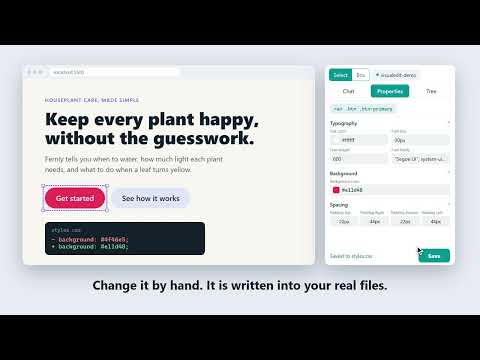
Edit your local website visually in Chrome, or describe a change and let AI make it. Every change is written into your real files.
VisualEdit lets you change your own website visually, right in Chrome, and writes every change into your real project files. Click an element on your page, change its colour, size, spacing, font, border or layout in the side panel, press Save, and the code in your project is updated. No copy-pasting between the browser and your editor. Or describe the change in plain words and the AI makes the edit. VisualEdit is in beta. For an important project, keep a copy or use git. HOW IT WORKS VisualEdit has two parts: this extension, and a small free helper program that runs on your computer and edits the files of your project folder. Start the helper in your project folder with one command: npx visualedit-agent (Node.js is needed; the current LTS version is best.) Then open your site on localhost and open the VisualEdit side panel. WHAT YOU CAN DO • Select any element on the page and see its tag, its styles and its place in the page tree • Change colours, typography, spacing, size, layout, backgrounds, borders and effects, with a live preview before you save • See the box model (margin, border, padding) of the selected element on the page • Edit the Hover state of an element • Change text, links and images, and upload a picture into your project • Add, move, duplicate and delete elements, and copy one element's style onto another • Describe a change in plain words and let the AI make it, for example "make this button green and a little bigger" • Undo and redo the changes VisualEdit made, with or without git • If your project uses git, each change is committed on its own • Three looks for the panel: Classic, Modern and Dark WORKS WITH Plain HTML and CSS projects (external stylesheet, <style> block or inline style), and React projects built with Vite that use Tailwind CSS v4 or plain CSS. Other frameworks (for example Next.js, Vue or Svelte) are not supported yet. FREE AND PRO • Free: unlimited visual editing, plus 30 AI requests in total. • Pro: 3,000 AI requests every month, $5.99 per month, cancel any time. Your month starts on the day you pay. Editing by hand is always free and unlimited. PRIVACY VisualEdit only runs on localhost pages, never on other websites. Your project files stay on your computer. Only when you send an AI command, your command and the code of the selected element are sent to our AI service to make the change. No ads, no tracking, and we never sell data. Privacy Policy: https://frontendwep-developer.github.io/visualedit-site/privacy.html Terms: https://frontendwep-developer.github.io/visualedit-site/terms.html How to use: https://frontendwep-developer.github.io/visualedit-site/how-to-use.html Support: visualedithelp.support@gmail.com
0 out of 5No ratings
Details
- Version1.0.2
- UpdatedOctober 24, 2026
- FeaturesOffers in-app purchases
- Offered byWeb Developer
- Size110KiB
- LanguagesEnglish
- DeveloperDilshodbek Kholmuminov
Bogieram 47 Termiz, Surxondaryo Viloyati 100034 UZEmail
webdeveloper.extensions@gmail.com - TraderThis developer has identified itself as a trader per the definition from the European Union and committed to only offer products or services that comply with EU laws.
Privacy

VisualEdit has disclosed the following information regarding the collection and usage of your data. More detailed information can be found in the developer's privacy policy.
VisualEdit handles the following:
This developer declares that your data is
- Not being sold to third parties, outside of the approved use cases
- Not being used or transferred for purposes that are unrelated to the item's core functionality
- Not being used or transferred to determine creditworthiness or for lending purposes
Support
For help with questions, suggestions, or problems, visit the developer's support site