


Visão geral
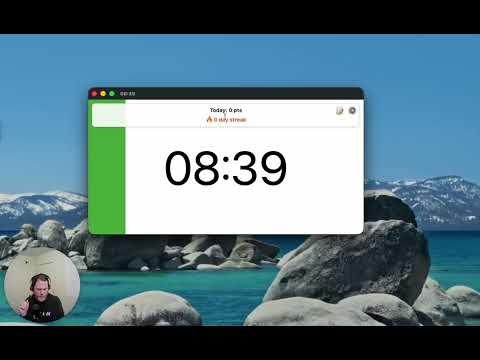
A visual timer to help you focus on your current task.
This timer is designed to help you be more productive by keeping your fingers on the keyboard. Click the extension icon from your browser to pop a new timer (or bring the existing one into the foreground). Then just type the number of minutes you want the timer to run for and hit Enter. The timer will start as a countdown, filling up as the timer runs so you'll know roughly how much time you have left without breaking your concentration. Once the timer completes, it begins flashing so you know it's complete. If you need to pause the timer, just select the timer popup and hit Space. Space again to resume. If you want to reset the timer (for the previously selected duration) just select the timer popup and hit "R" and it will start over. Cheatsheet for keyboard shortcuts: - 1-999 : Start a timer for that many minutes - R : Reset the timer - Space : Pause/resume the timer - ? : Toggle config mode (where you can set the background color, toggle the "ding") - T : Toggle task mode where you can list your tasks and start a timer for each - > (right angle bracket) : Mark current task done (delete it) and begin next task New in this version (1.5.0): * Removed default timer controls that show on hover (you can still toggle these back on) * Improved styling on settings and tasks view New in version 1.4.0 (Sep 12, 2025): * Gamification! Under settings you can opt in to setting a target number of minutes working on tasks (timers must be started from the tasks list) and track your streak. Feel the productivity points as you make a daily habit for spending at least an hour working on tasks. * More icons for those that aren't used to keyboard shortcuts: start/pause toggle icon, restart icon, task list icon Thanks to everyone who has commented on the Youtube instructional video to provide feedback and request new features!
4,5 de 535 notas
Detalhes
- Versão1.5.0
- Atualização27 de dezembro de 2025
- Oferecido porvisualtimerext
- Tamanho164KiB
- IdiomasEnglish
- Desenvolvedor
E-mail
ian@yawmp.com - Não negocianteEsse desenvolvedor não se identificou como comerciante. Caso você seja da União Europeia, observe que os direitos do consumidor não se aplicam a contratos firmados entre você e esse desenvolvedor.
Privacidade
O desenvolvedor declara que seus dados
- Não são vendidos a terceiros, exceto nos casos de uso aprovados
- Não são usados ou transferidos para fins não relacionados à função principal do item
- Não são usados ou transferidos para informações de crédito ou empréstimo