


Übersicht
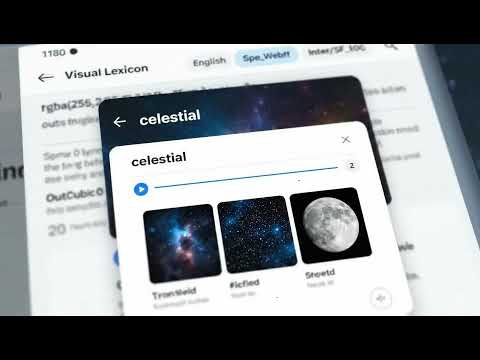
See images + concise meaning + audio on double-click. Save words and review with quizzes.
VISUAL LEXICON — Chrome Extension Double-click any word to see images, translations, audio, a 3D thesaurus, and mini vocab games—privacy-first. Overview Visual Lexicon turns any web page into a visual dictionary. Double-click or highlight a word (or short phrase) to open a tiny on-page popup—no page reloads, no new tabs. What you get Instant visuals: Relevant images that make meanings stick. Smart translations: Context-aware translations for multiple languages. Optional audio: Clear pronunciations. Language switcher: Toggle languages or jump to the full image gallery. Saved Words: When signed in, every lookup is saved to My Account → All Saved Words and synced across devices. What’s new Camera OCR (Beta): Scan printed text using your browser’s camera and open image/meaning cards instantly—processed on-device with Tesseract.js (no image uploads). Works over HTTPS. 3D Thesaurus: Explore synonyms, antonyms, and related terms in an interactive 3D view for nuance and discovery. Quick Games: Bite-size challenges (e.g., Word Boss — Color Pop) you can launch right from the popup to reinforce learning while you browse. Performance & UX: Faster popup rendering, smoother language switching, and improved keyboard/mouse accessibility. Privacy-first by design Processes only the text you select—never the full page. Requests are made without sending the page URL (the site you’re on isn’t revealed). Stores simple preferences locally (language, on/off, per-site allow/deny). If you sign in, we store only the queried term plus minimal sync metadata. No ads. No third-party trackers. No remote code execution. Network requests download content payloads only (images/definitions/audio). Permissions (scoped to the core feature) Host permissions: Detect selections and render the popup on the page you’re viewing. Tabs: Read the active tab’s origin and broadcast enable/disable across your open tabs (not used for history or other pages). Storage: Lightweight settings and, if signed in, an auth token for Saved Words sync. ContextMenus: Right-click to look up a selection or toggle on this site. You stay in control Toolbar switch + per-site controls. Disable any time. By installing, you acknowledge that data is used only to provide and improve the core functionality. We comply with Chrome Web Store Developer Program Policies and applicable privacy laws. Category: Productivity Primary language: English (US) Support: support@visuallexicon.org
0 von 5Keine Bewertungen
Details
- Version3.2
- Aktualisiert10. September 2025
- Größe513KiB
- Sprachen5 Sprachen
- Entwickler
- Kein HändlerDieser Entwickler hat sich nicht als Händler deklariert. Für Verbraucher in der Europäischen Union gelten die Verbraucherrechte nicht für Verträge, die zwischen dir und diesem Entwickler geschlossen werden.
Datenschutz

Visual Lexicon hat folgende Informationen hinsichtlich der Erhebung und Nutzung deiner Daten offengelegt. Weitere Details findest du im privacy policy des Entwicklers.
Visual Lexicon verarbeitet Folgendes:
Dieser Entwickler erklärt, dass deine Daten
- nicht an Dritte verkauft werden, außer in den genehmigten Anwendungsfällen
- nicht für Zwecke genutzt oder übertragen werden, die nichts mit der Hauptfunktionalität des Artikels zu tun haben
- nicht zur Ermittlung der Kreditwürdigkeit oder für Darlehenszwecke verwendet oder übertragen werden
Support
Wenn du Probleme, Fragen oder Vorschläge hast, rufe die Supportwebsite des Entwicklers auf