

Visual Feedback Capture: UI Reviews, Bug Reports & AI Prompts
7 ratings
)
Overview
Capture visual comments on browser-based UIs and copy AI-ready handoffs for PMs, QA testers, developers, and AI agents.
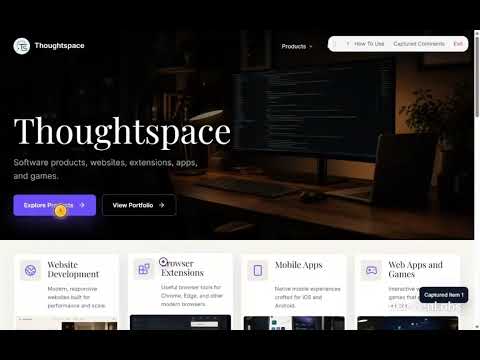
Visual Feedback Capture help users easily capture feedback and turn it into structured handoffs to other team members or AI agent. Start review mode on a browser-based UI, capture comments by selecting an element, dragging over an area, or adding a page-level note, then review all captured comments in one local session. When you are ready to hand off the feedback, copy either a visual handoff containing screenshots, markers, and structured comments or a text-only output. The MVP includes Basic and AI-focused formats designed for copy/paste workflows. Use it for: - UI reviews on websites, web apps, SaaS products, prototypes, and preview deployments. - Visual bug reports and QA notes. - Design review feedback. - AI coding prompts and implementation handoffs. - Client or stakeholder review sessions where comments need to become clear next steps. Core workflow: 1. Start review mode from the extension icon. 2. Alt + click to comment on a UI element. 3. Alt + drag to comment on an area. 4. Alt + double-click to add a page-level comment. 5. Review comments in Captured Comments. 6. Copy a visual handoff or copy text only. Privacy-first by default: - No account required to start. - No backend required for default local mode. - No AI API calls in the default MVP. - No GitHub, Jira, repository, or source-code access. - Captured comments and screenshots are stored locally in your browser. - Data is not uploaded by default. - Copying or exporting is user-initiated. Visual Feedback Capture is built for low-friction review workflows where the goal is simple: click the UI, leave a note, and create a clean handoff.
5 out of 57 ratings
Details
- Version0.1.3
- UpdatedJuly 14, 2026
- Offered byThoughtspace Studio
- Size50.92KiB
- LanguagesEnglish
- DeveloperThoughtspace Studio Ltd.
3249 E 19th Ave Vancouver, BC V5M 2T4 CAEmail
info@thoughtspacestudio.comPhone
+1 604-725-5672 - TraderThis developer has identified itself as a trader per the definition from the European Union and committed to only offer products or services that comply with EU laws.
Privacy

Visual Feedback Capture: UI Reviews, Bug Reports & AI Prompts has disclosed the following information regarding the collection and usage of your data. More detailed information can be found in the developer's privacy policy.
Visual Feedback Capture: UI Reviews, Bug Reports & AI Prompts handles the following:
This developer declares that your data is
- Not being sold to third parties, outside of the approved use cases
- Not being used or transferred for purposes that are unrelated to the item's core functionality
- Not being used or transferred to determine creditworthiness or for lending purposes
Support
For help with questions, suggestions, or problems, visit the developer's support site