

View Once Photos Bypass for Whatsapp Web
248 puan
)
Genel bakış
See view-once media and deleted/edited messages
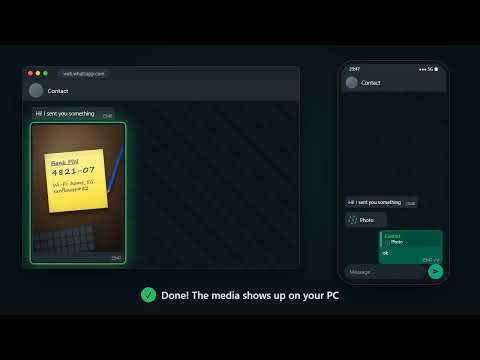
See view-once photos, videos and voice messages on WhatsApp Web, on your computer, as many times as you want. It also shows deleted messages and the history of edited messages. ✅ WORKING AGAIN (October 2026) After being down for months because of WhatsApp changes, the extension was completely rebuilt and works again on the current WhatsApp Web. You no longer need to log out of WhatsApp Web or scan the QR code again for every media. HOW TO SEE VIEW-ONCE PHOTOS ON PC 1. Install the extension and open WhatsApp Web (web.whatsapp.com) in Chrome. 2. When a view-once photo, video or voice message arrives, the extension shows an instruction in its place. 3. On your phone, select and reply to that message with any text. 4. Done: the media shows up right in the WhatsApp Web chat, with its caption. FEATURES • View once on PC: see view-once photos, videos and voice messages on WhatsApp Web • View as many times as you want: the media stays saved even after reloading the page • Save view-once photos: button to download the image to your computer • Zoom: click the photo to see it full screen • Caption: shows the text sent with the photo or video • Deleted messages: the original text stays visible, marked with a trash icon (anti-delete) • Edited messages: a pencil icon shows every version of the text, from the original to the latest edit • Lightweight: built not to slow down WhatsApp Web, even on low-end computers PRIVACY Everything is stored only in your browser. The extension does not send your messages, photos or videos to any server and does not require login or sign-up. FREQUENTLY ASKED QUESTIONS Can I see view-once photos on WhatsApp Web? Yes. WhatsApp Web normally doesn't open view-once photos on the computer. With this extension, just reply to the message from your phone and the photo shows up on your PC. Does it work with view-once videos and voice messages? Yes. View-once photos, videos and voice messages are shown in the chat. Do I need to scan the QR code again? No. That was the method of the old versions. The current version works without logging out of WhatsApp Web. Can I see deleted messages on WhatsApp Web? Yes, as long as WhatsApp Web was open with the extension enabled when the message arrived. The same goes for the history of edited messages. Does the sender find out? The extension does not send any notification. The sender only sees the reply you send from your phone, like any other reply. Which browsers does it work on? It was made for Google Chrome. Chromium-based browsers that install extensions from the Chrome Web Store, such as Edge and Brave, usually work too. NOTES • Works only on WhatsApp Web (web.whatsapp.com), on a computer. • This extension is not affiliated with WhatsApp or Meta.
5 üzerinden 2,4248 puan
Ayrıntılar
- Sürüm3.0
- Güncellenme tarihi:20 Ekim 2026
- ÖzelliklerUygulama içi satın alma olanağı sunar
- Sunan:Cleverson Pelegrini
- Boyut27.42KiB
- Diller4 dil
- Geliştirici
E-posta
cleversonpelegrini@gmail.com - Tacir olmayanBu yayıncı kendisini tacir olarak tanımlamamış. Avrupa Birliği'ndeki tüketiciler açısından bakıldığında, bu geliştiriciyle yapmış olduğunuz sözleşmelerde tüketici haklarının geçerli olmadığını lütfen unutmayın.
Gizlilik

Bu geliştirici, verilerinizle ilgili olarak aşağıdakileri beyan eder:
- Onaylanan kullanım alanları dışında üçüncü taraflara satılmaz
- Öğenin temel işleviyle alakasız amaçlar için kullanılmaz ya da aktarılmaz
- Kredibilitenin belirlenmesi veya borç verme amaçlarıyla kullanılmaz ya da aktarılmaz