


Overview
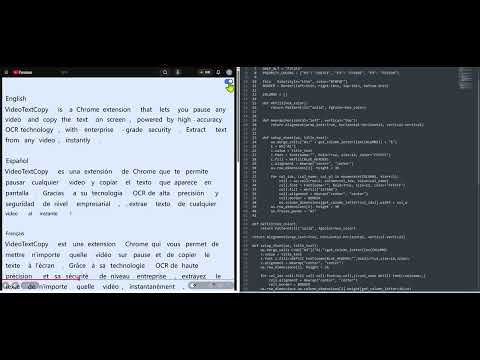
VideoTextCopy is a Chrome extension that lets you pause any video and copy the text on screen.
🚀 VideoTextCopy — Stop Retyping What You See On Screen Ever paused a video just to copy a subtitle, a line of code, or a slide of text — only to end up typing it out by hand? VideoTextCopy turns any text inside a video frame into real, selectable, copyable text in one shortcut. ✨ WHY YOU'LL LOVE IT 1. One shortcut (Alt+C) — text appears as a clean overlay right on the video, instantly. 2. Select like a pro: drag-select, column-select (Alt+Drag), Ctrl+A / Ctrl+C — just like your favorite text editor. 3. Built-in recognition history so you never lose a snippet you've already extracted. 4. Works on the sites you're already on: YouTube, Netflix, Bilibili, TikTok, Coursera, Udemy, Zoom, Google Meet, Teams, and 50+ more — or activate it manually on any page. 📖 HOW TO USE IT 1. Pause the video at the moment you need. 2. Press Alt+C, or click the floating button on the player. 3. Select the recognized text and copy it — done. 🎬 PERFECT FOR 1. Students capturing slides and subtitles from online courses 2. Professionals grabbing key lines from meeting recordings 3. Anyone who needs text from a video — fast, accurate, no typing 🔒 PRIVACY & SECURITY VideoTextCopy only reads the current frame the moment you trigger it — no background tracking, no recording, no silent data collection. Full details at videotextcopy.com/privacy. 💬 GET STARTED FREE Includes a free trial — no credit card required. Need more? Upgrade to Pro anytime at videotextcopy.com. Questions or feedback? We're listening: support@videotextcopy.com
5 out of 52 ratings
Details
- Version1.0.0
- UpdatedJuly 20, 2026
- Size46.88KiB
- LanguagesEnglish (United States)
- Developer段建民Website
书院镇丽正路1059弄94号楼302室 94号楼302室 浦东新区, 上海市 201304 CNEmail
support@videotextcopy.comPhone
+86 137 6116 9067 - TraderThis developer has identified itself as a trader per the definition from the European Union and committed to only offer products or services that comply with EU laws.
Privacy

VideoTextCopy has disclosed the following information regarding the collection and usage of your data. More detailed information can be found in the developer's privacy policy.
VideoTextCopy handles the following:
This developer declares that your data is
- Not being sold to third parties, outside of the approved use cases
- Not being used or transferred for purposes that are unrelated to the item's core functionality
- Not being used or transferred to determine creditworthiness or for lending purposes
Support
For help with questions, suggestions, or problems, visit the developer's support site