


Overview
Take timestamped YouTube notes, draw on exact frames, and optionally add encrypted backup and sync.
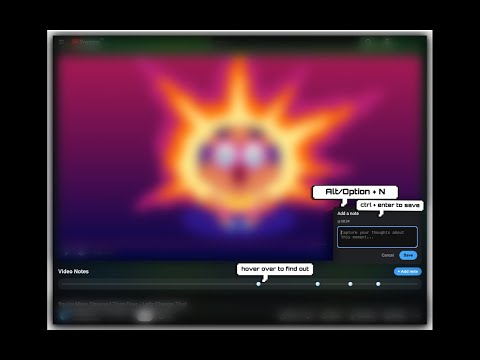
Turn YouTube into a private, distraction-free notebook. Video Notes lets you capture timestamped notes, draw directly on exact video frames, and ask questions across everything you have saved. Every note stays linked to the moment that created it, so you can return with one click. ASK YOUR NOTES • Ask across your full library, one video, or a tag. • Get cited answers that open the relevant YouTube timestamp. • Use “Only my notes” to restrict answers to what you wrote. • Bring your own Gemini API key; it stays stored on your device. CAPTURE WITHOUT BREAKING YOUR FLOW • Press Alt+N (Option+N on Mac) to create a note at the current timestamp. • The video pauses while you write and resumes when you save. • Every note becomes a marker on the timeline. Hover to preview or click to return to that moment. ANNOTATE EXACT FRAMES • Press Alt+A (Option+A on Mac) to draw over the paused video. • Add arrows, shapes, highlights, text and freehand drawings. • Reopen an annotation later to return to the exact frame with the drawing in place. FIND AND ORGANIZE EVERYTHING • Search notes across every saved video. • Organize videos with reusable tags. • Open any result at its exact YouTube timestamp. • Back up and restore your complete library as JSON. OPTIONAL BACKUP & SYNC • Connect an email account to add encrypted cloud backup and sync across devices. • A 14-day free trial is offered when checkout is open. The annual price varies by region; Paddle shows the final local price and taxes at checkout. A payment method is required; cancel before the trial ends to avoid a charge. • Restore notes and access 30-day revision history with 1 GB of cloud storage. • Note text, titles, tags, and drawings are encrypted on your device before upload. Video Notes stores the account key and can decrypt your cloud backup, so signing in with an email code can restore it on another device. Existing backups migrate from a connected device; if every old device is gone, a previously saved recovery key may be needed once. • All free local note-taking and manual export features remain available without an account or subscription. SHARE OR EXPORT • Create a clean, read-only link containing a video’s notes and drawings. • Export customizable Markdown for Obsidian, Notion and other note-taking tools. • No account is required for you or the people viewing a shared page. STAY FOCUSED • Zen mode hides recommendations, comments and merchandise. • Light and dark themes automatically match YouTube. • Optional flashcards turn your own notes into review questions using your Gemini API key. PRIVATE BY DEFAULT Notes, drawings, tags and settings stay in local browser storage unless you choose a remote feature. Creating a share link sends that video's selected notes and drawings to the Video Notes share service. Optional Backup & Sync uses your email, account/session identifiers, and device name. Encrypted note data and the account key are sent to the Video Notes sync service after you opt in, complete trial checkout, and enable backup. Video Notes can decrypt synced content. Paddle handles billing. Optional Gemini features send notes in the selected scope (the full library by default for Ask your notes) to Google with your own API key. No advertising or behavioral tracking. Video Notes is free for local use. Backup & Sync is optional and paid after its trial.
5 out of 59 ratings
Details
- Version2.8.8
- UpdatedOctober 27, 2026
- Size504KiB
- LanguagesEnglish
- DeveloperWebsite
Email
pe.messh@gmail.com - Non-traderThis developer has not identified itself as a trader. For consumers in the European Union, please note that consumer rights do not apply to contracts between you and this developer.
Privacy

Video Notes — Timestamped YouTube Notes has disclosed the following information regarding the collection and usage of your data. More detailed information can be found in the developer's privacy policy.
Video Notes — Timestamped YouTube Notes handles the following:
This developer declares that your data is
- Not being sold to third parties, outside of the approved use cases
- Not being used or transferred for purposes that are unrelated to the item's core functionality
- Not being used or transferred to determine creditworthiness or for lending purposes
Support
For help with questions, suggestions, or problems, visit the developer's support site