


Общ преглед
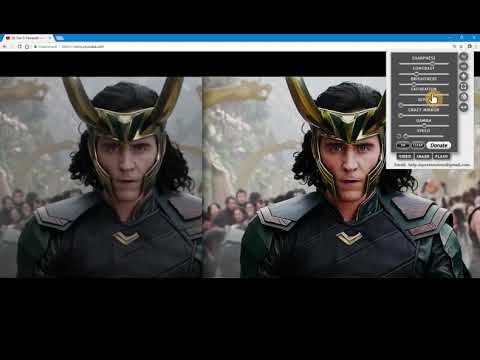
The extension regulate sharpness, contrast, brightness, saturation and other settings for video and images on the all websites.
The settings can be applied to video, pictures, flash players, as well as to any items you select. Opens the video in a separate window (picture in picture mode) Used Picture-in-Picture Web API Extension works in YANDEX BROWSER It supports GOOGLE MAPS, and YANDEX MAPS, 2D and 3D games, and many other other applications built on HTML5. Just press the FLASH button ;) ALLOWS YOU TO SHARE VIEWED PAGES IN SOCIAL NETWORKS!!! ADJUST VIDEO SETTINGS ✫ Sharpness ✫ Brightness ✫ Contrast ✫ Color Balance ✫ Saturate ✫ Gamma ✫ Grayscale ✫ Sepia ✫ Crazy mirror ✫ Decrease or increase the video speed (from 0.1x up to 4x) ✫ The ability to rotate or flip video, pictures, flash players, and any other content ✫ Connected smart sharpening allows more flexible editing of video and other graphics You can control the extension from both the extension panel and the player (the button is located in the upper left corner) The extension supports players based on both HTML5 and Flash. You improve video in this video editor. Enhance video will make clean and bright video color the picture. Correct video image in real time. Video correction settings are saved, all the parameters of the video effect stored. Edit quality sharpen video can in the range from 0 to 3 Speed control works in the range from 0.1x to 4x in increments of 0.1 You can control the speed by holding down the CTRL + ALT keys and pressing the ↑ ↓ arrows on the keyboard
4,4 от 5600 оценки
Подробности
- Версия10.0.0
- Актуализирано20 ноември 2024 г.
- Предлага се отjohnsmitt
- Размер5.69MiB
- Езици2 езика
- Програмист
По имейл
help.myextensions@gmail.com - НетърговецТози програмист не се е идентифицирал като търговец. Имайте предвид, че правата на потребителите не са приложими за договори, сключени между потребители в Европейския съюз и този програмист.
Поверителност
Този програмист декларира, че данните ви:
- Не се продават на трети страни за цели извън одобрените случаи на употреба
- Не се използват или прехвърлят за цели, които не са свързани с основната функционалност на елемента
- Не се използват или прехвърлят с цел оценка на кредитоспособността или с цел кредитиране
Поддръжка
За помощ относно въпроси, предложения или проблеми, моля, отворете тази страница на настолния си браузър