


總覽
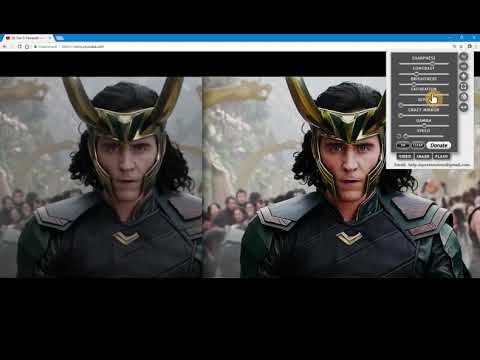
The extension regulate sharpness, contrast, brightness, saturation and other settings for video and images on the all websites.
The settings can be applied to video, pictures, flash players, as well as to any items you select. Opens the video in a separate window (picture in picture mode) Used Picture-in-Picture Web API Extension works in YANDEX BROWSER It supports GOOGLE MAPS, and YANDEX MAPS, 2D and 3D games, and many other other applications built on HTML5. Just press the FLASH button ;) ALLOWS YOU TO SHARE VIEWED PAGES IN SOCIAL NETWORKS!!! ADJUST VIDEO SETTINGS ✫ Sharpness ✫ Brightness ✫ Contrast ✫ Color Balance ✫ Saturate ✫ Gamma ✫ Grayscale ✫ Sepia ✫ Crazy mirror ✫ Decrease or increase the video speed (from 0.1x up to 4x) ✫ The ability to rotate or flip video, pictures, flash players, and any other content ✫ Connected smart sharpening allows more flexible editing of video and other graphics You can control the extension from both the extension panel and the player (the button is located in the upper left corner) The extension supports players based on both HTML5 and Flash. You improve video in this video editor. Enhance video will make clean and bright video color the picture. Correct video image in real time. Video correction settings are saved, all the parameters of the video effect stored. Edit quality sharpen video can in the range from 0 to 3 Speed control works in the range from 0.1x to 4x in increments of 0.1 You can control the speed by holding down the CTRL + ALT keys and pressing the ↑ ↓ arrows on the keyboard
4.4 分 (滿分 5 分)600 個評分
詳細資料
- 版本10.0.0
- 已更新2024年11月20日
- 提供者johnsmitt
- 大小5.69MiB
- 語言2 種語言
- 開發人員
電子郵件
help.myextensions@gmail.com - 非交易商這位開發人員並未表明自己是交易商。歐盟地區的消費者請注意,消費者權利不適用於你和這位開發人員之間簽訂的合約。
隱私權
這位開發者就你的資料做出下列聲明:
- 除經核准的用途外,不會將你的資料販售給第三方
- 不會基於與商品核心功能無關的目的,使用或轉移資料
- 不會為了確認信用度或基於貸款目的,使用或轉移資料
支援
如有疑問或建議,請使用電腦版瀏覽器開啟這個頁面