

Video editor VideoStudio

Ikuspegi orokorra
VideoStudio video editor online to create and edit videos using videos, audios, images and texts
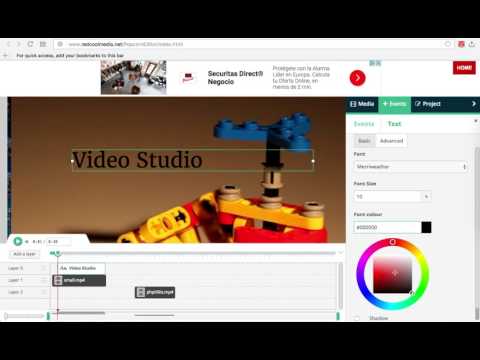
VideoStudio is a video editor that allows you to create and edit videos using a combination of files: videos, audios, images, and texts. Moreover, it scans and collects the webpages you browse in the Internet. These webpages are uploaded to our servers in order to know if they contain MP4 video files that can be edited using our extension integrated with our online app. It is based on Mozilla PopcornMaker and it can handle MP4, MP3, GIF, PNG, JPG and TEXT files. PopcornMaker could handle sounds or videos from a number of places like videos from YouTube, Vimeo, or SoundCloud. However, VideoStudio has removed any feature related to YouTube, Vimeo, or SoundCloud in order to be compliant with YouTube, Vimeo and SoundCloud service terms. Main Features: - Add videos in your project * Add MP4 videos to your Gallery from the Internet by pasting in the link, or from your local disk. Once you have found a MP4 video you like, copy the link by right-clicking on the Video link and selecting Copy Link Address from the context menu. Then paste the link into your VideoStudio project and click on Get Media. * Drag your video from the Media Gallery to the timeline. Drag it to Layer 0 or any other layer. * Once you have dragged your video to the timeline, you will see the Clip Editor in the Events pane with the following options: + Extend the video time or shorten it. + Select only a portion of your video if you would like. + Remove any video portion and do the same thing with the audio, as well as turn the volume down. * Mix your project in layers. Layers with lower numbers appear above layers with a higher number. So layer one appears on top of layer two. * Zoom in on part of your timeline. This makes it easier to work with events of shorter duration. - Add audios in your project * Add MP3 audio files to your Gallery from the Internet by pasting in the link, or from your local disk. Once you have found a MP3 audio you like, copy the link by right-clicking on the audio link and selecting Copy Link Address from the context menu. Then paste the link into your VideoStudio project and click on Get Media. * Drag your audio from the Media Gallery to the timeline. Drag it to Layer 0 or any other layer. * Extend the audio time or shorten it. - Add texts to your video * If you click on the Events tab, you will see that you have the option to add some text to your video. * Once you start typing your text, you will see that you have a number of different options. + Change the time when your text starts and ends. + Move the text around on the video canvas. + Change the way the text transitions on and off the video. + Under the Advanced tab, Change the font and color. - Add an image to your video * Add an image into your video by uploading it from your local disk or from a URL link. - Create your MP4 video file * If you click on the Project tab, you will see that there is a button to create a MP4 file with your composition of videos, audios, images and texts. The engine to create the MP4 file uses FFMPEG.
2,7/5215 balorazio
Xehetasunak
- Bertsioa1.8.7
- Eguneratuta2024(e)ko irailaren 3(a)
- Tamaina263KiB
- Hizkuntzak18 hizkuntza
- Garatzailea
- Merkataria ez den entitate batGaratzaile honek ez du identifikatu bere burua merkatari gisa. Europar Batasuneko kontsumitzaile bat bazara, kontuan izan zure eta garatzaile horren arteko kontratuetan ez dela aplikatuko kontsumitzaile-eskubiderik.
Pribatutasuna

Datuen bilketari eta erabilerari buruzko informazio hau ezagutarazi da Video editor VideoStudio elementuan. Informazio xehatuagoa lortzeko, irakurri garatzailearen privacy policy.
Video editor VideoStudio elementuak hauek kudeatzen ditu:
Garatzaileak adierazitakoaren arabera, zure datuak:
- Ez zaie saltzen hirugarrenei, erabilera onartuko kasuetan salbu
- Ez dira erabiltzen edo transferitzen elementuaren funtzio nagusiarekin erlazionatuta ez dauden xedeetarako
- Ez dira erabiltzen edo transferitzen kaudimena zehazteko edo maileguak emateko
Laguntza
Galdera, iradokizun edo arazorik baduzu, ireki orria ordenagailuetarako arakatzailean