


Overview
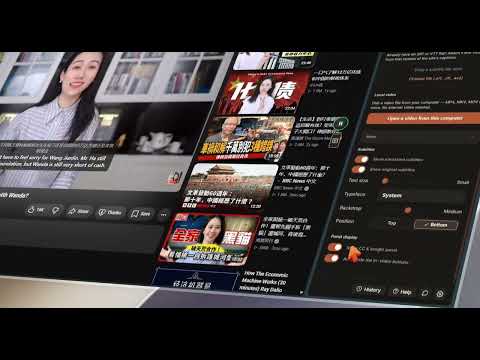
Real-time AI dubbing across many video platforms and your own files. It reads the topic first, so terminology stays correct.
🎬 VidDub dubs video with AI while you watch. One click and the video speaks your language — a real voice over the original, whose own sound ducks smoothly underneath. 💪 WHAT YOU GET 👉 Dubbing ✔️ Real time: click the VidDub button in the player (or press Alt+D) and you hear it. ✔️ Translated IN CONTEXT, not line by line. VidDub works out what the video is about before it translates a word, so the meaning, the names and the terminology carry across instead of breaking at every cue — a tech talk keeps "deploy", "API" and "model" instead of having them turned into something that reads like a different sentence. ✔️ Reading the whole passage is also what lets it repair what the captions got wrong. Automatic captions and speech recognition mishear names constantly, and once the topic is clear the right name usually is too — especially when the video says it clearly somewhere else: Emmy Nutter → Emmy Noether Keyy → Kyiv 音質効果ガス → 温室効果ガス (sound-quality gas → greenhouse gas) ✔️ It repairs only what it can identify with confidence — names, acronyms, version strings and the technical terms the topic makes obvious. A name that is already spelled correctly is left alone, and one that could be several different things is written the way it sounded rather than guessed into the wrong famous name. Quality mode runs this full pipeline. ✔️ 16 dubbing languages, 44 source languages, source language detected automatically. ✔️ Many voices to choose from — a male and a female voice in every one of those 16 languages, from more than one speech engine. ✔️ Two modes: Quality runs the full topic-aware pipeline; Fast trades part of that for a lighter translation that starts sooner. Switch any time. ✔️ No captions on the video at all? The AI listens and recognises the speech itself, then dubs from that. ✔️ Stays in sync through seeking, replays and playback-speed changes. ✔️ A mixer for the balance between the original sound and the dub. 👉 Subtitles you can actually fix ✔️ Dual subtitles on screen: original and translation together. ✔️ A transcript panel that follows along — click any timestamp to jump there. ✔️ Disagree with a line? Edit it yourself, then regenerate the audio for THAT line only — no need to redo the whole video. ✔️ Undo per line, and your edits are still there when you come back. ✔️ Size, typeface, backdrop and screen position are yours to set. 👉 Take it with you ✔️ Export subtitles as SRT or VTT — translated, original, or bilingual. ✔️ Export the dubbed voice track VidDub made for you as one MP3, every line on its real timestamp. It is the synthesized speech only — never the original video or its soundtrack. ✔️ Summary with a timeline: a short TL;DR, the key points each with a timestamp you can click, and a chapter list — worth 20 seconds before you commit 40 minutes to a lecture. Copy it or export it as Markdown. 👉 Your own files ✔️ A built-in player for local files: drag one in, or keep a library of the folders you watch from, with thumbnails and a "needs subtitles" filter. ✔️ Dub what you keep in Google Drive the same way. ✔️ Already have a subtitle file? Attach your own SRT, VTT or ASS — to a local file or to an online video — and dub from that instead of the site's own captions, with an offset control to nudge it into sync. If the file holds several subtitle tracks, VidDub picks the one matching your language and shows you the choice before it starts. 🌐 WHERE IT WORKS ✔️ Built-in support works immediately on supported video, social, learning and cloud-storage sites, as well as your own local video files. ✔️ Every other site is your choice, and nothing is on until you say so. VidDub does not start anywhere else by itself. Click its toolbar icon on a page you want dubbed and it runs there for that visit only; if it worked, the side panel offers to keep it on for that one site. Turn a site back off, or allow every site at once, from the same panel. ✔️ The current compatibility list — including what was measured on course, news, finance, video-community and creator-publishing sites — is at https://viddub.app/supported-sites ✔️ One page is not a promise about every page, and any site can change its player tomorrow. Read that list as where to start, and use the try-once click to check your own page before you keep VidDub switched on there. 💻 HOW TO START 🔸 Click "Add to Chrome", then pin VidDub to your toolbar. 🔸 Sign in with Google, Microsoft, or a link sent to your email. 🔸 Open a video and click the VidDub button in the player (or press Alt+D). ⌨️ ALSO 🔸 Five keyboard shortcuts, all remappable in Options: dub (Alt+D), back to the original sound (Alt+S), summary (Alt+I), transcript (Alt+J), close (Esc). 🔸 Light, dark and system themes. 🔸 A history of what you dubbed and what your credits were spent on. 🔸 Interface in 15 languages, set from your region on first run. ❓ FAQ 📌 Do I need my own API key? — No. No keys to paste, and no setup per site. 📌 What if the video has no subtitles? — VidDub listens and recognises the speech itself, then dubs from that. 📌 What if the dub cannot be produced? — VidDub KEEPS THE VIDEO PAUSED and tells you why, rather than quietly playing the original as if nothing had happened. 📌 What does it cost? — Free to start: every account gets free credits each day, and no card is needed. Optional credit packs and a VIP plan are sold on our website — see https://viddub.app/pricing — with checkout by our reseller, Creem. Nothing is charged inside the extension. 🔒 PRIVACY & DATA HANDLING ✔️ VidDub processes dubbing requests on our backend to provide translation and text-to-speech. When you dub something we process the subtitle text and the title. Your account keeps a history — video id, platform, language and result, never the title and never the page address, which both stay on your own device — and you can delete it at any time. That history is kept until you delete it — there is no automatic expiry; feedback expires after 365 days; short-lived operational records are swept every six hours. ✔️ When a video has no subtitles, VidDub can read the media in your browser, separate out the audio track alone, and upload that audio to write the subtitles for you — a local file, a Google Drive video, or a site you granted VidDub access to yourself. It asks you first, and you can choose to remember that answer for that one site; Options → Privacy lists every site holding a standing allow and clears them. If the audio cannot be separated, VidDub stops and tells you rather than uploading the file whole. The uploaded audio is deleted as soon as the transcript comes back. ✔️ When VidDub CANNOT dub a page — you clicked its toolbar icon on a site it was not built for and the attempt did not end in a working dub, or its button never appeared — it reports that page's domain name (for example example.com) so we know which site to support next. When the video comes from another company's player, that player's domain travels on the same report, never on its own. A page it handles successfully sends no domain. Only domain names, never the full address and never the media itself; one report per site per day; not linked to your account; and turning anonymous diagnostics off in Options → Privacy stops it completely. ✔️ Anonymous crash diagnostics — when something goes wrong, VidDub can send an error report that carries no subtitle text, no video title, no page address and nothing that identifies your account. It is the same switch in Options → Privacy as the domain report above, so turning it off stops both. ✔️ We do NOT collect: video files, apart from the audio-only case above that you confirm first; browsing history, apart from the domain case above; microphone, camera, keyboard or clipboard data. We never sell your data. ✔️ For language defaults, VidDub derives your approximate country from your network connection. No IP address is stored with your account. 📄 Full policy: https://viddub.app/privacy 🗑️ Delete your account and data: https://viddub.app/account/delete 📪 Questions or feedback? 💌 support@viddub.app
3.7 out of 53 ratings
Details
- Version1.10.2
- UpdatedOctober 23, 2026
- Size4.16MiB
- Languages15 languages
- DeveloperWebsite
Email
support@viddub.app - Non-traderThis developer has not identified itself as a trader. For consumers in the European Union, please note that consumer rights do not apply to contracts between you and this developer.
Privacy

VidDub — Video Dubbing, Translate & Dub has disclosed the following information regarding the collection and usage of your data. More detailed information can be found in the developer's privacy policy.
VidDub — Video Dubbing, Translate & Dub handles the following:
This developer declares that your data is
- Not being sold to third parties, outside of the approved use cases
- Not being used or transferred for purposes that are unrelated to the item's core functionality
- Not being used or transferred to determine creditworthiness or for lending purposes
Support
For help with questions, suggestions, or problems, please open this page on your desktop browser