Item logo image for VidClip - Video Segment Tool

VidClip - Video Segment Tool

5.0(

2 ratings

)
Item media 5 (screenshot) for VidClip - Video Segment Tool
Item video thumbnail
Item media 2 (screenshot) for VidClip - Video Segment Tool
Item media 3 (screenshot) for VidClip - Video Segment Tool
Item media 4 (screenshot) for VidClip - Video Segment Tool
Item media 5 (screenshot) for VidClip - Video Segment Tool
Item video thumbnail
Item media 2 (screenshot) for VidClip - Video Segment Tool
Item media 3 (screenshot) for VidClip - Video Segment Tool
Item media 4 (screenshot) for VidClip - Video Segment Tool
Item media 5 (screenshot) for VidClip - Video Segment Tool

Overview

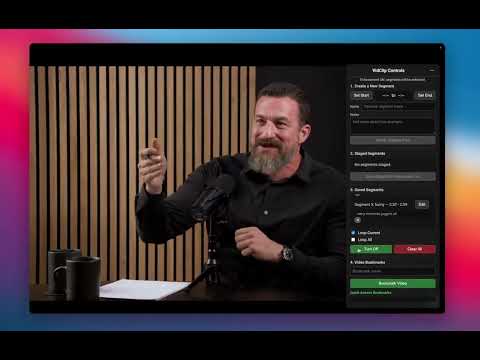
Mark and organize video segments for better viewing. Create start/end points, loop playback, and share your favorite moments.

VidClip is the ultimate video segment organization tool for YouTube and any other video platform. Create, save, and share video segments without downloading anything. Perfect for students, educators, content creators, and anyone who wants to focus on the best parts of videos. KEY FEATURES: - Mark start and end times on YouTube and most video sites - Create and save multiple segments from the same video - Loop segments or play them in sequence - Share video segments with others via URL - Import shared segments from other users - Save clips locally in your browser - Quick on/off toggle for normal viewing - Organize segments with custom names - Visual progress bar markers for saved segments PERFECT FOR: - Students and researchers focusing on key moments from lectures - Educators creating focused lesson segments - Content creators organizing highlights for reference - Anyone who wants to skip filler and watch only what matters - Bookmarking favorite parts of long videos RECENT UPDATES: - Share video segments with others via shareable URLs - Import shared segments from other users - Enhanced naming system for sites, pages, and segments - Improved compatibility and performance - Visual segment markers on video progress bars VidClip helps you focus on what's important. Create highlights, study efficiently, and share your curated video segments with others. Completely free with no watermarks or limitations.

Details

  • Version
    1.1.2
  • Updated
    September 9, 2025
  • Offered by
    Pr33thaml
  • Size
    827KiB
  • Languages
    English
  • Developer
    Email
    freevision92@gmail.com
  • Non-trader
    This developer has not identified itself as a trader. For consumers in the European Union, please note that consumer rights do not apply to contracts between you and this developer.

Privacy

VidClip - Video Segment Tool has disclosed the following information regarding the collection and usage of your data. More detailed information can be found in the developer's privacy policy.

VidClip - Video Segment Tool handles the following:

Authentication information
User activity
Website content

This developer declares that your data is

  • Not being sold to third parties, outside of the approved use cases
  • Not being used or transferred for purposes that are unrelated to the item's core functionality
  • Not being used or transferred to determine creditworthiness or for lending purposes

Support

Related

LookStuffUp — Instant definitions, translations & AI summaries

5.0

Instant definitions, translations & AI summaries for any selected text. Private, on-device AI.

Vivideo - Real-time Video Enhancement

0.0

Real-time video enhancement with brightness, contrast, saturation, gamma, and color temperature controls

FirstTab - Visually Switch and Manage Your Tabs

5.0

Allows for visual tab and recent document selection. Provides instant search across your work. Helps organize tabs to avoid chaos.

Live PiP Media Player: Display any media in a floating window

5.0

Create a standalone window for Picture-in-Picture playback.

Video Cutter for Chrome

0.0

Trim video files directly in your browser with this chrome extension— fast, simple, and hassle-free

Video Screenshot

5.0

Capture high quality video screenshots for free in multiple formats on YouTube, Netflix, Tiktok, Instagram, Facebook and others.

Looper

5.0

Loop sections of YouTube videos

video-clipper

0.0

video-clipper

Cut Video

2.0

Cut Video - Trim MP4 MKV

YouTube Moment Clipper

4.0

Clip and organize specific moments in YouTube videos for easy reference and sharing

YouTube Segment Clipper

0.0

Mark any part of a YouTube video and instantly see its captions.

TabStack

3.3

A new tab page replacement with visual bookmarks and tab management, built for how people actually use the web.

LookStuffUp — Instant definitions, translations & AI summaries

5.0

Instant definitions, translations & AI summaries for any selected text. Private, on-device AI.

Vivideo - Real-time Video Enhancement

0.0

Real-time video enhancement with brightness, contrast, saturation, gamma, and color temperature controls

FirstTab - Visually Switch and Manage Your Tabs

5.0

Allows for visual tab and recent document selection. Provides instant search across your work. Helps organize tabs to avoid chaos.

Live PiP Media Player: Display any media in a floating window

5.0

Create a standalone window for Picture-in-Picture playback.

Video Cutter for Chrome

0.0

Trim video files directly in your browser with this chrome extension— fast, simple, and hassle-free

Video Screenshot

5.0

Capture high quality video screenshots for free in multiple formats on YouTube, Netflix, Tiktok, Instagram, Facebook and others.

Looper

5.0

Loop sections of YouTube videos

video-clipper

0.0

video-clipper

Google apps